Theme
Updated
Sunnyaid
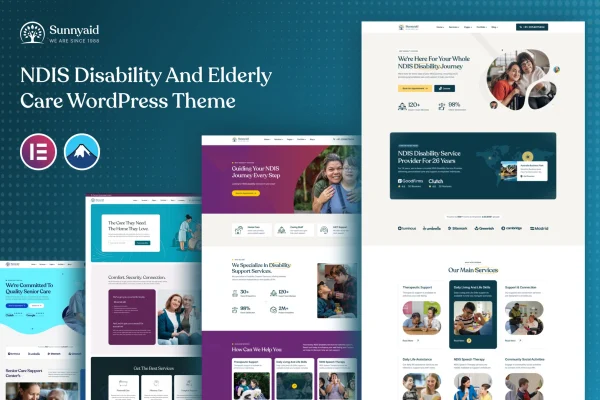
Sunnyaid is a WordPress theme built for organizations that provide NDIS (National Disability Insurance Scheme) disability services. It gives providers a modern, welcoming layout and content sections for services, events, staff and testimonials, so clients and families can find clear information about what you offer.
- Version
- 1.0.0
- Released
- Aug 13, 2024
- Developer
- XpressBuddy
- Type
- WordPress theme
- Licence
- GPL
- Included in
- Every plan, or $3.99 on its own
What’s new in Sunnyaid 1.0.0
Version 1.0.0 · Aug 13, 2024
Latest
What it does
Disability service providers need a website that explains programs and support options clearly to clients, families and other stakeholders. This theme is designed around that job. It includes content modules made for NDIS providers, such as service listings, event calendars, staff profiles and testimonials, so the information people look for most has a ready place on the site. The design puts weight on clarity and easy navigation, and it is described as accessibility-ready to meet web content accessibility guidelines.
You build pages with customizable homepage layouts and drag-and-drop builders, which lets you shape the site around your organization's values and services without starting from a blank page. The layout is responsive, so it adapts to desktops, tablets and phones. The theme works with popular plugins for contact forms, bookings and social media, and it supports multilingual content for providers serving diverse communities. It suits small nonprofits as well as larger organizations that want a clear, inclusive web presence.
Best for
- NDIS registered disability service providers
- Disability support nonprofits and community organizations
- Care providers serving multilingual communities
Features
Customizable homepage layouts
Build and adjust the homepage with drag-and-drop builders so the site reflects your organization's values, programs and support services.
NDIS-specific content modules
Ready sections for service listings, event calendars, staff profiles and testimonials help you present the details clients and families need in an orderly way.
Accessibility-ready design
The theme is designed to meet web content accessibility guidelines, helping keep your site usable for visitors of all abilities.
Responsive mobile layout
Pages adapt to different screen sizes, so visitors can browse your services comfortably on desktops, tablets and smartphones.
Works with popular plugins
Connect contact forms, booking systems and social media tools to handle client communication and appointment requests from your site.
Multilingual support
Offer content in multiple languages so people from different communities can read about your services in a language they understand.
Clear, easy navigation
The layout focuses on clarity and simple navigation, making it easier for visitors to find programs, events and contact details.
Questions about Sunnyaid
Is this theme made for NDIS providers specifically?
Yes. It is designed for organizations offering NDIS disability services, with content modules for service listings, event calendars, staff profiles and testimonials that match how these providers typically present their work.
Can I take online bookings and contact requests?
The theme works with popular plugins for contact forms and booking systems, so you can add enquiry forms and appointment booking to your site. It also works with social media tools for connecting with your community.
How does the theme handle accessibility?
Sunnyaid is described as accessibility-ready and designed to meet web content accessibility guidelines. It also puts an emphasis on clear layouts and easy navigation, which helps visitors with different needs move through the site.
Can I publish content in more than one language?
Yes. The theme includes multilingual support, so you can offer your content in multiple languages and reach the diverse communities your organization serves.
Is Sunnyaid free?
The code of Sunnyaid is licensed under the GPL, so anyone may use, change and share it. GPL Feast is a paid service: a plan or a single purchase gives you the download and automatic updates. The developer's own support, licence key and online services are not included.
Which version of Sunnyaid is this?
Version 1.0.0, released Aug 13, 2024. New versions appear here when the developer publishes them, and members get them as automatic updates.
How do I update Sunnyaid?
Install the free GPL Feast Updater on your site and connect it with your API key. It installs new versions of Sunnyaid automatically and keeps a backup, so you can roll back.