Theme
Updated
Tada & Blog
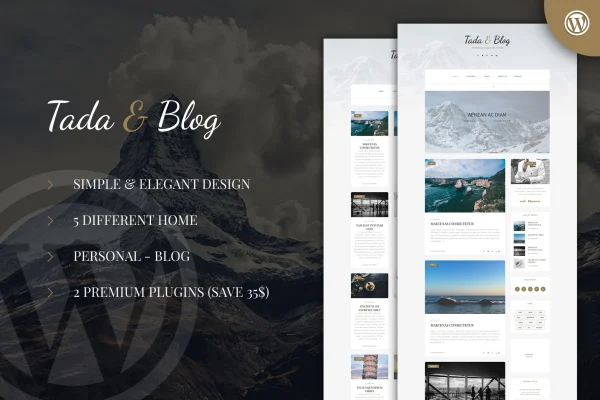
Tada & Blog is a WordPress theme built for personal bloggers who want a clean, modern site for their stories, photos and videos. It offers five home and blog layouts, a variety of post formats and bundled gallery and slider plugins, so you can shape the look of your blog without writing code.
- Version
- 1.3
- Developer
- ad-theme
- Type
- WordPress theme
- Licence
- GPL
- Included in
- Every plan, or $3.99 on its own
What’s new in Tada & Blog 1.3
Version 1.3
Latest
What it does
Personal bloggers often need a site that handles long posts, photo sets and video without a lot of setup work. This theme covers that with five different home and blog layouts, several post formats and a responsive, retina ready design that adapts to phones, tablets and high-resolution screens. It suits writers who cover travel, food, lifestyle, photography or everyday life and want the design to match their own voice and style.
Setup starts with a one-click demo import that loads complete demo content, which you can then replace with your own posts. From there you can pick left or right sidebars for pages and posts, choose typography from Google Fonts and add social links with the included icon fonts. The Fast Gallery and Fast Slider plugins handle image galleries and featured post sliders. The theme is built on the Bootstrap framework, works with WPBakery Page Builder (formerly Visual Composer) and ships with PSD and HTML files for further design work.
Best for
- Personal bloggers sharing stories, photos and videos
- Travel, food and lifestyle writers
- Photographers who want galleries and sliders on a blog
Features
Five home and blog layouts
Choose from five different home and blog layouts to match your content and personality, giving your blog a look that fits what you write about.
Fast Gallery and Fast Slider
The theme includes the Fast Gallery and Fast Slider plugins, so you can display image galleries and slide through featured posts on your blog.
One-click demo import
Import complete demo content in one step to get a working blog layout in place, then swap in your own posts, images and pages.
Flexible sidebar options
Place sidebars on the left or right for both pages and posts, letting you decide how widgets and extra content sit beside your writing.
Sticky menu
The navigation menu stays at the top of the screen as visitors scroll, so they can move to other sections of your blog at any point.
Google Fonts typography
Pick typography from the Google Fonts library to set readable, on-brand text for headings and body copy across your blog.
Preloader in four styles
Show a loading animation while pages open, with four different preloader styles to choose from depending on the look you want.
Page builder and design files
Build and adjust pages with WPBakery Page Builder, and use the included PSD and HTML files when you want to customize the design further.
Questions about Tada & Blog
Can I build pages with a drag and drop builder?
Yes. The theme is compatible with Visual Composer and WPBakery Page Builder, so you can build and adjust pages with drag and drop tools instead of editing code.
Will my blog look right on phones and high-resolution screens?
The theme uses a responsive and retina ready design, so layouts adapt to different screen sizes and images stay sharp on high-resolution displays. It is also built on the Bootstrap framework for consistent behavior across browsers.
How do I get a gallery or slider on my blog?
The theme comes with the Fast Gallery and Fast Slider plugins. Fast Gallery handles image galleries, and Fast Slider lets you rotate through featured posts, which suits photo-heavy and visual blogs.
Can I start from a ready-made layout instead of a blank site?
Yes. A one-click demo import loads complete demo content, and you can choose from five home and blog layouts. You then replace the sample content with your own posts and images.
Is Tada & Blog free?
The code of Tada & Blog is licensed under the GPL, so anyone may use, change and share it. GPL Feast is a paid service: a plan or a single purchase gives you the download and automatic updates. The developer's own support, licence key and online services are not included.
Which version of Tada & Blog is this?
Version 1.3. New versions appear here when the developer publishes them, and members get them as automatic updates.
How do I update Tada & Blog?
Install the free GPL Feast Updater on your site and connect it with your API key. It installs new versions of Tada & Blog automatically and keeps a backup, so you can roll back.
You might also like