Theme
Updated
Techza
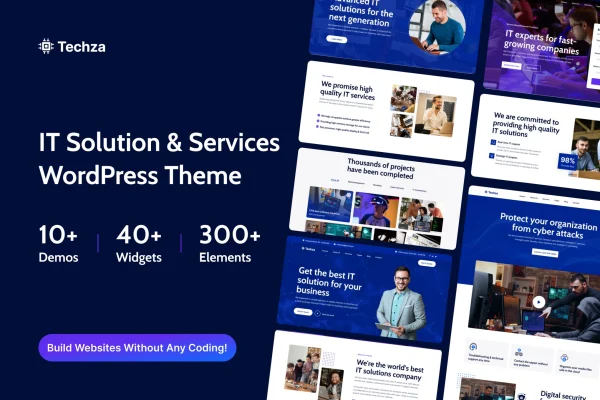
Techza is a WordPress theme built for IT solutions companies, technology service providers and digital agencies. It gives you ready-made layouts for presenting services, case studies and team members, and it works with Elementor so you can adjust pages without writing code.
- Version
- 1.0.1
- Developer
- mthemeus
- Type
- WordPress theme
- Licence
- GPL
- Included in
- Every plan, or $3.99 on its own
What’s new in Techza 1.0.1
Version 1.0.1
Latest
What it does
Building a tech company website from a blank theme takes time, especially when you need pages for services, past projects and the people behind the work. This theme starts you off with layouts made for the IT and technology niche. You can import the demo content in one click, then swap in your own text, images and details. It suits a corporate site for an IT firm as well as a more creative portfolio for a tech studio or agency.
Editing happens through Elementor, so you can rearrange sections and change content with drag and drop instead of code. There are 10 homepage layouts to pick from, each with a clean, modern look and smooth animations. The design is responsive and retina ready, so pages adapt to phones, tablets and high-resolution screens. A child theme is included, which gives you a safe place for custom changes that stay separate from the main theme files.
Best for
- IT solutions companies and managed service providers
- Technology service businesses presenting case studies and teams
- Digital agencies building a tech-focused portfolio site
Features
Ten homepage layouts
Choose from 10 homepage designs made for IT solutions and technology services, giving you several starting points for the look of your front page.
Elementor compatibility
Build and change pages with Elementor's drag and drop editor, so you can adjust layouts and content without touching any code.
One-click demo import
Import the demo content in a single step to get the ready-made layouts in place, then replace the sample material with your own.
Responsive and retina ready
Layouts adapt to different screen sizes, from desktop monitors to mobile phones, and display sharply on high-resolution screens.
Child theme included
A bundled child theme lets you make custom changes in a separate place, keeping your edits apart from the main theme files.
Service and team sections
Present your IT services, case studies and team members in layouts designed for technology businesses and the clients they serve.
Modern design with animations
A clean, modern interface with smooth animations gives tech company sites a current, professional appearance.
Questions about Techza
Do I need to know how to code to customize this theme?
No. The theme is compatible with Elementor, so you can edit pages with drag and drop. You can change text, images and section order visually. If you do want to add custom code, the included child theme gives you a separate place for those changes.
How many homepage designs come with Techza?
There are 10 homepage layouts, each designed for IT solutions and technology businesses. You can import the demo content in one click and then pick the layout that best matches the style you want for your company.
Will my site look right on phones and tablets?
Yes. The design is responsive, so layouts adjust to different screen sizes including mobile phones and tablets. It is also retina ready, which means graphics and content display sharply on high-resolution screens.
Can I use this theme for a creative tech portfolio instead of a corporate site?
Yes. The theme is aimed at both corporate IT company sites and more creative technology portfolios. Its layouts include sections for services, case studies and team members, which work well for presenting past projects and the people behind them.
Is Techza free?
The code of Techza is licensed under the GPL, so anyone may use, change and share it. GPL Feast is a paid service: a plan or a single purchase gives you the download and automatic updates. The developer's own support, licence key and online services are not included.
Which version of Techza is this?
Version 1.0.1. New versions appear here when the developer publishes them, and members get them as automatic updates.
How do I update Techza?
Install the free GPL Feast Updater on your site and connect it with your API key. It installs new versions of Techza automatically and keeps a backup, so you can roll back.