Theme
Updated
Travil
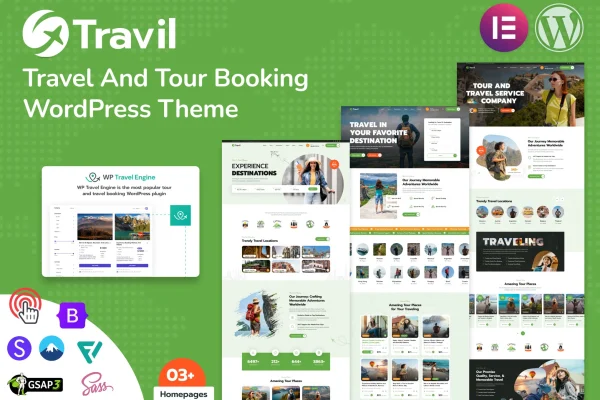
Travil is a WordPress theme by modinatheme built for travel agencies, tour operators and related service providers. It gives you layouts for presenting destinations, itineraries and tour packages, along with booking system integration so visitors can reserve trips directly on your site.
- Version
- 1.2.0
- Released
- Jul 16, 2025
- Developer
- modinatheme
- Type
- WordPress theme
- Licence
- GPL
- Included in
- Every plan, or $3.99 on its own
What’s new in Travil 1.2.0
Version 1.2.0 · Jul 16, 2025
Latest
- FixedFooter Builder Issues fixed
- ImprovedDemo Updated
- ImprovedSome CSS fixed
What it does
Running a travel business online means presenting a lot of detail clearly: where a tour goes, what the itinerary looks like, what it costs and what past travelers thought. This theme includes dedicated sections for destinations, itineraries, prices and customer reviews, so each package has a consistent place for that information. Booking system integration covers real-time availability, automated confirmations and secure payment options, which lets customers plan and reserve a trip without leaving your site.
Setup starts with a one-click demo import that loads sample content you can edit into your own pages. From there, the theme options panel controls colors, fonts, header styles and more, and the theme works with drag-and-drop page builders for building custom layouts. The design is responsive and retina ready, it is compatible with WPML for multilingual sites, and social media integration lets you connect your channels for sharing travel stories.
Best for
- Travel agencies selling tour packages online
- Tour operators who take bookings on their own site
- Travel businesses serving clients in several languages
Features
Booking system integration
Supports trip reservations with real-time availability, automated confirmations and secure payment options, so customers can book directly through your site.
Tour package sections
Dedicated areas for destinations, itineraries, prices and customer reviews help you present each tour with the details travelers look for.
Pre-built homepage templates
Multiple pre-built templates and compatibility with drag-and-drop page builders let you create custom pages for your tours and services.
One-click demo import
Load the demo content in one step to get a ready-to-edit starting point for your travel website instead of building from a blank page.
Theme options panel
Adjust colors, fonts, header styles and other design settings from a central panel to match your brand without writing code.
Multilingual and WPML compatible
The theme supports multiple languages and works with WPML, which helps when your clients come from different countries.
Responsive, retina ready design
Layouts adapt to desktops, tablets and smartphones, and the design is prepared for high-resolution retina screens.
Social media integration
Connect your social channels to the site so visitors can follow your business and you can share travel stories.
Questions about Travil
Can customers book tours directly on my website?
Yes. The theme includes booking system integration with real-time availability, automated confirmations and secure payment options, so visitors can plan and reserve trips through your site.
Do I need coding skills to customize the design?
No coding is needed for common changes. The theme options panel controls colors, fonts, header styles and more, and the theme works with drag-and-drop page builders for building custom page layouts.
Can I run a multilingual travel site with this theme?
Yes. The theme supports multiple languages and is compatible with WPML, which makes it suitable for travel businesses that want to reach clients in different countries.
Is there a quick way to get a starting layout?
The one-click demo import loads demo content and multiple pre-built templates, giving you an editable foundation you can adapt with your own destinations, tours and images.
Is Travil free?
The code of Travil is licensed under the GPL, so anyone may use, change and share it. GPL Feast is a paid service: a plan or a single purchase gives you the download and automatic updates. The developer's own support, licence key and online services are not included.
Which version of Travil is this?
Version 1.2.0, released Jul 16, 2025. New versions appear here when the developer publishes them, and members get them as automatic updates.
How do I update Travil?
Install the free GPL Feast Updater on your site and connect it with your API key. It installs new versions of Travil automatically and keeps a backup, so you can roll back.
More from modinatheme