
Theme
Updated
vCamp
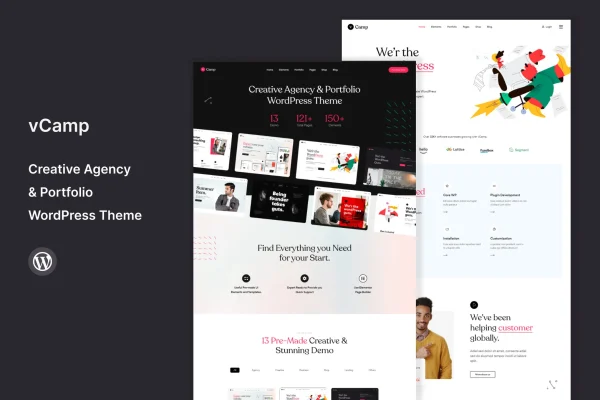
vCamp is a WordPress theme built for creative agencies that want a professional website for their work and services. It gives you portfolio grids, pre-built page layouts and drag-and-drop customization, so you can shape the site around your brand without writing code.
- Version
- 1.8
- Released
- Aug 13, 2024
- Developer
- template_path
- Type
- WordPress theme
- Licence
- GPL
- Included in
- Every plan, or $3.99 on its own
What’s new in vCamp 1.8
Version 1.8 · Aug 13, 2024
Latest
What it does
Creative agencies need a site that presents projects, explains services and makes it easy for potential clients to get in touch. This theme is designed around that job. Its modern layout puts your portfolio and services up front, and you can add client testimonials and agency milestones to give visitors a fuller picture of who you are and what you have done.
Setup starts with a one-click demo import that copies the demo content into your site, which you then adjust with drag-and-drop tools. Pre-built layouts cover common pages like About, Services and Contact. The design is responsive across desktops, tablets and phones, social profiles can be connected, and the theme is translation and RTL ready for sites in other languages.
Best for
- Creative and design agencies presenting portfolios
- Studios that want a site without writing code
- Agencies serving clients in multiple languages
Features
Responsive design
Layouts adapt to desktops, tablets and smartphones, so your projects and service pages display properly on whatever device a visitor uses.
Drag-and-drop customization
Adjust layouts and content to match your brand style using drag-and-drop tools, with no coding knowledge needed to make changes.
Portfolio galleries and grids
Present your projects with galleries and customizable portfolio grids that let potential clients browse the work your agency has produced.
Pre-built page layouts
Choose from a set of ready-made templates to set up pages such as About, Services and Contact without starting from a blank page.
One-click demo import
Copy the live demo content into your site in one step, then swap in your own text, images and projects.
Social media integration
Connect your agency's social profiles to the site so visitors can find and follow you on the platforms you use.
Translation and RTL ready
Translate the site into other languages and support right-to-left scripts when your agency serves clients in different regions.
SEO-friendly structure
The theme is built following on-page SEO practices, giving your content a clean structure for search engines to read.
Questions about vCamp
Can I customize the layout without knowing how to code?
Yes. The theme includes drag-and-drop customization, so you can change layouts and content to fit your brand style without writing code. The pre-built layouts also give you a starting point for common pages like About, Services and Contact.
How do I get my site looking like the demo?
The theme offers a one-click demo import that copies the live demo content into your site. From there you can replace the sample text, images and projects with your own agency's material.
Does vCamp work for portfolio-heavy agency sites?
It is designed for that. You get dynamic galleries and customizable portfolio grids for presenting projects, and the layout also supports content like client testimonials and agency milestones alongside your services.
Can I build a site in a language other than English?
Yes. The theme is translation ready, so you can translate the site into other languages, and it supports right-to-left languages for audiences that read in RTL scripts.
Is vCamp free?
The code of vCamp is licensed under the GPL, so anyone may use, change and share it. GPL Feast is a paid service: a plan or a single purchase gives you the download and automatic updates. The developer's own support, licence key and online services are not included.
Which version of vCamp is this?
Version 1.8, released Aug 13, 2024. New versions appear here when the developer publishes them, and members get them as automatic updates.
How do I update vCamp?
Install the free GPL Feast Updater on your site and connect it with your API key. It installs new versions of vCamp automatically and keeps a backup, so you can roll back.






