Theme
Updated
Vemus
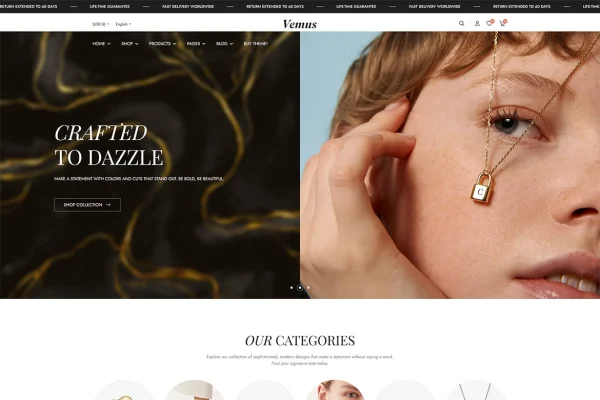
Vemus is a WooCommerce WordPress theme designed for jewelry stores. It gives shop owners an elegant, responsive storefront for rings, bracelets, necklaces and watches, with product layouts built to display fine detail and a setup that works with WooCommerce for products, payments, shipping and orders.
- Version
- 1.0.3
- Released
- Jul 9, 2026
- Developer
- themesflat
- Type
- WordPress theme
- Licence
- GPL
- Included in
- Every plan, or $3.99 on its own
What’s new in Vemus 1.0.3
Version 1.0.3 · Jul 9, 2026
Latest
- FixedCart Page is fixed.
What it does
Selling jewelry online depends on presentation. Buyers want to see the shine of a ring or the clasp on a bracelet before they commit, and a generic shop theme rarely gives small pieces the attention they need. This theme is built around that problem, with multiple gallery styles and zoom features on product pages so customers can look closely at each item. It runs on WooCommerce, so the store side, including products, inventory, payments, shipping and orders, is handled through tools many WordPress users already know.
Getting started is quick thanks to one-click demo import, which loads a ready-made layout you can then adjust. Colors, fonts and layouts on the homepage and inner pages can be changed without coding, and you can choose from several header and footer styles to set up navigation the way you like. A built-in blog lets you publish styling tips, brand stories and news. The theme is translation ready and compatible with WPML, which suits stores serving customers in more than one language.
Best for
- Online jewelry stores selling rings, necklaces and bracelets
- Watch and accessory retailers using WooCommerce
- Jewelry brands selling to customers in multiple languages
Features
WooCommerce store integration
Works with WooCommerce so you can manage products, inventory, payments, shipping and orders for your jewelry shop from within WordPress.
Product galleries with zoom
Multiple gallery styles and zoom features let shoppers inspect rings, necklaces, bracelets and watches up close on each product page.
Responsive layouts
The design adapts to desktops, tablets and smartphones, so your collections display properly whichever device a customer uses to browse.
Customization without code
Adjust colors, fonts and layouts on the homepage and inner pages to match your brand style, with no coding knowledge required.
One-click demo import
Import the demo content in one step to get a working site layout in place, then start customizing it right away.
Header and footer choices
Pick from multiple header and footer styles to shape your site navigation and give the store the look you want.
Built-in blog
Publish news, styling tips and brand stories through the included blog functionality to keep customers informed about your pieces.
Multilingual ready
The theme is translation ready and WPML compatible, so you can offer your store in several languages for a wider audience.
Questions about Vemus
Does this theme work with WooCommerce?
Yes. It is built for WooCommerce, so you manage products, inventory, payments, shipping and orders through it. The theme provides the storefront design and product layouts on top of that store functionality.
Can customers zoom in on product photos?
Yes. The product pages include multiple gallery styles along with zoom features, which helps shoppers examine small details on pieces like rings, bracelets and watches before buying.
Can I change the design without coding?
You can adjust colors, fonts and layouts on the homepage and inner pages without coding knowledge. There are also several header and footer styles to choose from, and a one-click demo import gives you a starting layout to edit.
Can I run my jewelry store in more than one language?
Yes. Vemus is translation ready and compatible with WPML, so you can set up a multilingual store and present your collections to customers in different languages.
Is Vemus free?
The code of Vemus is licensed under the GPL, so anyone may use, change and share it. GPL Feast is a paid service: a plan or a single purchase gives you the download and automatic updates. The developer's own support, licence key and online services are not included.
Which version of Vemus is this?
Version 1.0.3, released Jul 9, 2026. New versions appear here when the developer publishes them, and members get them as automatic updates.
How do I update Vemus?
Install the free GPL Feast Updater on your site and connect it with your API key. It installs new versions of Vemus automatically and keeps a backup, so you can roll back.