
Theme
Updated
Vervoer
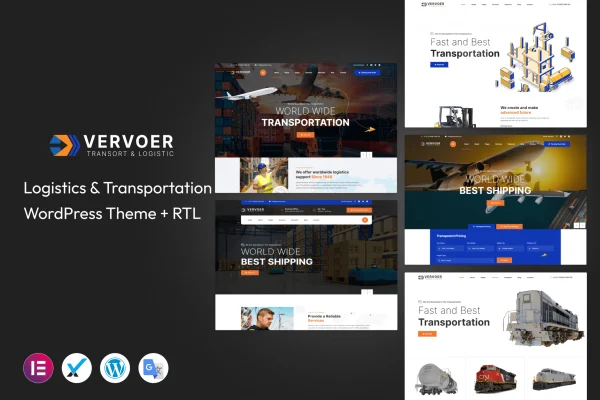
Vervoer is a WordPress theme built for logistics, transportation and freight businesses. It gives companies a professional site where they can present their services, fleet and industry news, with multiple homepage layouts and a drag-and-drop builder for editing pages without code.
- Version
- 1.0.1
- Released
- Apr 19, 2024
- Developer
- template_path
- Type
- WordPress theme
- Licence
- GPL
- Included in
- Every plan, or $3.99 on its own
What’s new in Vervoer 1.0.1
Version 1.0.1 · Apr 19, 2024
Latest
What it does
Logistics companies need a website that explains what they move, how they move it and why clients should trust them. This theme is designed around that need. It includes pre-built sections for services, fleet details, client testimonials and industry news, so a freight or transport business can put its main information in front of visitors without designing every block from scratch. The layout is responsive, so pages adjust to smartphones, tablets and desktops.
You start by picking one of the multiple homepage layouts that suits your brand, then adjust pages with the drag-and-drop page builder. No coding knowledge is needed. Header and footer options let you shape the site's branding, and the theme works with WooCommerce if you want to add booking or online sales features. It is also translation-ready and compatible with WPML, which helps companies that serve clients in more than one language.
Best for
- Logistics and freight forwarding companies
- Trucking, shipping and transportation businesses
- Agencies building websites for transport clients
Features
Multiple homepage layouts
Choose from several homepage designs and pick the one that best matches the look and identity of your logistics or transportation business.
Drag-and-drop page builder
Build and rearrange pages visually with a drag-and-drop builder, so non-technical users can create professional pages without writing any code.
Pre-built industry sections
Ready-made sections cover services, fleet details, client testimonials and industry news, giving you a starting point for the content transport clients look for.
Responsive design
Layouts adapt to smartphones, tablets and desktops, so visitors can browse your services and contact details comfortably on any screen size.
Custom header and footer
Header and footer options let you adjust these areas to create a branded browsing experience that fits your company's style.
WooCommerce compatibility
The theme works with WooCommerce, which makes it possible to add booking systems or online sales to your logistics website.
Translation and WPML ready
The theme is translation-ready and compatible with WPML, so you can run your site in several languages for an international audience.
Questions about Vervoer
Do I need coding skills to customize this theme?
No. The theme includes a drag-and-drop page builder, so you can edit and arrange pages visually. Multiple homepage layouts and header and footer options give you further control over the design without touching code.
Can I show my fleet and services on the site?
Yes. The theme comes with pre-built sections for services and fleet details, along with sections for client testimonials and industry news. These help a transportation company present what it offers and build credibility with visitors.
Can I add bookings or sell services online with Vervoer?
Vervoer is compatible with WooCommerce, which you can use to add online sales. The theme also supports plugins for booking systems, so you can add those features if your business needs them.
Will the theme work for a multilingual audience?
Yes. The theme is translation-ready and compatible with WPML, so you can translate your content and serve clients in different languages from the same site.
Is Vervoer free?
The code of Vervoer is licensed under the GPL, so anyone may use, change and share it. GPL Feast is a paid service: a plan or a single purchase gives you the download and automatic updates. The developer's own support, licence key and online services are not included.
Which version of Vervoer is this?
Version 1.0.1, released Apr 19, 2024. New versions appear here when the developer publishes them, and members get them as automatic updates.
How do I update Vervoer?
Install the free GPL Feast Updater on your site and connect it with your API key. It installs new versions of Vervoer automatically and keeps a backup, so you can roll back.






