Theme
Updated
Zolar
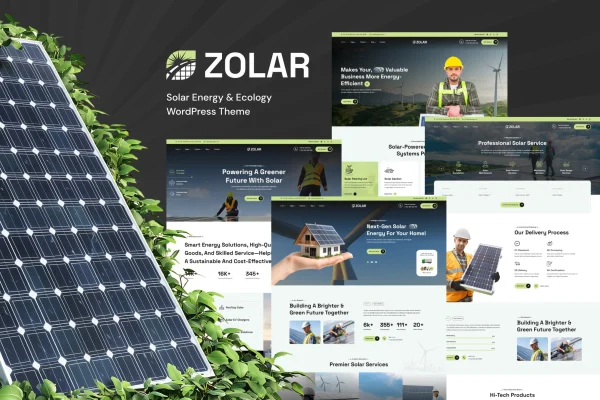
Zolar is a WordPress theme built for solar energy businesses and other eco-conscious companies. It gives you a clean, modern layout with ready-made pages for services and projects, so you can present your installations, explain what you offer and share your sustainability work.
- Version
- 1.0.7
- Released
- Aug 15, 2026
- Developer
- venusweb
- Type
- WordPress theme
- Licence
- GPL
- Included in
- Every plan, or $3.99 on its own
What’s new in Zolar 1.0.7
Version 1.0.7
Latest
- ImprovedPortfolio security updated.
- ImprovedCompatible with latest WordPress Version.
- ImprovedCompatible with latest WordPress Version.
What it does
Solar installers and renewable energy firms need a site that explains their services clearly and shows real work. Zolar is designed around that need. It includes pre-built service and project pages where you can present installations and eco-friendly initiatives, plus a blog section for news, tips and sustainability articles. The design is modern and organized, and the layout is responsive, so pages adjust to desktop, tablet and phone screens.
You can adjust colors, fonts, layouts and content to match your brand without advanced coding. The theme works with Elementor, Contact Form 7 and WooCommerce, which lets you build pages visually, add contact forms or set up a shop for products. It is also ready for translation plugins, which helps if you serve customers in more than one language. Documentation is included to guide you through setting things up.
Best for
- Solar panel installers and renewable energy companies
- Eco-conscious businesses promoting sustainability services
- Agencies building websites for green energy clients
Features
Pre-built service and project pages
Ready-made pages let you present your solar installations, list your services and describe eco-friendly initiatives without building every layout from scratch.
Responsive layout
Pages adapt to desktop, tablet and smartphone screens, so visitors get a usable site whichever device they use to browse.
Brand customization options
Change colors, fonts, layouts and content to fit your company identity, with options that do not require advanced coding skills.
Built-in blog section
Publish company news, energy-saving tips and sustainability articles to keep customers informed and give visitors useful reading.
Works with popular plugins
Compatible with Elementor, Contact Form 7 and WooCommerce, so you can design pages visually, collect inquiries through forms and sell products.
Translation ready
The theme is prepared for translation plugins, making it possible to offer your site in multiple languages for a wider audience.
Clean, modern design
An organized, professional look suited to renewable energy brands, keeping attention on your projects and the services you provide.
Questions about Zolar
Can I use Elementor to edit pages with this theme?
Yes. Zolar is compatible with Elementor, so you can build and adjust pages visually. It also works with Contact Form 7 for contact and quote forms, and with WooCommerce if you want to sell products from your site.
Does the theme include pages for showing completed projects?
It does. The theme comes with pre-built project and service pages, which give you a ready structure for presenting solar installations, describing the services you offer and highlighting eco-friendly initiatives your company is involved in.
Can I translate my site into other languages?
Yes. The theme is ready for translation plugins, so you can offer your content in more than one language. This is useful for companies that serve customers across different regions or language groups.
Will I need coding skills to customize it?
No advanced coding is needed. You can change colors, fonts, layouts and content through the customization options, and documentation is included to help you understand how the theme is set up.
Is Zolar free?
The code of Zolar is licensed under the GPL, so anyone may use, change and share it. GPL Feast is a paid service: a plan or a single purchase gives you the download and automatic updates. The developer's own support, licence key and online services are not included.
Which version of Zolar is this?
Version 1.0.7, released Aug 15, 2026. New versions appear here when the developer publishes them, and members get them as automatic updates.
How do I update Zolar?
Install the free GPL Feast Updater on your site and connect it with your API key. It installs new versions of Zolar automatically and keeps a backup, so you can roll back.
More from venusweb