Plugin
Updated
Advanced Pricing Table For Divi
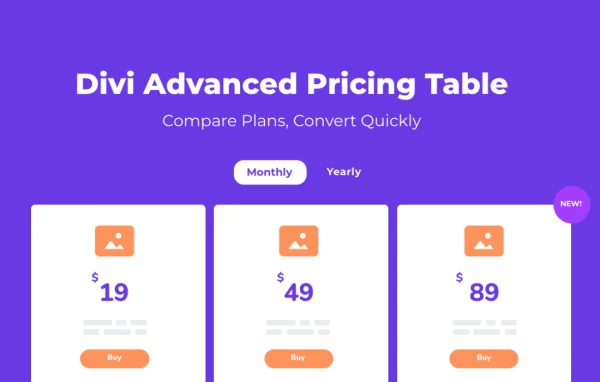
This is a WordPress plugin by Aspen Grove Studios that adds a pricing table module to the Divi Builder. It lets you build horizontal, vertical or comparison pricing tables, add monthly and yearly toggles, and highlight featured plans, all without writing code.
- Version
- 1.0.4
- Released
- May 8, 2024
- Developer
- WP Zone
- Type
- WordPress plugin
- Licence
- GPL
- Included in
- Every plan, or $3.99 a year on its own
What’s new in Advanced Pricing Table For Divi 1.0.4
Version 1.0.4
Latest
- NewAdd comparison table layout
- FixedFix issues in Visual Builder
- SecurityImplement security fix
What it does
Presenting service tiers clearly can take a lot of manual layout work in a page builder. This plugin gives Divi users a dedicated module for the job. You place it in the Divi Builder like any other module, then pick a layout and adjust the content and design settings. Horizontal, vertical and comparison tables are available, so you can match the format to how many plans you offer and how much detail each one needs.
Inside each table you can turn on, turn off or reorder up to 11 elements, so the table shows only what matters for your plans. Visitors can switch between billing cycles or plan groups with toggle and tabbed displays. Icons and tooltips help explain individual features, badges mark the plans you want to point out, and equal height columns keep everything lined up. Tables are built to be responsive across desktop and mobile screens.
Best for
- Agencies building client sites with Divi
- SaaS and subscription businesses showing plan tiers
- Online service providers comparing packages
Features
Three table layouts
Build horizontal, vertical or comparison pricing tables, choosing the format that best fits your page design and the number of plans you offer.
Up to 11 adjustable elements
Enable, disable or reposition up to 11 elements within a pricing table, so you control exactly which details appear and in what order.
Toggle and tabbed pricing
Let visitors switch between billing cycles, such as monthly and yearly, or between different plan sets using toggle and tabbed displays.
Feature icons and tooltips
Add icons beside plan features and attach tooltips that give short explanations, helping visitors understand what each plan includes.
Plan badges
Choose from a variety of badges to call attention to a featured or recommended plan within the table.
Equal height columns
Keep all pricing columns the same height for a consistent, balanced layout regardless of how much content each plan contains.
Works inside Divi Builder
Add and configure pricing tables directly in the Divi Builder, including the Visual Builder, with no coding needed.
Responsive tables
Pricing tables adapt to different screen sizes so they remain readable on desktops, tablets and smartphones.
Questions about Advanced Pricing Table For Divi
Do I need Divi to use this plugin?
Yes. The plugin is built for Divi users and works as a module inside the Divi Builder. You create and edit your pricing tables within Divi rather than through a separate interface.
Can I show monthly and yearly prices in the same table?
Yes. The toggle and tabbed pricing displays let visitors switch between billing cycles such as monthly and yearly, or between different groups of plans, without leaving the page.
Can I build a feature comparison table?
Yes. Along with horizontal and vertical layouts, the plugin includes a comparison table layout, which suits pages where visitors need to compare features across several plans side by side.
How much control do I have over what appears in each table?
You can enable, disable or reposition up to 11 elements in a table. You can also add feature icons, tooltips and badges, and use equal height columns to keep the layout consistent.
Is Advanced Pricing Table For Divi free?
The code of Advanced Pricing Table For Divi is licensed under the GPL, so anyone may use, change and share it. GPL Feast is a paid service: a plan or a single purchase gives you the download and automatic updates. The developer's own support, licence key and online services are not included.
Which version of Advanced Pricing Table For Divi is this?
Version 1.0.4, released May 8, 2024. New versions appear here when the developer publishes them, and members get them as automatic updates.
How do I update Advanced Pricing Table For Divi?
Install the free GPL Feast Updater on your site and connect it with your API key. It installs new versions of Advanced Pricing Table For Divi automatically and keeps a backup, so you can roll back.
More from WP Zone