Plugin
Updated
BuddyBoss Sharing
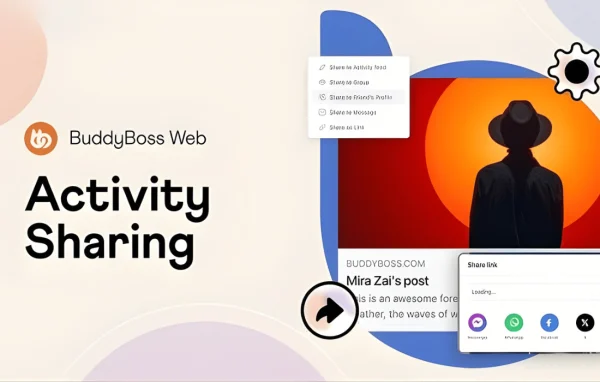
BuddyBoss Sharing is a WordPress plugin that adds activity sharing to communities built on BuddyBoss. A Share button sits next to Like and Comment on each activity post, so members can repost content in one click to places inside the community or out to social networks.
- Version
- 2.1.0
- Released
- Sep 21, 2026
- Developer
- BuddyBoss
- Type
- WordPress plugin
- Licence
- GPL
- Included in
- Every plan, or $2.39 on its own
What’s new in BuddyBoss Sharing 2.1.0
Version 2.1.0
Latest
- FixedCore - Fixed an issue where clicking View details on the BuddyBoss products not showing update details
- FixedCore - Updated the BuddyBoss products compatibility version with the latest WordPress version as unknown
- SecurityProfiles - Fixed a privacy issue where a member's full name could still appear in page source code and social sharing previews even when only their first name was set to display
What it does
In a BuddyBoss community, a good activity post often stays in the feed where it was published. Members who want to pass it along have to copy text or explain where to find it. This plugin gives every activity post a Share button placed beside the familiar Like and Comment options. One click lets a member repost the item to their own feed, a group, a friend's profile or a private message, so useful posts travel further inside the community.
Sharing can also go outside the site. Members can copy a direct link to a post or send it to popular social networks. Admins decide where sharing is allowed and whether members may add their own message when they repost, which keeps the feature in line with the rules of the community. Because it works inside the existing BuddyBoss interface, members see the button in a spot they already know.
Best for
- Community sites built on BuddyBoss
- Groups wanting members to repost activity easily
- Admins who want control over where content gets shared
Features
One-click share button
A Share button appears next to Like and Comment on activity posts, letting members repost any activity item with a single click.
Share to feeds and groups
Members can repost activity to their own personal feed or into a group they belong to, spreading content across different parts of the community.
Share to profiles and messages
Posts can be shared to a friend's profile or sent through private messages, which suits members who want to pass something along to one person.
Copy a direct link
Members can copy a direct link to an activity post and paste it wherever they like, inside or outside the community.
External social network sharing
Activity posts can be shared out to popular social networks, giving community content a path beyond the BuddyBoss site.
Admin sharing controls
Administrators choose where sharing is allowed and manage member permissions, so sharing follows the guidelines set for the community.
Optional custom messages
Admins can let members add a personal message when they share a post, giving context to the repost, or turn this option off.
BuddyBoss Sharing older versions
- 2.0.3Jul 111 fix
- 2.0.2Jul 32 fixes
- 2.0.1Jun 121 improvement
- 2.0.0May 19
- 1.1.0Dec 12, 2025
- 1.0.1Nov 24, 2025
Members and buyers of this product can download older versions.
Questions about BuddyBoss Sharing
Where does the Share button appear?
The Share button shows up on activity posts right next to the Like and Comment options. Members see it in the same place they already react to and comment on content, so there is little to learn.
Where can members share an activity post?
Members can repost to their own feed, to a group, to a friend's profile or to a private message. They can also copy a direct link to the post or share it to popular external social networks.
Can I limit where sharing is allowed?
Yes. Administrators can configure where sharing is permitted and manage user permissions. This lets you match the sharing options to your community's policies instead of enabling every destination by default.
Can members add a note when they share something?
They can if you allow it. The plugin includes an optional custom message setting, so members may write their own message alongside a repost. Admins can enable or disable this option.
Is BuddyBoss Sharing free?
The code of BuddyBoss Sharing is licensed under the GPL, so anyone may use, change and share it. GPL Feast is a paid service: a plan or a single purchase gives you the download and automatic updates. The developer's own support, licence key and online services are not included.
Which version of BuddyBoss Sharing is this?
Version 2.1.0, released Sep 21, 2026. New versions appear here when the developer publishes them, and members get them as automatic updates.
How do I update BuddyBoss Sharing?
Install the free GPL Feast Updater on your site and connect it with your API key. It installs new versions of BuddyBoss Sharing automatically and keeps a backup, so you can roll back.
More from BuddyBoss