Plugin
Updated
BWD Unfold Content
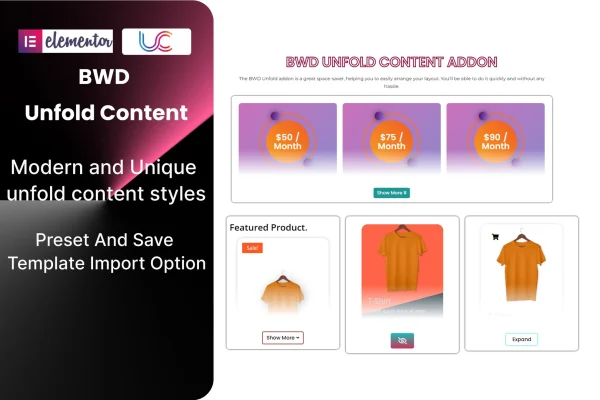
BWD Unfold Content is an Elementor addon plugin for building content sections that expand when a visitor clicks. It lets you hide longer text, images or other content behind a button, keeping pages tidy while the details stay one click away.
- Version
- 1.4
- Released
- Jun 22, 2026
- Type
- WordPress plugin
- Requires
- Elementor
- Licence
- GPL
- Included in
- Every plan, or $3.99 on its own
What’s new in BWD Unfold Content 1.4
Version 1.4 · Jun 22, 2026
Latest
What it does
Long pages can feel heavy when every detail is visible at once. This addon gives you an unfold section inside Elementor: a short preview shows first, and the rest opens when a visitor clicks the button. It works well for FAQs, portfolio descriptions, service details and any block of content that readers may want to skim before reading in full. You build everything with Elementor's visual controls, so no coding is needed.
You can adjust icons, buttons, images and colors to match your branding, and you can start from presets or import saved templates to reuse a design across pages. The layout is responsive, so sections adapt to different screen sizes, and it is built to work across major browsers. A POT file is included for translating the addon's text, which helps on multilingual sites. It requires Elementor and is intended to work with WordPress themes built on Elementor.
Best for
- Elementor sites with long FAQs or detailed service pages
- Portfolio sites that need compact project descriptions
- Multilingual WordPress sites built with Elementor
Features
Click to unfold content
Hide longer text, images or other content behind a button so visitors reveal the full section only when they want to read more.
Presets and template import
Start from preset designs or import saved templates to reuse your favorite unfold layouts and keep styling consistent across pages.
Custom icons, buttons and colors
Adjust icons, buttons, images and colors with Elementor controls so each unfold section fits the look of your site.
No coding required
Build and style unfold sections entirely through the visual Elementor editor, which suits beginners and experienced site builders alike.
Responsive layout
Unfold sections adapt to different screen sizes, so the preview and expanded content display properly on phones, tablets and desktops.
Translation ready
An included POT file lets you translate the addon's text into other languages for sites that serve visitors in more than one language.
Cross-browser compatibility
The addon is built to give a consistent experience across major browsers, so visitors see the same behavior wherever they browse.
BWD Unfold Content older versions
- 1.0Apr 27, 2025
Members and buyers of this product can download older versions.
Questions about BWD Unfold Content
Do I need Elementor to use this addon?
Yes. The plugin requires Elementor and adds its unfold content section to the Elementor editor. It is designed to work with WordPress themes built on Elementor, so you style everything with the visual controls you already use.
What kind of content can I put inside an unfold section?
You can hide text, images or other content behind the unfold button. Common uses include FAQ answers, portfolio details and longer descriptions that you want available without making the page feel crowded.
Can I match the sections to my brand?
Yes. Icons, buttons, images and colors are all customizable. You can also start from presets or import saved templates, which makes it easier to keep the same design on every page.
Will it work on a site in another language?
The addon includes a POT file, which lets you translate its text into other languages. That makes it a practical choice for multilingual Elementor sites.
Is BWD Unfold Content free?
The code of BWD Unfold Content is licensed under the GPL, so anyone may use, change and share it. GPL Feast is a paid service: a plan or a single purchase gives you the download and automatic updates. The developer's own support, licence key and online services are not included.
Which version of BWD Unfold Content is this?
Version 1.4, released Jun 22, 2026. New versions appear here when the developer publishes them, and members get them as automatic updates.
How do I update BWD Unfold Content?
Install the free GPL Feast Updater on your site and connect it with your API key. It installs new versions of BWD Unfold Content automatically and keeps a backup, so you can roll back.
What does BWD Unfold Content need?
BWD Unfold Content needs Elementor installed and active.
You might also like