Plugin
Updated
Divi Module Custom CSS Selectors
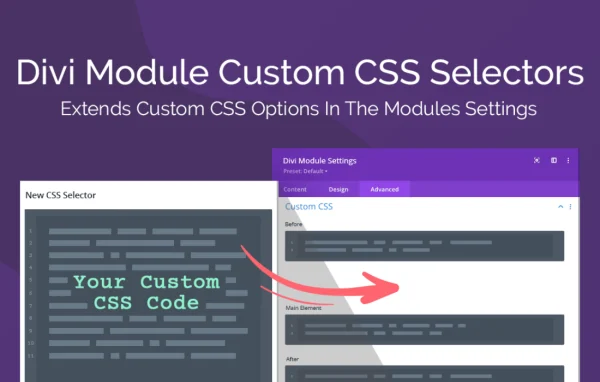
Divi Module Custom CSS Selectors by Aspen Grove Studios is a WordPress plugin for people who build sites with the Divi Builder. It adds over 500 new Custom CSS selectors to the Advanced tab of Divi's core modules, so you can target specific module elements and write responsive CSS right inside the module.
- Version
- 1.0.3
- Released
- Sep 23, 2022
- Developer
- WP Zone
- Type
- WordPress plugin
- Licence
- GPL
- Included in
- Every plan, or $3.99 a year on its own
What’s new in Divi Module Custom CSS Selectors 1.0.3
Version 1.0.3 · Sep 23, 2022
Latest
- NewAdd selector: Slider Module -> Slide Image Tag
- ImprovedRebrand to WP Zone
What it does
Divi gives every module a Custom CSS area, but the built-in list of targets only reaches a handful of elements. When you need to style a smaller part of a module, you usually end up opening browser developer tools, hunting for class names and writing rules in a separate stylesheet. This plugin expands that list with over 500 extra selectors, so the element you want to style is often already there to pick in the module's Advanced tab.
Because the selectors live inside the module settings, you can write device-specific CSS for each breakpoint and add hover state styles without hand-writing media queries. There is no extra interface and no configuration step, and the selectors work across Divi's native modules. The plugin also works with Divi's CSS minification, keeping its footprint small. It suits designers and developers who already write some CSS and want a quicker way to apply it to individual module parts.
Best for
- Web designers building client sites with the Divi Builder
- Developers who write custom CSS for Divi modules
- Agencies fine-tuning responsive Divi layouts
Features
Over 500 new selectors
Adds more than 500 Custom CSS selectors to Divi's core modules, giving you targets for many individual module elements that the default list does not cover.
Responsive CSS per breakpoint
Write CSS for each device breakpoint directly in the module, so you can adjust styles for different screen sizes without writing media queries yourself.
Hover state styling
Apply custom CSS to hover states from the same module settings, which makes interactive effects on specific elements simpler to set up.
Lives in the Advanced tab
The new selectors appear in the Advanced tab of each Divi module, alongside the existing Custom CSS fields, so there is no separate screen to learn.
No configuration needed
There are no settings to adjust before use. Once the plugin is active, the extra selectors are available in your modules.
Works with native Divi modules
The selectors are added across the native Divi Builder modules, giving consistent styling control from one module to the next.
Fits Divi's CSS minification
The plugin works with Divi's CSS minification and keeps a small footprint, so custom styles are handled through Divi's own output.
Questions about Divi Module Custom CSS Selectors
Do I still need to know CSS to use this?
Yes, some CSS knowledge helps. The plugin gives you many more places to target within each Divi module, but you still write the style rules yourself. What it removes is the work of finding class names and writing media queries for breakpoints.
Where do the new selectors show up?
They appear in the Advanced tab of each Divi module, in the Custom CSS area. You use them the same way as Divi's built-in selectors, with access to many more module elements.
Can I set different styles for mobile, tablet and hover?
Yes. You can write CSS for each breakpoint and for hover states directly in the module settings, without manually creating media queries in a stylesheet.
Which modules does it work with?
It adds selectors to Divi's core modules and works across the native Divi Builder modules. For example, the Slider module includes a selector for the slide image tag.
Is Divi Module Custom CSS Selectors free?
The code of Divi Module Custom CSS Selectors is licensed under the GPL, so anyone may use, change and share it. GPL Feast is a paid service: a plan or a single purchase gives you the download and automatic updates. The developer's own support, licence key and online services are not included.
Which version of Divi Module Custom CSS Selectors is this?
Version 1.0.3, released Sep 23, 2022. New versions appear here when the developer publishes them, and members get them as automatic updates.
How do I update Divi Module Custom CSS Selectors?
Install the free GPL Feast Updater on your site and connect it with your API key. It installs new versions of Divi Module Custom CSS Selectors automatically and keeps a backup, so you can roll back.
More from WP Zone