Plugin
Updated
Fluent Boards Pro
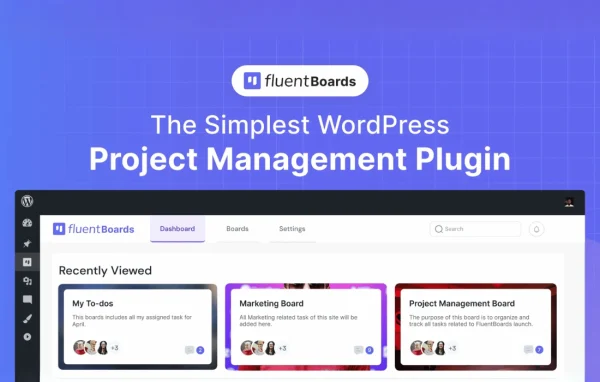
Fluent Boards Pro is a WordPress plugin by WPManageNinja that turns your site into a place to plan and track team projects. It gives you customizable boards with drag-and-drop tasks, assignments, deadlines and progress tracking, so work stays inside WordPress instead of a separate app.
- Version
- 2.2.1
- Released
- Oct 13, 2026
- Developer
- WPManageNinja
- Type
- WordPress plugin
- Requires
- Fluent Boards
- Licence
- GPL
- Included in
- Every plan, or $6.39 a year on its own
What’s new in Fluent Boards Pro 2.2.1
Version 2.2.1 · Oct 13, 2026
Latest
- FixedUpload directory warning issue
- FixedCloud attachment downloads failing on some sites
- FixedSearch briefly showing empty results while typing
- FixedCSV import upload error handling
- FixedRecurring task and reminder scheduling fixes
- FixedMinor stability and permission fixes
What it does
Many teams that run their business on WordPress still keep their project plans in an outside tool, which means extra logins and scattered information. This plugin brings task management into the WordPress admin. You build boards for each project, add tasks, and move them between stages with drag and drop. Boards can follow a Kanban style or work as simple to-do lists, depending on how your team likes to plan. It extends the Fluent Boards plugin, which it requires.
Day to day, team members can be assigned tasks and receive notifications, set deadlines with calendar support, and comment with rich text formatting. Visual progress indicators, color-coded priorities and colored labels that adapt to light and dark modes make it easier to scan a board. Role-based permissions control who can see what, and filtering and search help you find tasks and activity quickly. If you are moving from Trello, boards can be imported through its API.
Best for
- Agencies managing client projects inside WordPress
- Small businesses planning team tasks on their own site
- Teams moving their Trello boards into WordPress
Features
Drag-and-drop task boards
Organize and reprioritize tasks by dragging them between stages, with boards you can shape into Kanban columns or simple to-do lists.
Task assignment with notifications
Assign tasks to team members and notify them, so everyone knows who owns each piece of work and how workload is spread.
Deadlines and calendar
Set due dates on tasks and view them with calendar integration to keep project timelines visible to the whole team.
Visual progress tracking
Progress indicators, color-coded priorities and task headers showing the current stage give a quick read on where each task stands.
Role-based permissions
Control which team members can access boards and data, keeping project information limited to the people who need it.
Filtering and search
Find specific tasks, boards or team activity quickly with filtering and search tools, even when projects grow large.
Trello board import
Bring existing Trello boards into WordPress through the Trello API, so you can move projects over without rebuilding them by hand.
Rich comments and attachments
Format comments and replies with rich text, and preview Markdown attachments, including Mermaid diagrams, in a full-screen mode.
Fluent Boards Pro older versions
- 2.2.0Oct 137 new, 8 improvements, 9 fixes
- 2.0.15Sep 94 improvements, 7 fixes
- 2.0.12Aug 214 improvements, 2 fixes, 1 change
- 2.0.10Aug 13
- 2.0.4Aug 4
- 2.0.2Aug 2
- 2.0.0Jul 31
- 1.95.2Jun 14
- 1.95May 22
- 1.91.2Jan 26
Members and buyers of this product can download older versions.
29 older versions in all. If you need one that is not listed, ask support.
Questions about Fluent Boards Pro
Do I need anything else for this plugin to work?
Yes. It builds on the Fluent Boards plugin, which needs to be on your site. The Pro add-on then brings extra capabilities such as Trello import, role-based permissions, calendar deadlines and advanced filtering.
Can I move my existing Trello projects over?
Yes. The plugin can import Trello boards through the Trello API, which lets you bring current projects into WordPress instead of recreating each board and task manually.
Can I control what each team member sees?
Role-based permissions let you decide who can access boards and their data. This helps keep sensitive project details limited to the right people while others work on their own boards.
Does it work on phones and tablets?
The interface is responsive, so boards and tasks can be used on desktops, tablets and mobile devices. That makes it practical to check progress or update a task away from your desk.
Is Fluent Boards Pro free?
The code of Fluent Boards Pro is licensed under the GPL, so anyone may use, change and share it. GPL Feast is a paid service: a plan or a single purchase gives you the download and automatic updates. The developer's own support, licence key and online services are not included.
Which version of Fluent Boards Pro is this?
Version 2.2.1, released Oct 13, 2026. New versions appear here when the developer publishes them, and members get them as automatic updates.
How do I update Fluent Boards Pro?
Install the free GPL Feast Updater on your site and connect it with your API key. It installs new versions of Fluent Boards Pro automatically and keeps a backup, so you can roll back.
What does Fluent Boards Pro need?
Fluent Boards Pro needs Fluent Boards installed and active.
More from WPManageNinja