Plugin
Updated
Gravity Forms Styler
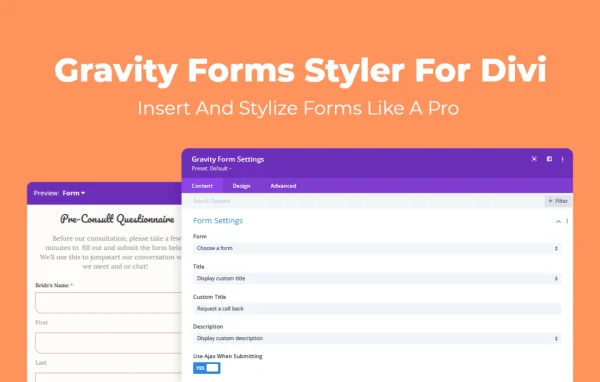
Gravity Forms Styler For Divi by Aspen Grove Studios is a WordPress plugin that brings Gravity Forms into the Divi Builder. You can place a form on any page or post and adjust its colors, fonts, spacing and layout with visual controls, so it matches the rest of your Divi site without writing CSS.
- Version
- 1.0.6
- Released
- Nov 14, 2023
- Developer
- WP Zone
- Type
- WordPress plugin
- Licence
- GPL
- Included in
- Every plan, or $3.99 a year on its own
What’s new in Gravity Forms Styler 1.0.6
Version 1.0.6 · Nov 14, 2023
Latest
- ImprovedAdd save and continue preview and styling options
What it does
Gravity Forms handles the form logic well, but its default look rarely matches a custom Divi design. Getting it to fit usually means pasting shortcodes, switching between the builder and the backend, and writing CSS by hand. This plugin removes that back and forth. You insert a form directly in the Divi Builder and style it from the same settings panel you use for the rest of the page, which keeps form design part of your normal page building routine.
Changes appear in a real-time preview as you work, so you can tune typography, colors, margins and field layouts and see the result right away. You can also switch the preview between the main form, validation messages, confirmation messages and the save and continue view, which helps you check every state a visitor might see. A library of premade templates gives you a designed starting point when you would rather adjust than start from scratch. It suits simple contact forms as well as longer multi-step submissions.
Best for
- Divi websites that use Gravity Forms
- Freelancers building client sites in the Divi Builder
- Site owners who want styled forms without writing CSS
Features
Insert forms in Divi
Add Gravity Forms directly to Divi pages and posts from the builder, without copying shortcodes or jumping to the WordPress backend.
Wide range of design settings
Adjust text size, typography, colors, spacing, margins and field layouts so each form lines up with your brand and the rest of your Divi design.
Real-time visual preview
See every styling change as you make it, which makes it easier to fine-tune details and catch problems before the page goes live.
Multiple preview modes
Switch between the primary form, validation messages and confirmation messages to check how visitors experience the form at each stage.
Save and continue styling
Preview and style the save and continue view of a form, so that step matches the look of the rest of the form.
Premade form templates
Start from a library of professionally designed form templates, then adjust colors, fonts and spacing to fit your own site.
No custom CSS needed
All styling happens through visual controls, so users of any skill level can get polished forms without writing or maintaining stylesheet code.
Gravity Forms Styler older versions
- 1.0.5Nov 3, 20231 fix
- 1.0.4Oct 21, 20231 new, 2 fixes
- 1.0.3Oct 11, 20231 new
- 1.0.2Apr 18, 2023
Members and buyers of this product can download older versions.
Questions about Gravity Forms Styler
Do I need both Divi and Gravity Forms to use this?
Yes. The plugin works inside the Divi Builder and styles forms created with Gravity Forms, so you need both in place. It adds the visual styling and insertion layer that connects the two.
Can I check how error and confirmation messages look?
Yes. The preview can switch between the main form, validation messages and confirmation messages, plus the save and continue view. That lets you style each state and confirm it looks right before visitors see it.
Will I have to write CSS to match my site design?
No. Typography, colors, spacing, margins and field layouts are all adjusted through visual settings in the Divi Builder, with a live preview showing the result. You can also begin from a premade template and tweak it.
Does it work for longer, multi-step forms?
The plugin is described as suitable for both simple contact forms and complex multi-step submissions. You style them with the same Divi controls and preview them in real time while you work.
Is Gravity Forms Styler free?
The code of Gravity Forms Styler is licensed under the GPL, so anyone may use, change and share it. GPL Feast is a paid service: a plan or a single purchase gives you the download and automatic updates. The developer's own support, licence key and online services are not included.
Which version of Gravity Forms Styler is this?
Version 1.0.6, released Nov 14, 2023. New versions appear here when the developer publishes them, and members get them as automatic updates.
How do I update Gravity Forms Styler?
Install the free GPL Feast Updater on your site and connect it with your API key. It installs new versions of Gravity Forms Styler automatically and keeps a backup, so you can roll back.
More from WP Zone