Plugin
Plugin
Updated
LambertGroup - Chameleon HTML5 Audio Player With/Without Playlist
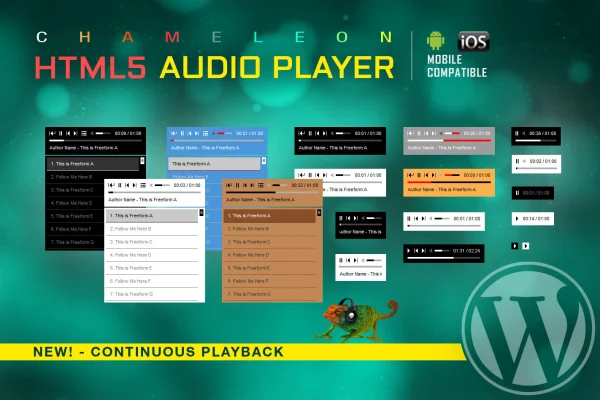
This WordPress plugin by LambertGroup adds an HTML5 audio player to your pages, with or without a playlist. You can match its colors to your site, choose which controls appear and place tracks with a shortcode.
- Version
- 3.5.6
- Released
- May 2, 2023
- Type
- WordPress plugin
- Licence
- GPL
- Included in
- Every plan, or $3.99 on its own
What’s new in LambertGroup - Chameleon HTML5 Audio Player With/Without Playlist 3.5.6
Version 3.5.6 · May 2, 2023
Latest
What it does
Sharing audio on a WordPress site often means relying on a third-party embed or writing custom code. This plugin gives you a self-contained player built on native HTML5 audio that plays MP3 files directly on your pages. It works in modern browsers and is built for iOS and Android devices, so visitors on phones and desktops get the same player. That makes it a practical fit for musicians posting tracks, podcasters sharing episodes or any site that needs a clean way to present audio.
Customization covers both looks and controls. You can set colors for the background, buttons, sliders and playlist, and pick which elements show, such as rewind, play, next, mute, the volume slider, the timer, the buffer bar and the playlist. Shortcode parameters let you specify the MP3 file path, song title and author right where you place the player. Designers who want to go further can edit the included layered PSD file to restyle the controller graphics.
Best for
- Musicians and bands sharing tracks on their own site
- Podcasters publishing episodes in WordPress
- Designers building branded audio pages for clients
Features
Custom color scheme
Set colors for the player background, buttons, sliders and playlist elements so the audio player matches the look and branding of your website.
Show or hide controls
Choose which controls appear, including rewind, play, next, mute, volume slider, timer, buffer and playlist, for a full player or a minimal one.
Optional playlist
Display a playlist of multiple tracks with customizable fonts and backgrounds, or run the player without a playlist for a single track.
Shortcode parameters
Add the MP3 file path, song title and author directly in the shortcode, which makes placing audio in posts and pages quick to manage.
Mobile device support
The player is built for iOS and Android, so visitors listening on phones and tablets can play your audio as they would on desktop.
Native HTML5 audio
Playback uses the browser's built-in HTML5 audio capabilities, working across modern browsers without Flash or iframe-based players.
Layered PSD for controls
A layered Photoshop file is included so designers can restyle the player control graphics beyond what the color settings allow.
Questions about LambertGroup - Chameleon HTML5 Audio Player With/Without Playlist
Can I use the player without a playlist?
Yes. The player works with or without a playlist. You can show a playlist with several tracks and styled fonts and backgrounds, or hide it and present a single track with just the controls you choose.
Will the audio player work on phones?
The player is built for iOS and Android devices and uses native HTML5 audio supported by modern browsers, so visitors on mobile and desktop can listen to your tracks in the same player.
How do I add track details like title and artist?
You can set the MP3 file path, song title and author through optional shortcode parameters. This lets you place a player with its track information directly inside a post or page.
Can I make the player match my site's design?
Yes. You can adjust colors for the background, buttons, sliders and playlist, and hide controls you do not need. For deeper changes, a layered PSD file lets designers rework the controller graphics.
Is LambertGroup - Chameleon HTML5 Audio Player With/Without Playlist free?
The code of LambertGroup - Chameleon HTML5 Audio Player With/Without Playlist is licensed under the GPL, so anyone may use, change and share it. GPL Feast is a paid service: a plan or a single purchase gives you the download and automatic updates. The developer's own support, licence key and online services are not included.
Which version of LambertGroup - Chameleon HTML5 Audio Player With/Without Playlist is this?
Version 3.5.6, released May 2, 2023. New versions appear here when the developer publishes them, and members get them as automatic updates.
How do I update LambertGroup - Chameleon HTML5 Audio Player With/Without Playlist?
Install the free GPL Feast Updater on your site and connect it with your API key. It installs new versions of LambertGroup - Chameleon HTML5 Audio Player With/Without Playlist automatically and keeps a backup, so you can roll back.
You might also like
Plugin
Plugin
Plugin



LambertGroup - Chameleon HTML5 Audio Player With/Without Playlistv3.5.6 · From $14/month or $3.99
See plans