Plugin
Updated
Product Carousel
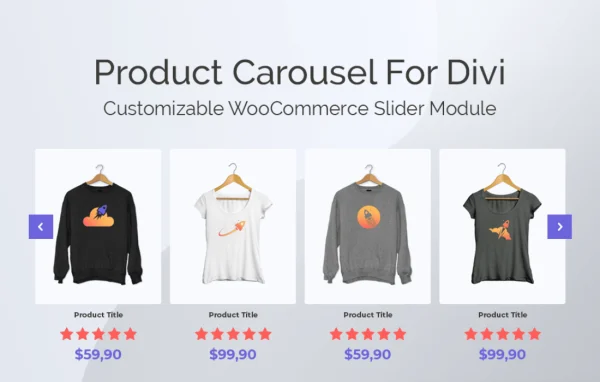
Product Carousel for Divi and WooCommerce is a plugin by Aspen Grove Studios that adds product sliders to the Divi builder. You can place a carousel of WooCommerce products anywhere on a Divi-built site and control which products appear, how they look and how the slides move.
- Version
- 1.0.17
- Released
- Jan 2, 2025
- Developer
- WP Zone
- Type
- WordPress plugin
- Licence
- GPL
- Included in
- Every plan, or $3.99 a year on its own
What’s new in Product Carousel 1.0.17
Version 1.0.17 · Jan 2, 2025
Latest
- FixedDon't load swiper.min.js.map
What it does
Divi sites that sell through WooCommerce often need a way to feature a set of products on a homepage, landing page or blog post without hand-building each listing. This plugin gives you a carousel module inside Divi that pulls products straight from your store. You choose what to show based on criteria such as newest additions, featured items, products on sale, top ratings, categories, price ranges, availability or a random selection, and the carousel fills itself from those rules.
Design work happens in the familiar Divi visual editor. You can drag and drop product elements such as titles, images, ratings and buttons into the order you want, then adjust over 100 configuration controls covering slider speed, product count, spacing, height and navigation. Native Divi options like animations, transformations, shadows and borders apply here too, so carousels match the rest of your layout without custom code. Carousels can show up to six products at once and adapt to different screen sizes.
Best for
- WooCommerce stores built with the Divi theme or builder
- Designers creating Divi shop pages for clients
- Store owners featuring sales, new arrivals or top-rated products
Features
Drag and drop element order
Rearrange product titles, images, ratings and buttons inside the Divi visual editor so each carousel shows elements in the order that suits your store.
Over 100 configuration controls
Adjust slider speed, product count, spacing, height and navigation settings to control both the look and the behavior of every carousel you build.
Rule-based product selection
Fill carousels automatically by newest, featured, on sale, top rated, category, price range, availability or random selection, so the products shown follow your chosen criteria.
Up to six products per view
Show as many as six products at the same time, with settings for sizing, padding and positioning of each item in the carousel.
Buy now buttons and sale badges
Place a Buy Now button on every product and automatically mark discounted items with a sale badge so current offers stand out in the slider.
Ratings and hover effects
Display product ratings and reviews within the carousel, and add animated color overlays and hover state effects to individual product items.
Native Divi styling options
Use Divi's built-in animations, transformations, shadows and borders on carousels, keeping the design consistent with the rest of your Divi pages.
Autoplay, arrows and pagination
Set automatic slide speed and turn on navigation arrows or pagination so visitors can move through products at their own pace on any screen size.
Product Carousel older versions
- 1.0.16Nov 15, 20241 improvement
- 1.0.15Dec 27, 20231 fix
- 1.0.14Sep 19, 20231 new
- 1.0.12Apr 18, 2023
Members and buyers of this product can download older versions.
Questions about Product Carousel
Do I need Divi and WooCommerce to use this carousel?
Yes. The plugin is built specifically for the Divi builder and displays products from WooCommerce, so both need to be part of your site. The carousel appears as a module you place within Divi layouts, and it pulls product data such as titles, images, prices and ratings from your WooCommerce store.
Can I choose which products appear in the carousel?
You can. Products can be selected by newest additions, featured items, sale items, top-rated reviews, categories, price ranges, availability or random selection. The carousel then fills itself from those rules, so you can build one slider for discounted items and another for a single category, for example.
How many products can the carousel show at one time?
A carousel can display up to six products at once. You also control sizing, padding and positioning, along with the overall product count, slider speed and height, and the carousel adapts its layout to different screen sizes so it stays easy to browse on phones and tablets.
Will the carousel match the design of my Divi site?
It is designed to. Along with over 100 of its own configuration controls, the carousel supports native Divi features such as animations, transformations, shadows and borders. You can also add hover effects and color overlays, so styling works the same way as other Divi modules without extra code.
Is Product Carousel free?
The code of Product Carousel is licensed under the GPL, so anyone may use, change and share it. GPL Feast is a paid service: a plan or a single purchase gives you the download and automatic updates. The developer's own support, licence key and online services are not included.
Which version of Product Carousel is this?
Version 1.0.17, released Jan 2, 2025. New versions appear here when the developer publishes them, and members get them as automatic updates.
How do I update Product Carousel?
Install the free GPL Feast Updater on your site and connect it with your API key. It installs new versions of Product Carousel automatically and keeps a backup, so you can roll back.
More from WP Zone