Plugin
Updated
Testify
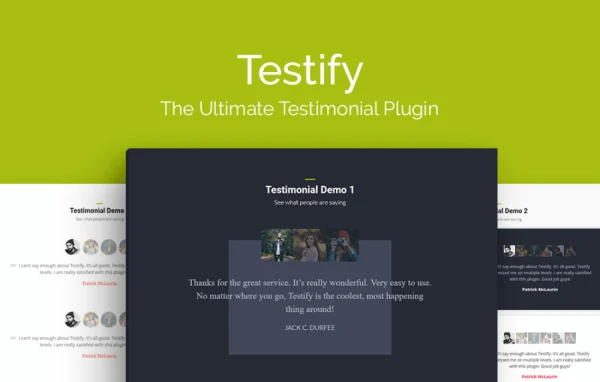
Testify by Aspen Grove Studios is a WordPress plugin for collecting, organizing and displaying customer testimonials. It stores reviews as their own post type and shows them in responsive, animated sliders that you can style to match your site, with a dedicated module for Divi users.
- Version
- 2.1.11
- Released
- Feb 22, 2023
- Developer
- WP Zone
- Type
- WordPress plugin
- Licence
- GPL
- Included in
- Every plan, or $3.99 a year on its own
What’s new in Testify 2.1.11
Version 2.1.11 · Feb 22, 2023
Latest
- FixedPotential conflicts with flex sliders in 3rd party plugins
- ImprovedChange CSS selectors for the flex slider
What it does
Testimonials are easy to gather and hard to manage once they pile up in emails and form entries. This plugin gives them a home inside WordPress as a custom post type with categories and tags, so you can sort reviews by product, service or client type and display the right ones on the right pages. It can also pull in feedback submitted through WPForms, Contact Form 7 or Gravity Forms, which cuts down on copying and pasting.
On the display side, testimonials appear in sliders with animated transitions, navigation controls and flexible display options. You can show each reviewer's name, photo and website link, and trim long entries with a character limit and a read more button. Over 60 styling parameters cover fonts, colors, icons, spacing, avatars and layout. Global styles can be set in the WordPress Customizer with live preview, Divi users get a dedicated module, and developers can add custom CSS or place sliders with a shortcode.
Best for
- Divi sites that need a testimonial slider module
- Small businesses collecting reviews through contact forms
- Developers and agencies wanting styleable testimonial displays
Features
Testimonial post type
Testimonials live in their own custom post type with categories and tags, so you can organize reviews and choose exactly which ones appear in each spot.
Form builder capture
Collect testimonials automatically through WPForms, Contact Form 7 or Gravity Forms, turning customer form submissions into entries you can publish.
Divi module
Add and adjust testimonial sliders directly inside Divi-built pages using a dedicated module, with no coding required.
Over 60 styling parameters
Adjust fonts, colors, icons, spacing, avatars and layout through more than 60 parameters to match the slider to your site's design.
Animated testimonial slider
Display reviews in a slider with animated transitions, navigation controls and flexible display options that adapt to desktops, tablets and phones.
Avatars and reviewer links
Show each reviewer's name, photo and a link to their website next to their testimonial so visitors can see who wrote it.
Read more trimming
Set a character limit on long testimonials and add a read more button so the slider layout stays clean and readable.
Customizer and custom CSS
Make global style changes with live preview in the WordPress Customizer, place sliders with a shortcode, and add your own CSS for further styling.
Questions about Testify
Do I need Divi to use this plugin?
The plugin is built for WordPress in general and includes a shortcode for placing sliders, along with WordPress Customizer styling. Divi users get an extra benefit: a dedicated module for adding and customizing testimonial sliders inside Divi-built pages.
Can customers submit testimonials through my existing forms?
Yes. It works with WPForms, Contact Form 7 and Gravity Forms, so feedback submitted through those forms can be captured automatically as testimonials, saving you from entering each one by hand.
How much control do I have over how testimonials look?
There are over 60 styling parameters covering fonts, colors, icons, spacing, avatars and layout. You can also set global styles in the WordPress Customizer with live preview, and add custom CSS if you want styling beyond the built-in options.
Can I show different testimonials on different pages?
Yes. Testimonials are stored as a custom post type with categories and tags, so you can group them by topic, product or service and display only the relevant set wherever you place a slider.
Is Testify free?
The code of Testify is licensed under the GPL, so anyone may use, change and share it. GPL Feast is a paid service: a plan or a single purchase gives you the download and automatic updates. The developer's own support, licence key and online services are not included.
Which version of Testify is this?
Version 2.1.11, released Feb 22, 2023. New versions appear here when the developer publishes them, and members get them as automatic updates.
How do I update Testify?
Install the free GPL Feast Updater on your site and connect it with your API key. It installs new versions of Testify automatically and keeps a backup, so you can roll back.
More from WP Zone