Plugin
Updated
Tutor LMS Certificate Builder
Tutor LMS Certificate Builder is a WordPress plugin by Themeum for designing course completion certificates inside Tutor LMS. You build certificates with a drag-and-drop editor, add your logo and text, and insert dynamic fields so each learner gets a personalized credential.
- Version
- 1.3.2
- Released
- Jun 18, 2026
- Developer
- Themeum
- Type
- WordPress plugin
- Licence
- GPL
- Included in
- Every plan, or $1.59 a year on its own
What’s new in Tutor LMS Certificate Builder 1.3.2
Version 1.3.2 · Jun 18, 2026
Latest
- FixedUpdated certificate backdrop image URLs
What it does
Many course creators want to give learners a certificate at the end of a course, but designing one usually means outside design tools and manual editing for every student. This plugin keeps the whole job inside your Tutor LMS setup in WordPress. You design a certificate once, place dynamic fields such as student name, course title and completion date, and each learner receives a version with their own details filled in.
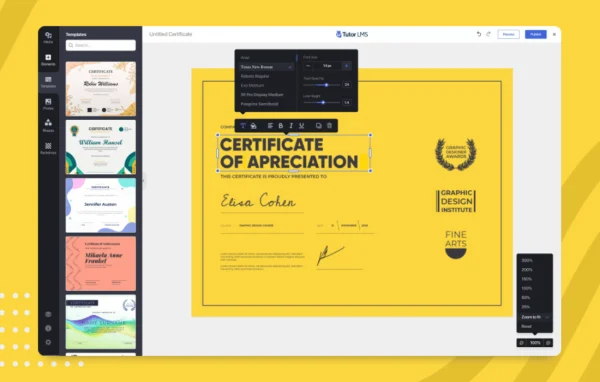
The editor works with drag and drop, so no code is needed. You can start from one of the pre-built templates, then adjust layout, text styling and branding, checking the result in a real-time preview as you go. Multiple certificates can be created, so different courses or milestones can each have their own design. Learners can print or download their certificates, which suits schools, trainers and anyone running courses on Tutor LMS.
Best for
- Online course sites built on Tutor LMS
- Educators and trainers issuing completion certificates
- Academies wanting branded certificates for several courses
Features
Drag-and-drop certificate editor
Arrange text, logos and other elements on the certificate by dragging them into place, with no code or design software required.
Pre-built certificate templates
Start from one of several ready-made templates and adjust it to fit your courses instead of designing every certificate from a blank page.
Dynamic learner fields
Insert fields such as student name, course title and completion date so each certificate fills in automatically with the right learner details.
Logo and branding options
Add your own logo and branding elements so every certificate matches the identity of your school, academy or training business.
Text styling and layout controls
Adjust fonts, text styles and layout settings to match the look of each course or keep a consistent style across all of them.
Real-time preview
See exactly how a certificate will look while you edit it, so you can fix spacing or wording before learners receive it.
Multiple certificates per course
Create more than one certificate for a course to recognize special achievements or milestones alongside standard completion.
Printable and downloadable certificates
Learners can print their certificates or download them, giving them easy access to their credentials whenever they need them.
Tutor LMS Certificate Builder older versions
- 1.3.1Apr 231 new, 1 fix
- 1.3.0Dec 22, 20251 new, 2 fixes
Members and buyers of this product can download older versions.
Questions about Tutor LMS Certificate Builder
Do I need design skills to create a certificate?
No. The plugin uses a drag-and-drop editor and includes pre-built templates you can start from. You place elements, adjust text and layout, and check your work in the real-time preview, all without writing code.
Will each student's name appear on their certificate automatically?
Yes. You can add dynamic fields such as student name, course title and completion date. When a learner completes a course, those fields are filled with their own details, so you don't edit certificates by hand.
Can I use different certificates for different courses?
Yes. You can design multiple certificate templates for different courses or milestones, and a single course can have more than one certificate to recognize special achievements in addition to completion.
Does this work without Tutor LMS?
The builder is made for Tutor LMS and works within it, pulling course and learner data directly from your Tutor LMS setup in WordPress. It is intended for sites that run their courses on Tutor LMS.
Is Tutor LMS Certificate Builder free?
The code of Tutor LMS Certificate Builder is licensed under the GPL, so anyone may use, change and share it. GPL Feast is a paid service: a plan or a single purchase gives you the download and automatic updates. The developer's own support, licence key and online services are not included.
Which version of Tutor LMS Certificate Builder is this?
Version 1.3.2, released Jun 18, 2026. New versions appear here when the developer publishes them, and members get them as automatic updates.
How do I update Tutor LMS Certificate Builder?
Install the free GPL Feast Updater on your site and connect it with your API key. It installs new versions of Tutor LMS Certificate Builder automatically and keeps a backup, so you can roll back.
More from Themeum