Plugin
Updated
User Registration Repeater Fields
User Registration Repeater Fields is an add-on plugin by WPEverest for the WP User Registration plugin. It lets you place repeating sets of fields inside a registration form, so users can enter several addresses, phone numbers or other similar details in one submission.
- Version
- 1.0.5
- Released
- Jul 21, 2025
- Developer
- WPEverest
- Type
- WordPress plugin
- Licence
- GPL
- Included in
- Every plan, or $3.99 on its own
What’s new in User Registration Repeater Fields 1.0.5
Version 1.0.5 · Jul 21, 2025
Latest
- FixedFalse update for version 1.0.4.
What it does
Some registration forms need more than one answer to the same question. A user may have two addresses, a few phone numbers or several entries of the same kind of information. Adding a fixed number of duplicate fields clutters the form and still may not cover everyone. This add-on solves that by letting you define a group of fields once and letting each user add or remove copies of that group as they fill in the form.
It works inside WP User Registration, so you build on the registration forms you already have. You choose which fields go into a repeating group, such as text fields, dropdowns and checkboxes, and you can pair groups with conditional logic to show or hide them based on earlier answers. The submitted entries are stored and can be viewed and managed in the backend. It suits membership sites, directories, event registrations and other sites that collect multi-entry user details.
Best for
- Membership sites collecting several addresses or contacts per user
- Directory sites that gather multi-entry member details
- Event registration forms with repeating attendee information
Features
Repeating field sets
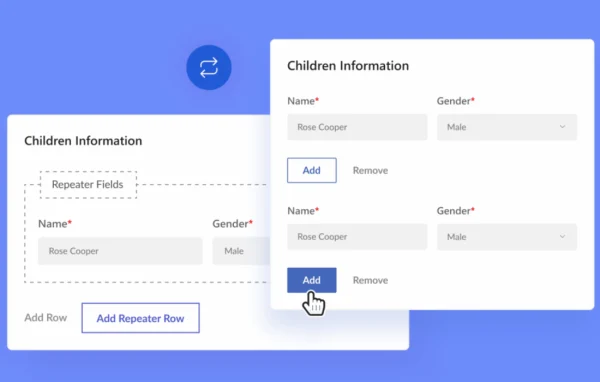
Add a group of fields that users can repeat within one form, so they can submit multiple addresses, phone numbers or other similar entries at once.
Add and remove controls
Users can add a new copy of a field group or remove one they no longer need while filling out the registration form.
Custom field groups
Choose which fields belong in each repeating group, with support for text fields, dropdowns, checkboxes and other field types.
Conditional logic support
Combine repeater fields with conditional logic to display or hide field groups depending on what a user has entered earlier in the form.
Works across devices
Repeater fields are built to be responsive, so the add and remove behavior works on desktops, tablets and smartphones.
Backend data management
Store, view and manage the repeated data in the WordPress backend, with entries organized so admins can review user details clearly.
Built for WP User Registration
The add-on extends existing WP User Registration forms, so you can add repeating groups without rebuilding your current registration setup.
User Registration Repeater Fields older versions
- 1.0.3Jun 21, 20251 improvement, 2 fixes
- 1.0.2Feb 26, 20251 improvement
- 1.0.1Nov 13, 20241 improvement, 2 fixes
- 1.0.0Aug 23, 2024
Members and buyers of this product can download older versions.
Questions about User Registration Repeater Fields
Does this work on its own or do I need another plugin?
It is an add-on for the WP User Registration plugin by WPEverest. It adds repeating field groups to the registration forms you create with that plugin, so you need WP User Registration in place for it to work.
What kinds of fields can I put in a repeating group?
You can tailor each repeating group to the data you need. Supported field types include text fields, dropdowns and checkboxes, along with other field types, so you can group whatever details belong together, such as the parts of an address.
Can I show a repeating group only when it is relevant?
Yes. Repeater fields can be combined with conditional logic, so a field group appears or stays hidden based on the user's earlier input. This keeps the form shorter for people who do not need the extra entries.
Where can I see the repeated entries users submit?
The repeated data is stored and can be viewed and managed in the backend. Entries are organized so admins can review each user's multiple addresses, phone numbers or other repeated details.
Is User Registration Repeater Fields free?
The code of User Registration Repeater Fields is licensed under the GPL, so anyone may use, change and share it. GPL Feast is a paid service: a plan or a single purchase gives you the download and automatic updates. The developer's own support, licence key and online services are not included.
Which version of User Registration Repeater Fields is this?
Version 1.0.5, released Jul 21, 2025. New versions appear here when the developer publishes them, and members get them as automatic updates.
How do I update User Registration Repeater Fields?
Install the free GPL Feast Updater on your site and connect it with your API key. It installs new versions of User Registration Repeater Fields automatically and keeps a backup, so you can roll back.
More from WPEverest