Plugin
Plugin
Updated
Wiloke Categories List Widget Avenue
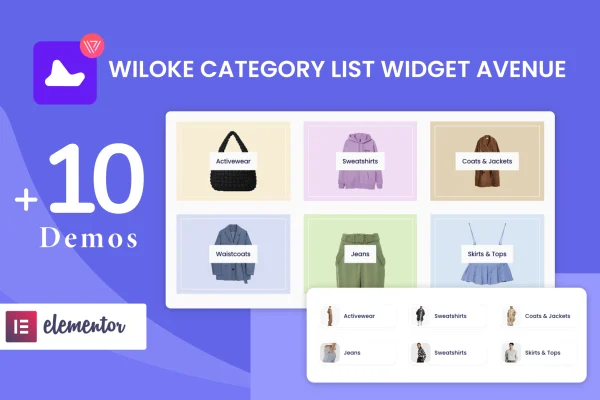
This plugin adds a category list widget to Elementor, built by Wiloke. It displays your blog categories as styled cards with category names, featured images and hover effects, so readers can browse posts by topic from any page you design.
- Version
- 1.0.20
- Released
- May 2, 2023
- Type
- WordPress plugin
- Requires
- Elementor
- Licence
- GPL
- Included in
- Every plan, or $3.99 on its own
What’s new in Wiloke Categories List Widget Avenue 1.0.20
Version 1.0.20 · May 2, 2023
Latest
What it does
Blogs with many topics often bury their categories in a sidebar or a plain text list, which makes it harder for readers to find related posts. Wiloke Categories List Widget Avenue gives you a dedicated Elementor widget for presenting those categories as a visual grid of cards. Each card can show the category name and a featured image, and hover effects add some movement when visitors move the cursor over them. The result is a clearer entry point into your content, placed wherever it makes sense on a page.
The widget works inside the Elementor page builder, so you drag it onto a page and see changes in a live preview as you adjust settings. Category lists are pulled in with one click, so you do not have to rebuild them by hand when your categories change. You pick from five card styles or set up your own, and you can show as many category cards per page as you like. The layouts are responsive and retina ready, and the code is written in plain HTML, CSS and JS.
Best for
- Blogs covering many topics or categories
- Elementor users building blog home or archive pages
- Content sites wanting visual category navigation
Features
One-click category import
Pull your blog's category list onto any page in a single step, without typing or updating each category by hand.
Five category card styles
Choose between five card designs, each combining category names, featured images and hover effects for a more visual category display.
Custom card style option
Create your own card style when the included designs do not match your site's look or branding.
Unlimited cards per page
Set how many category cards appear on a page, with no fixed cap, so large blogs can display every topic they cover.
Built for Elementor
Works as a drag-and-drop widget in the Elementor page builder, with real-time previews while you adjust the layout and styling.
Responsive and retina ready
Category cards adapt to different screen sizes and display sharply on high-resolution screens, so the grid holds up on phones and desktops.
Clean code base
Built with clean HTML, CSS and JS, keeping the widget's markup and styling straightforward to work alongside your theme.
Questions about Wiloke Categories List Widget Avenue
Do I need Elementor to use this widget?
Yes. The plugin is built specifically for the Elementor page builder and adds its category list as an Elementor widget, so Elementor needs to be active on your site for it to work.
Can I change how the category cards look?
You can choose from five card styles, each with category names, featured images and hover effects. If none of them fit your design, you can create your own custom style to match your branding.
Is there a limit on how many categories I can show?
No fixed limit is set. You can display unlimited category cards per page, which is handy for blogs with a long list of topics that all deserve a spot in the grid.
Will the category cards look right on mobile devices?
The layouts are responsive and retina ready, so the cards adjust to different screen sizes and stay sharp on high-resolution displays, including phones and tablets.
Is Wiloke Categories List Widget Avenue free?
The code of Wiloke Categories List Widget Avenue is licensed under the GPL, so anyone may use, change and share it. GPL Feast is a paid service: a plan or a single purchase gives you the download and automatic updates. The developer's own support, licence key and online services are not included.
Which version of Wiloke Categories List Widget Avenue is this?
Version 1.0.20, released May 2, 2023. New versions appear here when the developer publishes them, and members get them as automatic updates.
How do I update Wiloke Categories List Widget Avenue?
Install the free GPL Feast Updater on your site and connect it with your API key. It installs new versions of Wiloke Categories List Widget Avenue automatically and keeps a backup, so you can roll back.
What does Wiloke Categories List Widget Avenue need?
Wiloke Categories List Widget Avenue needs Elementor installed and active.
You might also like
Plugin
Plugin
Plugin