Plugin
Updated
WP and Divi Icons Pro
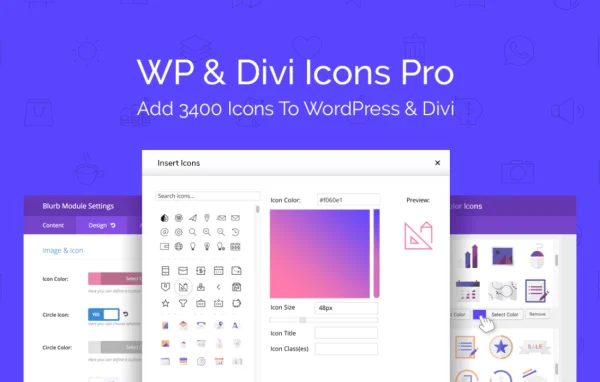
WP and Divi Icons Pro by Aspen Grove Studios is a WordPress plugin that adds a large icon library to your editor. It brings over 3,400 icons in 12 styles into the Classic Editor, Gutenberg and the Divi Page Builder, with color controls and support for your own icon fonts.
- Version
- 2.0.9
- Released
- Dec 27, 2023
- Developer
- WP Zone
- Type
- WordPress plugin
- Licence
- GPL
- Included in
- Every plan, or $3.99 a year on its own
What’s new in WP and Divi Icons Pro 2.0.9
Version 2.0.9 · Dec 27, 2023
Latest
- FixedDivi Booster compatibility fix
- ImprovedRestore Divi's Solid and Line icon filtering options in the Divi icon picker
What it does
The icon choices built into WordPress and Divi are limited, and adding outside icon sets usually means extra code or embed snippets. This plugin puts a searchable library of SVG and font icons right where you build pages. It includes sets such as Font Awesome and Material Design along with custom packs from WP Zone, so you can pick icons for features, services, buttons and section headers without leaving the editor.
When Divi is active, the plugin detects it and adds its icons to modules like Icon, Blurb and Button. Gutenberg users get a dedicated Icon Block, and the Classic Editor is supported too. You can set primary, secondary and tertiary colors with a live preview, and upload icon fonts made in Fontello or Icomoon for brand-specific graphics. It works without any third-party API credentials.
Best for
- Divi sites that need more icons in Blurb and Button modules
- Gutenberg or Classic Editor users wanting a searchable icon library
- Designers adding branded custom icon fonts to client sites
Features
Over 3,400 icons
A preloaded library spans 12 styles, including Font Awesome, Material Design and custom WP Zone packs, so you have plenty of options for common design needs.
Custom icon font uploads
Upload your own icon fonts created with Fontello or Icomoon and use them alongside the included sets for branded graphics.
Divi module integration
The plugin detects the Divi theme and adds its icons to the Icon, Blurb and Button modules, and keeps Divi's Solid and Line filtering in the icon picker.
Multi-color styling with preview
Set primary, secondary and tertiary colors on icons and see the result in a live preview before you apply it to the page.
Search and pack filters
Built-in search plus filters organized by icon pack help you find the icon you need in a large library quickly.
Gutenberg Icon Block
A dedicated block lets you place and style icons inside the block editor, and the Classic Editor is supported as well.
Scalable SVG icons
SVG icons stay crisp at any size, so they look sharp on small phone screens and large desktop displays alike.
No API credentials needed
The icons work without third-party API accounts or credentials, so there is nothing external to configure before you start using them.
WP and Divi Icons Pro older versions
- 2.0.8Oct 18, 20231 new
- 2.0.7Jul 18, 20231 fix
- 2.0.5May 14, 20231 fix
- 2.0.4Apr 18, 2023
Members and buyers of this product can download older versions.
Questions about WP and Divi Icons Pro
Does this only work with the Divi theme?
No. The plugin works with the WordPress Classic Editor and Gutenberg, where it adds a dedicated Icon Block. If Divi is active, it also detects it and adds icons to Divi modules such as Icon, Blurb and Button.
Can I use my own icons?
Yes. You can upload custom icon fonts that you created with Fontello or Icomoon. They appear alongside the included library, which is useful when a brand needs specific symbols the standard sets do not cover.
Which icon sets are included?
The library holds over 3,400 icons across 12 styles. It includes popular sets such as Font Awesome and Material Design, plus custom packs from WP Zone, all searchable and filterable by pack.
Can I change icon colors?
Yes. You can set primary, secondary and tertiary colors for multi-color icons, and a live preview shows how the icon will look as you adjust the styling.
Is WP and Divi Icons Pro free?
The code of WP and Divi Icons Pro is licensed under the GPL, so anyone may use, change and share it. GPL Feast is a paid service: a plan or a single purchase gives you the download and automatic updates. The developer's own support, licence key and online services are not included.
Which version of WP and Divi Icons Pro is this?
Version 2.0.9, released Dec 27, 2023. New versions appear here when the developer publishes them, and members get them as automatic updates.
How do I update WP and Divi Icons Pro?
Install the free GPL Feast Updater on your site and connect it with your API key. It installs new versions of WP and Divi Icons Pro automatically and keeps a backup, so you can roll back.
More from WP Zone