Plugin
Plugin
Updated
WP Comment Images and Videos
WP Comment Images and Videos is a WordPress plugin that adds media to your comment section. Visitors can upload images and embed videos from providers like YouTube and Vimeo right inside their comments, so discussions can include photos and clips alongside text.
- Version
- 1.4
- Released
- May 23, 2022
- Type
- WordPress plugin
- Licence
- GPL
- Included in
- Every plan, or $3.99 on its own
What’s new in WP Comment Images and Videos 1.4
Version 1.4 · May 23, 2022
Latest
- ImprovedUpdated all libraries to the latest version
What it does
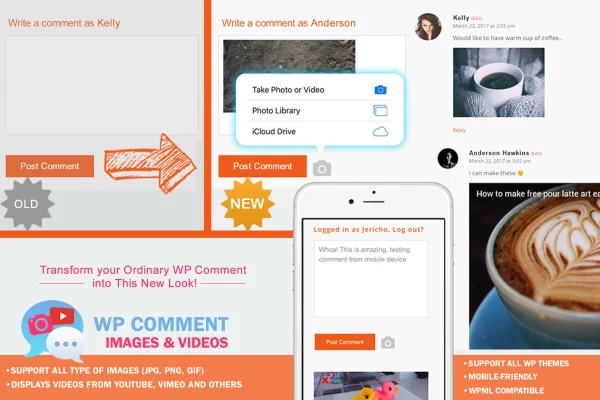
Standard WordPress comments only accept plain text, which makes it hard for readers to share a photo of their result, a screenshot of a problem or a related video. This plugin places an image upload icon next to the Post Comment button, so commenters can attach a picture without leaving the form. It accepts common formats such as .jpg, .png and .gif, including images with transparency.
Videos are handled through oEmbed, the WordPress method for displaying content from trusted providers like YouTube and Vimeo. On the settings side, you can adjust thumbnail sizes and captions to match your site's look. The plugin is built to work with WordPress themes, displays well on phones and tablets, uses a lightweight JavaScript setup and supports multilingual sites, including those running WPML.
Best for
- Blogs where readers share photos or screenshots
- Community and hobby sites with active discussions
- Multilingual sites running WPML
Features
Upload icon by the comment button
An image upload icon sits next to the Post Comment button, giving commenters a quick way to attach a photo to what they write.
Common image formats
Commenters can share .jpg, .png and .gif files, which covers everyday photos, screenshots and images with transparent backgrounds.
YouTube and Vimeo videos
Videos from popular providers like YouTube and Vimeo can be displayed directly inside comments, so readers can watch without leaving the page.
Video display through oEmbed
Embedded videos are shown using oEmbed, the standard WordPress approach for pulling in content from trusted video providers.
Caption and thumbnail settings
You can adjust thumbnail sizes and caption settings so images in the comment section fit the style of your site.
Mobile friendly display
Media in comments is designed to display well on smartphones and tablets as well as desktop screens.
Multilingual and WPML support
The plugin supports multi-language setups and works with WPML, which suits sites that publish content in more than one language.
Lightweight JavaScript
The front end uses a responsive, lightweight JavaScript implementation to keep the added media features compact.
Questions about WP Comment Images and Videos
Which image types can commenters upload?
Commenters can upload common image formats, including .jpg, .png and .gif. That covers regular photos, screenshots and images that use transparency, such as logos or graphics with clear backgrounds.
Can people add videos to their comments?
Yes. The plugin displays videos from popular providers like YouTube and Vimeo inside comments. Video content is shown through oEmbed, the WordPress method for embedding media from trusted sources.
Will it work with my theme?
The plugin is built to be compatible with WordPress themes, so the image upload icon and media display fit into your existing comment section. You can also adjust thumbnail sizes and captions to better match your design.
Does it support multilingual websites?
It does. The plugin supports multi-language setups and includes WPML support, which makes it a practical choice for sites that serve readers in several languages.
Is WP Comment Images and Videos free?
The code of WP Comment Images and Videos is licensed under the GPL, so anyone may use, change and share it. GPL Feast is a paid service: a plan or a single purchase gives you the download and automatic updates. The developer's own support, licence key and online services are not included.
Which version of WP Comment Images and Videos is this?
Version 1.4, released May 23, 2022. New versions appear here when the developer publishes them, and members get them as automatic updates.
How do I update WP Comment Images and Videos?
Install the free GPL Feast Updater on your site and connect it with your API key. It installs new versions of WP Comment Images and Videos automatically and keeps a backup, so you can roll back.
You might also like
Plugin
Plugin
Plugin