Plugin
Updated
Zoho CRM Connector Pro
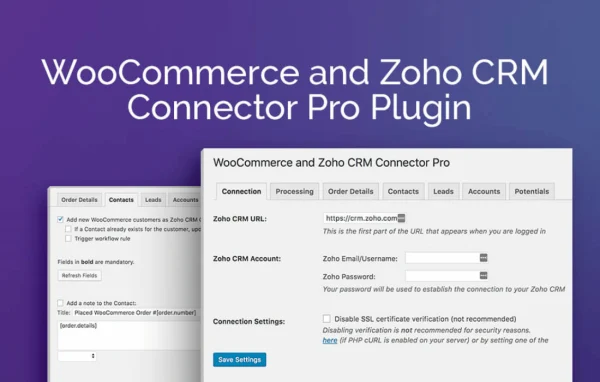
Zoho CRM Connector Pro for WooCommerce by Aspen Grove Studios is a WordPress plugin that links your WooCommerce store to Zoho CRM. It sends customer and order data into Zoho CRM as contacts, leads, accounts and potentials, either automatically or when you choose.
- Version
- 2.1.14
- Released
- Aug 26, 2024
- Developer
- WP Zone
- Type
- WordPress plugin
- Licence
- GPL
- Included in
- Every plan, or $3.99 a year on its own
What’s new in Zoho CRM Connector Pro 2.1.14
Version 2.1.14 · Aug 26, 2024
Latest
- NewAdd Order > items_subtotal field
What it does
Running a WooCommerce store alongside Zoho CRM usually means copying customer details and order information from one system to the other by hand. This plugin handles that transfer for you. When an order is created or moves to a status such as Pending Payment, Processing or Completed, the plugin can send the data to Zoho CRM. You can also push individual orders or a batch of orders manually from the WooCommerce order screen, which is handy for older orders or one-off fixes.
Setup lives in the WordPress admin, split into tabs for Connection, Processing rules and Data Mapping. You decide which WooCommerce fields map to which Zoho CRM objects, whether existing contacts and leads get updated instead of duplicated, and whether orders become potentials tied to a contact. Contacts can be linked to accounts, and Zoho CRM workflow rules can be triggered on transfer. An Isolation Mode helps contain errors during data transfer, and the plugin works with the free version of Zoho CRM.
Best for
- WooCommerce stores that manage customers in Zoho CRM
- Small businesses using the free version of Zoho CRM
- Agencies connecting client shops to Zoho CRM sales pipelines
Features
Automatic and manual syncing
Send WooCommerce customer data to Zoho CRM contacts, leads, accounts and potentials automatically, or run the transfer yourself when it suits your workflow.
Custom field mapping
Map WooCommerce fields to Zoho CRM objects so the data lands where your team expects it, including order fields such as the items subtotal.
Updates instead of duplicates
Update existing contacts and leads in Zoho CRM rather than creating new ones each time, which helps keep customer records clean.
Potentials from orders
Create sales potentials in Zoho CRM based on WooCommerce order information, linked to the matching customer contact for clearer sales tracking.
Account association
Associate contacts with Zoho CRM accounts, with the plugin creating new accounts or updating existing ones as needed.
Flexible transfer triggers
Choose to send data on order creation, on status changes like Pending Payment, Processing or Completed, or only when you trigger it manually.
Bulk order actions
Sync a single order or many orders at once using actions built into the WooCommerce order management screen.
Isolation Mode and workflow rules
Isolation Mode helps contain errors during transfer, and you can optionally trigger Zoho CRM workflow rules when records arrive.
Zoho CRM Connector Pro older versions
- 2.1.13Mar 15, 20241 fix
- 2.1.12Mar 7, 20241 improvement, 1 fix
- 2.1.11Jan 17, 20241 improvement, 3 fixes
- 2.1.10Jan 12, 2024
- 2.1.9Jan 8, 2024
- 2.1.8Nov 23, 2023
- 2.1.7Oct 6, 2023
- 2.1.6Apr 18, 2023
Members and buyers of this product can download older versions.
Questions about Zoho CRM Connector Pro
Does this work with the free version of Zoho CRM?
Yes. The plugin is compatible with the free version of Zoho CRM, so you can connect your WooCommerce store without moving to a paid Zoho plan first.
Can I control when orders are sent to Zoho CRM?
You can. Data can be sent when an order is created, when its status changes to options such as Pending Payment, Processing or Completed, or only when you sync orders manually from the WooCommerce order screen, one at a time or in bulk.
Will it create duplicate contacts in Zoho CRM?
The plugin can update existing contacts and leads in Zoho CRM instead of adding new ones. That setting helps keep your records tidy when repeat customers place more orders.
Can I choose which WooCommerce fields go to which Zoho CRM fields?
Yes. The Data Mapping tab lets you map WooCommerce fields to Zoho CRM objects such as contacts, leads, accounts and potentials, so the integration fits how your business already uses Zoho CRM.
Is Zoho CRM Connector Pro free?
The code of Zoho CRM Connector Pro is licensed under the GPL, so anyone may use, change and share it. GPL Feast is a paid service: a plan or a single purchase gives you the download and automatic updates. The developer's own support, licence key and online services are not included.
Which version of Zoho CRM Connector Pro is this?
Version 2.1.14, released Aug 26, 2024. New versions appear here when the developer publishes them, and members get them as automatic updates.
How do I update Zoho CRM Connector Pro?
Install the free GPL Feast Updater on your site and connect it with your API key. It installs new versions of Zoho CRM Connector Pro automatically and keeps a backup, so you can roll back.
More from WP Zone