Theme
Updated
Akali
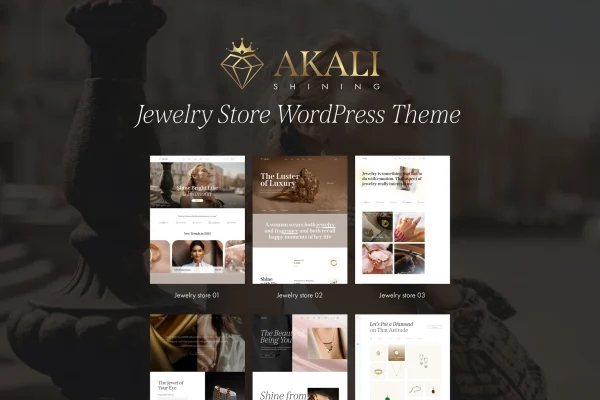
Akali is a WordPress theme by LA-Studio built for jewelry brands, artisans and retailers. It gives you an elegant, responsive storefront that works with WooCommerce, along with product galleries, blog layouts and demo content to help you get a jewelry shop online.
- Version
- 1.0.3
- Released
- Aug 8, 2026
- Developer
- LA-Studio
- Type
- WordPress theme
- Licence
- GPL
- Included in
- Every plan, or $3.99 on its own
What’s new in Akali 1.0.3
Version 1.0.3 · Aug 8, 2026
Latest
What it does
Selling jewelry online depends on presentation, since shoppers can't hold a ring or check the detail on a pendant. This theme focuses on displaying products clearly, with multiple gallery and product display options that include zoom, lightbox and carousel views. The responsive design adapts to desktops, tablets and smartphones, so your pieces look right on whatever screen a visitor uses. Layouts can be customized with drag and drop editing, letting you adjust colors and product pages to match your brand.
The store side runs on WooCommerce, which handles inventory, payment gateways and shipping options. A one-click demo import loads pre-built content so you start from a finished layout and edit from there, which suits both new shops and existing sites being redesigned. Built-in blog layouts give you room for brand stories, care tips and trend posts. The theme is also translation ready and supports right-to-left languages for stores serving shoppers in other languages.
Best for
- Independent jewelers opening an online shop
- Artisans selling handmade rings, necklaces and accessories
- Jewelry retailers redesigning an existing WooCommerce store
Features
Responsive jewelry store design
An elegant layout that adapts to desktops, tablets and smartphones, keeping product images and pages readable on every screen size.
Drag and drop layouts
Customize your storefront with drag and drop editing, adjusting color schemes and product pages so the shop matches your branding.
Product zoom, lightbox and carousel
Multiple gallery and product display options let shoppers zoom into details, open images in a lightbox and browse collections in carousels.
WooCommerce store tools
Works with WooCommerce for managing inventory, setting up payment gateways and configuring shipping options for your jewelry products.
Built-in blog layouts
Ready-made blog designs for publishing your brand story, jewelry care tips and posts about current trends alongside your shop.
One-click demo import
Load pre-built demo content in one step, then replace the sample text and images with your own products and branding.
Translation and RTL ready
Supports translation into other languages and right-to-left scripts, so you can run the store for shoppers who read Arabic, Hebrew and similar languages.
Akali older versions
- 1.0.2Dec 18, 2024
- 1.0.0Jun 28, 2024
Members and buyers of this product can download older versions.
Questions about Akali
Does this theme work with WooCommerce?
Yes. The theme integrates with WooCommerce, so you can manage inventory, accept payments through supported gateways and set up shipping options while using the theme's jewelry-focused product layouts.
Can shoppers zoom in on product photos?
Yes. Product pages offer several gallery and display options, including zoom, lightbox and carousel features, which help visitors see fine details like stones, settings and finishes before buying.
Can I make the design match my brand?
You can. Layouts are customizable with drag and drop editing, and you can change color schemes and product pages. Starting from the one-click demo import gives you a complete layout to adjust.
Will it work for a store in a right-to-left language?
Akali is translation ready and includes right-to-left language compatibility, so it can be used for stores in languages such as Arabic or Hebrew as well as multilingual setups.
Is Akali free?
The code of Akali is licensed under the GPL, so anyone may use, change and share it. GPL Feast is a paid service: a plan or a single purchase gives you the download and automatic updates. The developer's own support, licence key and online services are not included.
Which version of Akali is this?
Version 1.0.3, released Aug 8, 2026. New versions appear here when the developer publishes them, and members get them as automatic updates.
How do I update Akali?
Install the free GPL Feast Updater on your site and connect it with your API key. It installs new versions of Akali automatically and keeps a backup, so you can roll back.