Theme
Updated
Arcade Storefront Theme
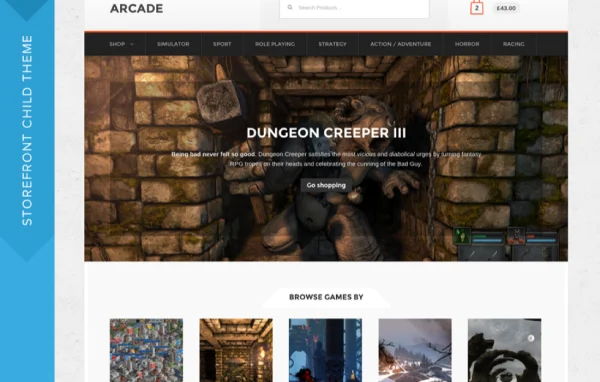
Arcade Storefront Theme is a WooCommerce child theme built on the Storefront core theme. It gives online shops a bold, retro-inspired design aimed at video game stores and tech marketplaces, with a homepage layout that puts a wide range of products in front of visitors.
- Version
- 2.1.10
- Released
- May 29, 2020
- Developer
- Storefront Child Theme
- Type
- WordPress theme
- Licence
- GPL
- Included in
- Every plan, or $4.79 a year on its own
What’s new in Arcade Storefront Theme 2.1.10
Version 2.1.10 · May 29, 2020
Latest
- FixedFix site-branding content justification.
What it does
Many WooCommerce stores run on Storefront because it is a dependable base, but its default look is plain. This child theme sits on top of Storefront and changes the design to suit shops selling games, consoles, gadgets and other tech products. The style draws on the look of game and technology retailers, with a playful, retro feel and a bold, modern layout that suits an audience of players and tech fans.
Because it is a Storefront child theme, your store keeps working with WooCommerce and its customer-facing extensions while the visual layer changes. The homepage is arranged to display many products in an organized format, so shoppers can browse categories and items as soon as they arrive. The design is responsive, layouts can be customized, and you can add Storefront Mega Menus if your catalog needs larger, multi-column navigation. It fits small indie game shops as well as larger marketplaces.
Best for
- Online video game shops running WooCommerce
- Tech and gadget stores built on Storefront
- Indie game sellers wanting a playful retro look
Features
Built on Storefront
Works as a child theme of the Storefront core theme, so your store keeps the familiar Storefront foundation while getting a new design on top.
Designed for WooCommerce
Made for WooCommerce stores and compatible with WooCommerce customer-facing extensions, so product, cart and checkout pages keep working as expected.
Game and tech store styling
A bold, retro-inspired look modeled on game and technology retailers, suited to shops selling video games, hardware and gadgets.
Product-focused homepage layout
The homepage is arranged to display a broad variety of products in an organized format, helping visitors browse your catalog from the first page.
Storefront Mega Menus support
Works with the optional Storefront Mega Menus extension, letting you add larger menus with more navigation options for stores with many categories.
Responsive design
The layout adapts to different screen sizes, so shoppers on phones, tablets and desktops get a usable storefront.
Customizable layouts
Layouts can be adjusted to fit your store, so you can shape pages around your products and audience.
Questions about Arcade Storefront Theme
Do I need the Storefront theme to use this?
Yes. Arcade Storefront Theme is a child theme, so it runs on top of the Storefront core theme. Storefront provides the base functionality, and this theme changes the design and homepage layout for game and tech stores.
Will it work with my WooCommerce extensions?
The theme is built for WooCommerce and, as a Storefront child theme, is described as compatible with WooCommerce and its customer-facing extensions. Your existing store features should keep working while the look of the shop changes.
Can I add bigger menus for a large catalog?
Yes. The theme works with the optional Storefront Mega Menus extension, which adds more advanced menu options. This is useful for stores with many product categories, such as platforms, genres and accessories.
Is it only for video game stores?
The design is aimed at video game stores and tech marketplaces, with a retro-inspired style that suits those products. Any WooCommerce shop selling gadgets, electronics or similar items that want a bold, playful look could also use it.
Is Arcade Storefront Theme free?
The code of Arcade Storefront Theme is licensed under the GPL, so anyone may use, change and share it. GPL Feast is a paid service: a plan or a single purchase gives you the download and automatic updates. The developer's own support, licence key and online services are not included.
Which version of Arcade Storefront Theme is this?
Version 2.1.10, released May 29, 2020. New versions appear here when the developer publishes them, and members get them as automatic updates.
How do I update Arcade Storefront Theme?
Install the free GPL Feast Updater on your site and connect it with your API key. It installs new versions of Arcade Storefront Theme automatically and keeps a backup, so you can roll back.
More from Storefront Child Theme