Theme
Updated
Galleria - Storefront Child Theme
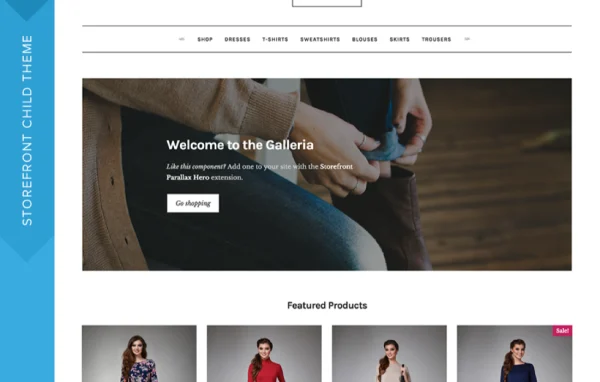
Galleria is a child theme for Storefront, the WooCommerce theme, with a clean and minimal design built around large product images. It suits visual stores such as fashion, art, design and photography shops that want their products to carry the page.
- Version
- 2.2.19
- Released
- May 31, 2021
- Developer
- Storefront Child Theme
- Type
- WordPress theme
- Licence
- GPL
- Included in
- Every plan, or $4.79 a year on its own
What’s new in Galleria - Storefront Child Theme 2.2.19
Version 2.2.19 · May 31, 2021
Latest
- FixedStyle compatibility fixes for WooCommerce Cart and Checkout blocks.
What it does
Many online stores sell products that need to be seen up close: clothing, accessories, prints, photos and other creative goods. A busy layout pulls attention away from those images. This child theme sits on top of Storefront and gives it a refined, minimalist look that keeps distractions low and puts product photos front and center, so shoppers focus on what you sell.
Because it is a Storefront child theme, it works with WooCommerce for product management, checkout and WooCommerce payment gateways. You can apply it to an existing Storefront site or start a new store with it. Appearance settings and Storefront extensions let you adjust the design to match your brand, and the responsive layout adapts to phones, tablets and desktops. Styling also covers the WooCommerce Cart and Checkout blocks.
Best for
- Fashion, apparel and accessories stores on WooCommerce
- Art, design and photography shops selling visual products
- Storefront users wanting a cleaner, minimal look
Features
Image-focused minimalist design
A clean, polished layout gives large, high-quality product images the most space, so apparel, artwork and other visual goods get noticed first.
Built on Storefront
Works as a child theme of Storefront, so you can restyle an existing Storefront-based store or build a new one on the same foundation.
WooCommerce compatibility
Works with WooCommerce for managing products and running checkout, and supports WooCommerce payment gateways for taking payments in your store.
Cart and Checkout block styling
Includes style compatibility for the WooCommerce Cart and Checkout blocks, so those pages match the rest of the theme's look.
Customizable appearance settings
Adjust the appearance settings and turn on Storefront extensions to shape a store design that fits your brand identity.
Responsive layout
The mobile-friendly layout adapts to different screen sizes, so shoppers can browse and buy comfortably on phones, tablets and desktops.
Tailored for fashion and design
Design elements are aimed at presenting apparel, accessories and creative goods, making it a natural fit for style-led shops.
Questions about Galleria - Storefront Child Theme
Do I need Storefront to use Galleria?
Yes. Galleria is a child theme, which means it runs on top of the Storefront parent theme. It is designed for WooCommerce stores built on Storefront, and it can be used to restyle an existing Storefront site or to set up a new one.
Can I apply this theme to a store I already run?
Yes. The theme can transform an existing Storefront-based website, keeping your WooCommerce products and setup while changing the look to its minimal, image-focused design. You can also use it to build a brand new store from scratch.
How much can I customize the design?
You can change the appearance settings and activate Storefront extensions to create a design that matches your brand. The base style stays clean and minimal, with product images given the most visual weight.
Will my checkout pages match the theme?
The theme includes style compatibility for the WooCommerce Cart and Checkout blocks, so those pages follow the same design. It also works with WooCommerce payment gateways for handling transactions.
Is Galleria - Storefront Child Theme free?
The code of Galleria - Storefront Child Theme is licensed under the GPL, so anyone may use, change and share it. GPL Feast is a paid service: a plan or a single purchase gives you the download and automatic updates. The developer's own support, licence key and online services are not included.
Which version of Galleria - Storefront Child Theme is this?
Version 2.2.19, released May 31, 2021. New versions appear here when the developer publishes them, and members get them as automatic updates.
How do I update Galleria - Storefront Child Theme?
Install the free GPL Feast Updater on your site and connect it with your API key. It installs new versions of Galleria - Storefront Child Theme automatically and keeps a backup, so you can roll back.
More from Storefront Child Theme