
Theme
Updated
BlogSquare Pro
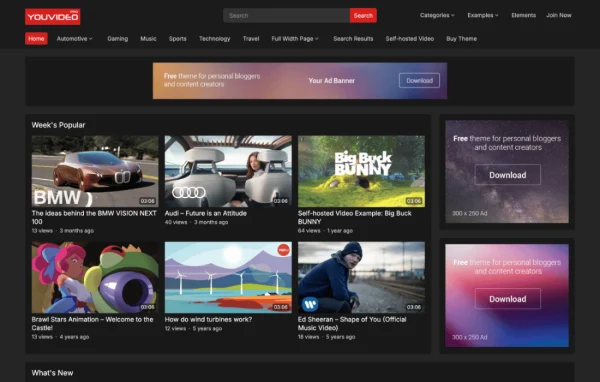
BlogSquare Pro is a WordPress theme built for content-focused blogs, personal writers and storytellers. It uses a clean layout that keeps posts at the center and gives you a theme options panel for adjusting fonts, ads, archives and single post pages.
- Version
- 1.0.5
- Released
- Feb 4, 2025
- Developer
- WPEnjoy
- Type
- WordPress theme
- Licence
- GPL
- Included in
- Every plan, or $3.99 a year on its own
What’s new in BlogSquare Pro 1.0.5
Version 1.0.5
Latest
- ImprovedUpdated theme framework
- ImprovedPHP 8.x compatible
- FixedBug fixes
What it does
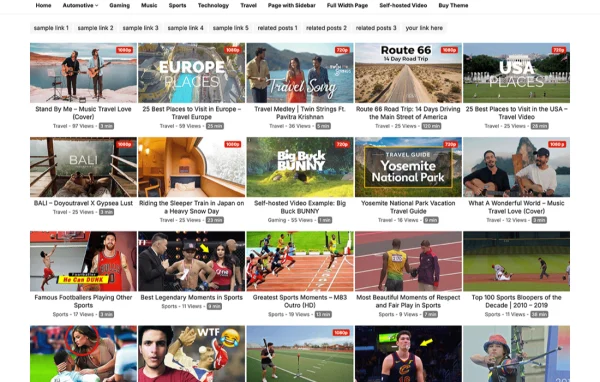
Many blog themes either look plain or bury your writing under layout clutter. BlogSquare Pro takes a simpler route with a clean, responsive design that puts your words, images and media up front on phones, tablets and desktops. It suits personal bloggers, content creators and photographers who want a polished site without building every page from scratch. A one-click demo import brings in sample content and layouts, so you start from a working design and replace it with your own posts.
Most of the customization happens in the theme options panel. There you can pick from more than 1000 Google Fonts, set how excerpts and thumbnails appear on archive pages, and choose how single posts are displayed. Bloggers who run ads can manage ad positions from the theme, and readers get social share icons on each post. If you need changes beyond the built-in settings, the custom code editor accepts your own CSS or scripts, and a footer editor handles copyright text.
Best for
- Personal bloggers and independent writers
- Photographers sharing images alongside written posts
- Content sites that display advertising placements
Features
Responsive blog layout
The design adapts to different screen sizes so posts, images and menus stay readable on phones, tablets and desktop browsers.
Theme options panel
A central settings panel lets you control your site's appearance and configuration from one place inside the WordPress dashboard.
Over 1000 Google Fonts
Choose site typography from more than 1000 Google Fonts, with unlimited site font settings to match the tone of your blog.
One-click demo import
Import the demo content and layouts in one step, then swap in your own posts, images and text to get started faster.
Ad position management
Add and control ad placements within your blog from the theme settings, useful for sites that show advertising alongside their content.
Custom code editor
Add your own CSS or scripts directly through the theme to adjust styling or behavior beyond what the standard options cover.
Social share icons
Posts include social share icons so readers can pass your articles along on popular social networks.
Archive and post display options
Set excerpt length and thumbnail width on archive pages, adjust single post layouts, and edit the footer copyright text.
BlogSquare Pro older versions
- 1.0.4Jan 1, 2024
- 1.0.3Apr 18, 2023
Members and buyers of this product can download older versions.
Questions about BlogSquare Pro
Can I run ads on my blog with this theme?
Yes. The theme includes ad position management, which lets you add and control ad placements within your blog from the theme settings. This suits bloggers who want to show advertising without hand-editing template files.
How much control do I get over fonts?
The theme options panel gives you access to more than 1000 Google Fonts, along with unlimited site font settings. You can set typography to fit your writing style and keep text easy to read.
Can I make my site look like the demo?
Yes. BlogSquare Pro includes a one-click demo import that brings in the demo content and layouts. From there you can replace the sample posts and images with your own and adjust settings in the options panel.
Can I add my own CSS if the built-in options are not enough?
Yes. A custom code editor lets you add your own CSS or scripts through the theme, so you can make styling changes beyond the standard settings without editing theme files directly.
Is BlogSquare Pro free?
The code of BlogSquare Pro is licensed under the GPL, so anyone may use, change and share it. GPL Feast is a paid service: a plan or a single purchase gives you the download and automatic updates. The developer's own support, licence key and online services are not included.
Which version of BlogSquare Pro is this?
Version 1.0.5, released Feb 4, 2025. New versions appear here when the developer publishes them, and members get them as automatic updates.
How do I update BlogSquare Pro?
Install the free GPL Feast Updater on your site and connect it with your API key. It installs new versions of BlogSquare Pro automatically and keeps a backup, so you can roll back.
More from WPEnjoy