Theme
Updated
VideoClub Pro
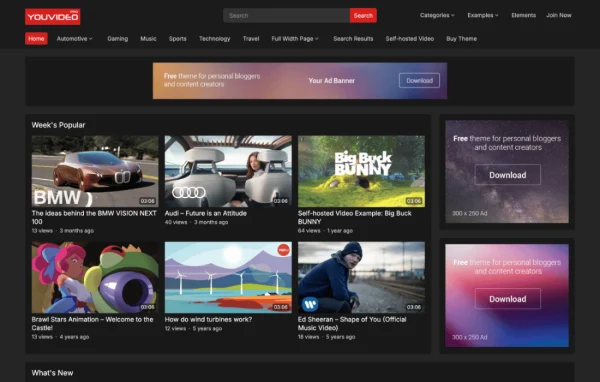
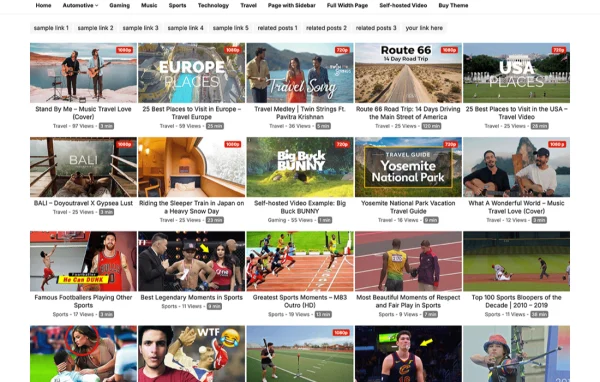
VideoClub Pro by WPEnjoy is a WordPress theme built for video-based websites. It gives you a clean, responsive layout with video sliders and galleries, and it plays content from YouTube, Vimeo or your own hosting. WooCommerce compatibility lets you add a shop when you need one.
- Version
- 1.0.2
- Released
- Mar 9, 2025
- Developer
- WPEnjoy
- Type
- WordPress theme
- Licence
- GPL
- Included in
- Every plan, or $3.99 a year on its own
What’s new in VideoClub Pro 1.0.2
Version 1.0.2
Latest
- ImprovedUpdated theme framework
- ImprovedPHP 8.x compatible
- FixedBug fixes
What it does
Running a video site on a general-purpose theme often means fighting layouts that were made for text posts. This theme starts from the other direction. Its design is focused on video, with sliders for featured clips and galleries for organizing larger collections. The layout is responsive, so pages adapt to desktops, tablets and phones, and the clean, modern look keeps attention on the videos themselves.
You can pull in videos from YouTube and Vimeo or use files hosted on your own server, so you are free to mix sources. Fonts and colors can be adjusted to match your brand through an options panel, and documentation is included to help with setup. Because the theme works with WooCommerce, you can sell courses, video content or merchandise alongside your library. It suits video blogs, streaming-style sites and multimedia portfolios.
Best for
- Video bloggers publishing regular YouTube or Vimeo content
- Streaming-style sites with large video libraries
- Creators selling courses or merchandise with WooCommerce
Features
Customizable video sliders
Place your top videos in slider layouts at the front of your pages so visitors see featured content first, with settings you can adjust to fit your design.
Video galleries
Organize larger collections of videos into gallery formats that make it easier for visitors to browse and find what they want to watch.
YouTube and Vimeo support
Embed videos from YouTube and Vimeo directly in your posts and pages, so you can build your site around content already hosted on those platforms.
Self-hosted video playback
Use video files stored on your own hosting alongside or instead of third-party platforms, giving you control over where your content lives.
WooCommerce compatibility
Add a store with WooCommerce to sell video content, courses or merchandise from the same site that hosts your videos.
Responsive layout
Pages adjust to different screen sizes, from desktop monitors to smartphones, so your videos and layout display properly on any device.
Custom fonts and colors
Change typography and color settings from the options panel to match your brand while keeping the clean, modern look of the theme.
VideoClub Pro older versions
- 1.0.0Sep 13, 2024
Members and buyers of this product can download older versions.
Questions about VideoClub Pro
Can I use videos from YouTube and Vimeo together on one site?
Yes. The theme supports YouTube and Vimeo videos, plus self-hosted files, so you can mix sources across your posts, sliders and galleries depending on where each video is stored.
Can I sell products or courses with this theme?
The theme is compatible with WooCommerce, so you can add a shop to sell video content, courses or merchandise. Your store pages sit alongside your video library on the same site.
Will my site look right on phones and tablets?
Yes. The layout is responsive and adapts to different screen sizes, so your videos, sliders and galleries display properly on smartphones and tablets as well as desktop screens.
How much can I change the design?
An options panel lets you adjust fonts and colors to match your brand, and you can configure the video sliders and galleries. Documentation is included to guide you through setup and personalization.
Is VideoClub Pro free?
The code of VideoClub Pro is licensed under the GPL, so anyone may use, change and share it. GPL Feast is a paid service: a plan or a single purchase gives you the download and automatic updates. The developer's own support, licence key and online services are not included.
Which version of VideoClub Pro is this?
Version 1.0.2, released Mar 9, 2025. New versions appear here when the developer publishes them, and members get them as automatic updates.
How do I update VideoClub Pro?
Install the free GPL Feast Updater on your site and connect it with your API key. It installs new versions of VideoClub Pro automatically and keeps a backup, so you can roll back.
More from WPEnjoy