Theme
Updated
Divi Photography
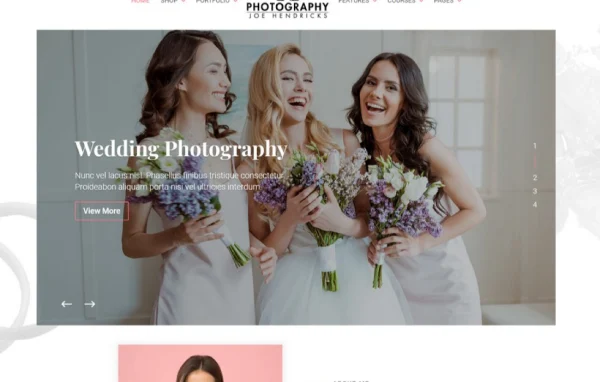
Divi Photography is a WordPress child theme for the Divi Builder, made for photographers and photography brands. It gives you a ready design for presenting your portfolio, plus pages for selling prints, booking sessions, running courses and promoting workshops.
Install this firstThis is a Child Theme for Divi Theme and you are required to purchase/install the Divi Theme first.
Go to product- Version
- 1.0.11
- Released
- Feb 27, 2023
- Developer
- WP Zone
- Type
- WordPress theme
- Licence
- GPL
- Included in
- Every plan, or $3.99 a year on its own
What’s new in Divi Photography 1.0.11
Version 1.0.11 · Feb 27, 2023
Latest
- NewRebrand
- ImprovedUpdate footer credits text
- FixedFix potential critical error when updating theme
What it does
Many photographers end up stitching together a portfolio, a shop, a booking tool and a course site, each with its own look. This child theme brings those pieces into one Divi-based design. You get three portfolio layouts with individual project pages, a styled WooCommerce store for prints, presets, gear or consultations, and an appointment booking feature for client meetings and photo sessions. Light and dark versions let you pick the backdrop that suits your images.
Because it runs on top of Divi, you edit layouts, fonts, colors and content with Divi's drag and drop builder instead of code. Beyond the portfolio, it includes styled pages for LifterLMS courses, an events section with a calendar view for workshops and exhibitions, and membership functionality for exclusive content. Small touches round it out: subtle animations, custom fonts, 50 photography icons, a custom 404 page and a responsive layout for phones and desktops.
Best for
- Freelance photographers building a portfolio site
- Photography studios selling prints and booking sessions
- Photographers who teach courses or run workshops
Features
Three portfolio layouts
Display your work with three different portfolio layouts, along with individual project pages that give each shoot or series its own space.
WooCommerce photography shop
A styled WooCommerce store set up for photography products, so you can sell prints, presets, gear, consultations and other items from your site.
Appointment booking
A built-in booking feature helps you schedule client meetings and photo sessions without sending people elsewhere to pick a time.
LifterLMS course pages
Fully styled pages for LifterLMS let you create and sell photography courses in the same design as the rest of your site.
Events and workshops calendar
Promote workshops, gallery exhibitions and live demonstrations with a calendar view and booking options for visitors who want to attend.
Membership functionality
Set up a membership area for photographers and clients, with support for delivering exclusive content to members.
Light and dark versions
Choose a light or dark look for the whole site, depending on your brand and the style of photography you shoot.
Custom icons and 404 page
Includes 50 photography-themed icons and a custom-designed 404 error page that keeps lost visitors inside your site's design.
Questions about Divi Photography
Do I need Divi to use this theme?
Yes. It is a child theme built for the Divi Builder, so it works on top of Divi. All layout, font, color and content changes are made with Divi's drag and drop builder, with no coding required.
Can I sell prints and other products with it?
Yes. The theme includes a styled WooCommerce shop set up for photography products. You can list prints, digital items like presets, gear and consultations, and they will match the rest of the site's design.
Does it support online courses?
It includes fully styled pages for LifterLMS, so you can create and sell photography courses. The course pages follow the same look as your portfolio and shop, keeping the whole site consistent.
Can I choose between a light and dark design?
Yes. The theme comes in light and dark versions. You can pick whichever fits your brand and photography style, then adjust fonts and colors further in the Divi Builder.
Is Divi Photography free?
The code of Divi Photography is licensed under the GPL, so anyone may use, change and share it. GPL Feast is a paid service: a plan or a single purchase gives you the download and automatic updates. The developer's own support, licence key and online services are not included.
Which version of Divi Photography is this?
Version 1.0.11, released Feb 27, 2023. New versions appear here when the developer publishes them, and members get them as automatic updates.
How do I update Divi Photography?
Install the free GPL Feast Updater on your site and connect it with your API key. It installs new versions of Divi Photography automatically and keeps a backup, so you can roll back.
More from WP Zone