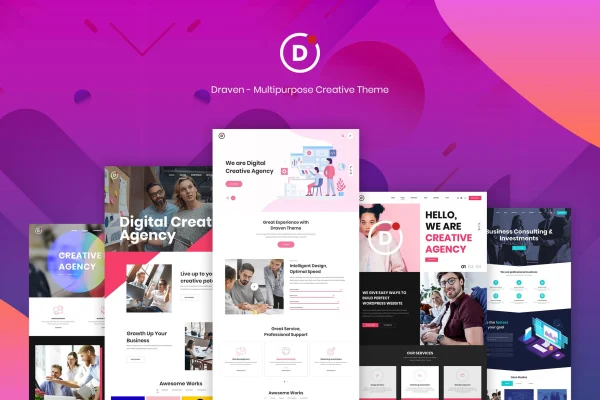
Theme
Updated
Draven
Draven is a multipurpose creative WordPress theme for building portfolios, business websites and blogs. It comes with a selection of pre-designed templates and a drag-and-drop page builder, so you can shape pages and match them to your brand without writing code.
- Version
- 1.9.0
- Released
- May 14, 2026
- Developer
- LA-Studio
- Type
- WordPress theme
- Licence
- GPL
- Included in
- Every plan, or $3.99 on its own
What’s new in Draven 1.9.0
Version 1.9.0 · May 14, 2026
Latest
- ImprovedCompatibility with WordPress 6.9.x
- ImprovedCompatibility with WooCommerce 10.7.x
- ImprovedCompatibility with Elementor 4.0.x
- ImprovedUpdate Revolution Slider 7.0.12
What it does
Many site owners need a theme that can handle more than one kind of project. A freelancer might want a portfolio this month and a client business site the next, while an agency may run several brands with different looks. This theme covers that range with a modern, creative design style and a set of pre-built layouts. You pick a starting point that fits the project, then adjust the content, fonts and colors until it reflects the brand you are working with.
Page creation happens through drag-and-drop editing, which suits beginners who do not code and still gives experienced builders room to customize. The layout is responsive, so pages adapt to desktops, tablets and phones, and the design is built to display consistently across major web browsers. The theme is maintained to work with Elementor and WooCommerce, and it works with Revolution Slider, which makes it a practical fit for creative studios, small businesses and blogs that may add a shop or sliders later.
Best for
- Freelancers and creatives building online portfolios
- Small businesses and agencies needing a modern company site
- Bloggers who want a flexible, customizable design
Features
Multipurpose design
Suitable for portfolios, business websites, blogs and other creative projects, so one theme can cover several kinds of sites.
Pre-designed templates
A wide range of ready-made layouts gives you a starting point that you can tailor to your own style and branding.
Drag-and-drop page building
Create and edit pages by moving elements into place, with no coding knowledge needed to build or rearrange layouts.
Responsive layout
Pages adjust to desktops, tablets and mobile devices, so visitors get a readable layout on whatever screen they use.
Typography and color controls
Detailed font and color settings let you match headings, body text and accents to your brand identity.
Cross-browser consistency
The theme is built to look and behave consistently across all major web browsers.
Works with popular plugins
Maintained for compatibility with Elementor and WooCommerce, and works with Revolution Slider for slider content.
Draven older versions
- 1.8.1Feb 26, 20254 improvements
- 1.6.0Feb 2, 20244 improvements
Members and buyers of this product can download older versions.
Questions about Draven
Can I build a portfolio and a business site with this theme?
Yes. It is a multipurpose theme designed for portfolios, business websites, blogs and similar projects. You start from one of the pre-designed templates and adjust the layout, fonts and colors to suit each project.
Do I need to know how to code to customize it?
No. Pages are created and edited with drag-and-drop tools, and fonts and colors are changed through the theme's typography and color controls. Experienced developers still have room to customize further if they want to.
Will my site look right on phones and tablets?
The theme uses a fully responsive layout, so pages adapt to desktops, tablets and mobile screens. It is also built to display consistently across major web browsers.
Does Draven work with Elementor and WooCommerce?
Yes. The theme is maintained for compatibility with both Elementor and WooCommerce, and it also works with Revolution Slider, so you can add store pages or sliders to your site.
Is Draven free?
The code of Draven is licensed under the GPL, so anyone may use, change and share it. GPL Feast is a paid service: a plan or a single purchase gives you the download and automatic updates. The developer's own support, licence key and online services are not included.
Which version of Draven is this?
Version 1.9.0, released May 14, 2026. New versions appear here when the developer publishes them, and members get them as automatic updates.
How do I update Draven?
Install the free GPL Feast Updater on your site and connect it with your API key. It installs new versions of Draven automatically and keeps a backup, so you can roll back.