
Theme
Updated
EnjoyNews Pro
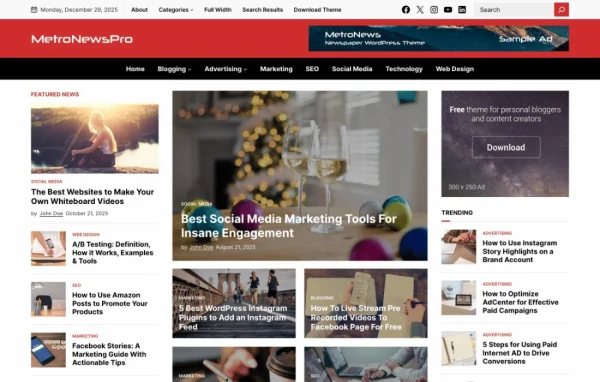
EnjoyNews Pro is a WordPress theme built for news websites, blogs and online magazines. It gives content-heavy sites a clean, responsive layout with featured sections, grids and sliders for top stories, plus room for ads and plenty of font and color choices.
- Version
- 1.1.6
- Released
- Feb 4, 2025
- Developer
- WPEnjoy
- Type
- WordPress theme
- Licence
- GPL
- Included in
- Every plan, or $3.99 a year on its own
What’s new in EnjoyNews Pro 1.1.6
Version 1.1.6
Latest
- ImprovedUpdated theme framework.
- ImprovedPHP 8.x compatible.
- FixedBug fixes.
What it does
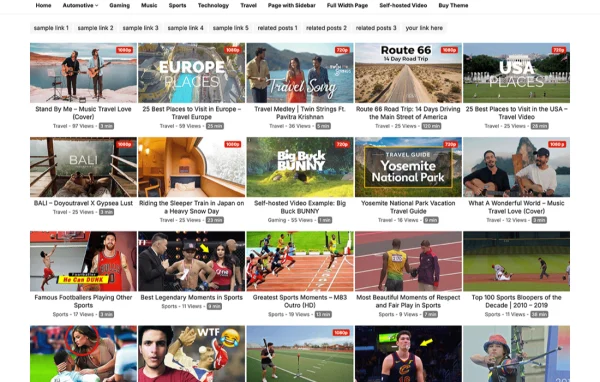
Running a news site or magazine means a lot of articles competing for space on the front page. This theme handles that with multiple featured sections, grids and sliders, so you can pick which stories sit up top and how the rest are arranged. Customizable widgets and a range of layout options let you shape the homepage and inner pages to suit your publication, and the responsive design adjusts to desktops, tablets and phones.
Setup starts with a one-click demo import that loads pre-built demo content, giving you a working structure to edit instead of a blank site. From there, a theme options panel controls appearance and functionality, including access to over 1000 Google Fonts and unlimited color skins. Built-in ad areas give publishers places to run advertising, and social sharing options help readers pass articles along. A sticky header and mobile-friendly search make it easier for visitors to get around.
Best for
- News websites publishing frequent articles
- Online magazines with many categories and features
- Bloggers who want a magazine-style layout
Features
Featured sections, grids and sliders
Multiple featured sections, grid layouts and sliders let you put your most important stories at the front of the homepage where readers see them first.
Customizable layouts
A range of layout options and style settings, along with customizable widgets, let you adjust the look of your site to match your brand.
Ad-ready layout
Dedicated ad areas are placed within the design so you can run advertising on your news site or magazine without rebuilding page layouts.
One-click demo import
Import pre-built demo content in one click to get a ready structure you can edit with your own articles, images and categories.
Google Fonts and color skins
Choose from over 1000 Google Fonts and unlimited color skins to give your publication its own typography and color scheme.
Sticky header and mobile search
A sticky header keeps navigation visible as readers scroll, and the search function is set up to work well for visitors on mobile devices.
Social media sharing
Social media integration lets readers share your articles across popular social platforms directly from your posts.
Theme options panel
A central options panel lets you manage the site's appearance and functionality from one place without editing code.
EnjoyNews Pro older versions
- 1.1.4Jan 1, 2024
- 1.1.2Apr 18, 2023
Members and buyers of this product can download older versions.
Questions about EnjoyNews Pro
Can I run ads with EnjoyNews Pro?
Yes. The theme includes ad areas positioned within the layout, so you can place advertising on your pages. These spots are part of the design, which helps ads sit alongside your content without needing a custom layout.
Will the theme look right on phones and tablets?
The design is responsive, so it adapts to desktops, tablets and smartphones. It also includes a sticky header for navigation and a search function set up for mobile users, which helps readers find articles on smaller screens.
How much can I change the design?
Quite a bit. You get multiple layout options, style settings, customizable widgets, over 1000 Google Fonts and unlimited color skins, all managed through a theme options panel. That lets you give a news site or magazine its own look.
Is there a quick way to get a starting layout?
Yes. A one-click demo import loads pre-built demo content, giving you a working site structure. You can then replace the sample posts and images with your own content and adjust the settings from there.
Is EnjoyNews Pro free?
The code of EnjoyNews Pro is licensed under the GPL, so anyone may use, change and share it. GPL Feast is a paid service: a plan or a single purchase gives you the download and automatic updates. The developer's own support, licence key and online services are not included.
Which version of EnjoyNews Pro is this?
Version 1.1.6, released Feb 4, 2025. New versions appear here when the developer publishes them, and members get them as automatic updates.
How do I update EnjoyNews Pro?
Install the free GPL Feast Updater on your site and connect it with your API key. It installs new versions of EnjoyNews Pro automatically and keeps a backup, so you can roll back.
More from WPEnjoy