Theme
Updated
EnjoyTube Pro
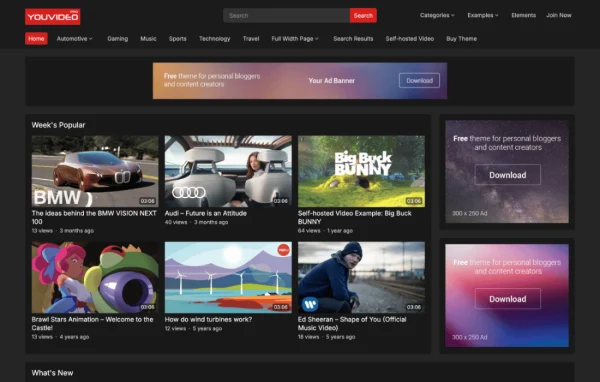
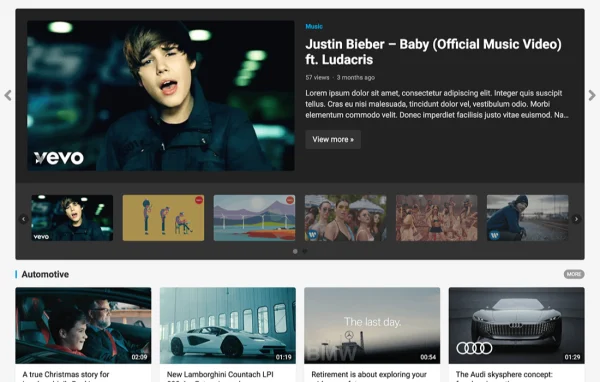
EnjoyTube Pro is a WordPress theme by WPEnjoy built for video-sharing websites. It gives you a responsive layout for publishing videos from many sources, along with tools for showing video details, related posts and viewer ratings.
- Version
- 1.0.8
- Released
- Dec 16, 2024
- Developer
- WPEnjoy
- Type
- WordPress theme
- Licence
- GPL
- Included in
- Every plan, or $3.99 a year on its own
What’s new in EnjoyTube Pro 1.0.8
Version 1.0.8 · Dec 16, 2024
Latest
What it does
Running a video site on a general blog theme often means videos sit awkwardly in the layout and viewers get little information about each clip. This theme is designed around video posts from the start. You can publish videos from a wide range of sources, show each video's duration and view count, and embed extra videos in a post. The layout is responsive and mobile-friendly, so your video pages adapt to desktops, tablets and phones.
Setup starts with a one click demo import that loads a full sample site you can then adjust. From there you can pick from over 1000 Google Fonts, set unlimited colors and skin colors, and choose where related videos appear. Visitors can rate posts with thumbs up or down and share them through built-in social icons. If you are moving from another video theme, migration tools help carry your content over, and theme settings can be exported or imported for backups.
Best for
- Vloggers running a personal video blog
- Niche video portals built around one topic
- Educators and businesses publishing video content
Features
Video duration and views
Each video post can display its running time and view count, giving visitors useful details before they press play.
One click demo import
Import a complete demo setup in a single step, then replace the sample content with your own videos and branding.
Fonts and color options
Choose from over 1000 Google Fonts, unlimited color options and flexible skin colors to match the site to your brand.
Flexible related posts
Place related video posts in the sidebar, at the bottom of a post or at the bottom of the site to help viewers find more content.
Post ratings and sharing
Visitors can give posts a thumbs up or thumbs down, and integrated social share icons let them pass videos along.
Extra videos and migration
Embed additional videos within a post and migrate content from other video themes when switching your site over.
Custom code and footer text
Add custom code snippets and set your own footer copyright or branding text through dedicated editors in the theme settings.
Settings import and export
Export your theme options to keep a backup or move them to another site, then import them again whenever needed.
EnjoyTube Pro older versions
- 1.0.6Jan 1, 2024
- 1.0.5Apr 18, 2023
Members and buyers of this product can download older versions.
Questions about EnjoyTube Pro
Can I show how long each video is and how many views it has?
Yes. The theme includes video management tools that display the duration and view count on video posts, so visitors can see these details at a glance.
I already use another video theme. Can I switch without losing my content?
The theme includes tools for migrating from other video themes, which helps you move existing video content over. You can also export and import theme settings to back up or transfer your configuration.
How much control do I have over the site's look?
You can choose from over 1000 Google Fonts, set unlimited colors and skin colors, and pick from several layout options, including where related posts appear. A footer text editor lets you add your own copyright or branding line.
Will the site work for visitors on phones?
Yes. The theme uses a responsive, mobile-friendly design, so video pages adjust to different screen sizes, from desktop monitors down to smartphones.
Is EnjoyTube Pro free?
The code of EnjoyTube Pro is licensed under the GPL, so anyone may use, change and share it. GPL Feast is a paid service: a plan or a single purchase gives you the download and automatic updates. The developer's own support, licence key and online services are not included.
Which version of EnjoyTube Pro is this?
Version 1.0.8, released Dec 16, 2024. New versions appear here when the developer publishes them, and members get them as automatic updates.
How do I update EnjoyTube Pro?
Install the free GPL Feast Updater on your site and connect it with your API key. It installs new versions of EnjoyTube Pro automatically and keeps a backup, so you can roll back.
More from WPEnjoy