Theme
Updated
EnjoyVideo Pro
EnjoyVideo Pro is a responsive WordPress theme built for video sharing websites and video blogs. It gives creators a clean magazine-style layout for publishing videos from multiple sources, with view counts, durations, ratings and social sharing built into each post.
- Version
- 1.1.3
- Released
- Dec 18, 2024
- Developer
- WPEnjoy
- Type
- WordPress theme
- Licence
- GPL
- Included in
- Every plan, or $3.99 a year on its own
What’s new in EnjoyVideo Pro 1.1.3
Version 1.1.3
Latest
- ImprovedUpdated theme framework
- ImprovedPHP 8.x compatible
- FixedBug fixes
What it does
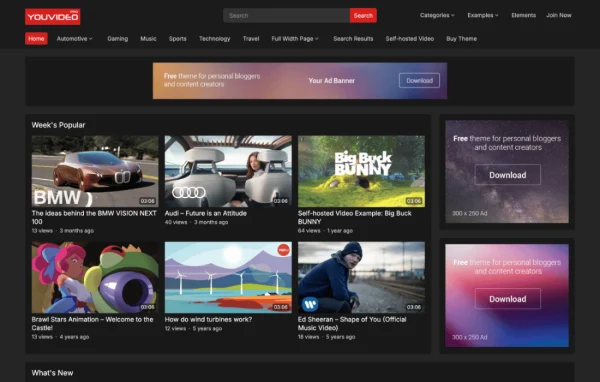
Running a video site on a general blog theme often means videos sit awkwardly in the layout and visitors get little context about what they are about to watch. This theme is designed around video posts from the start. You can publish videos from a variety of platforms or with embed codes, and each post can show its duration and view count so viewers can judge length and interest before pressing play.
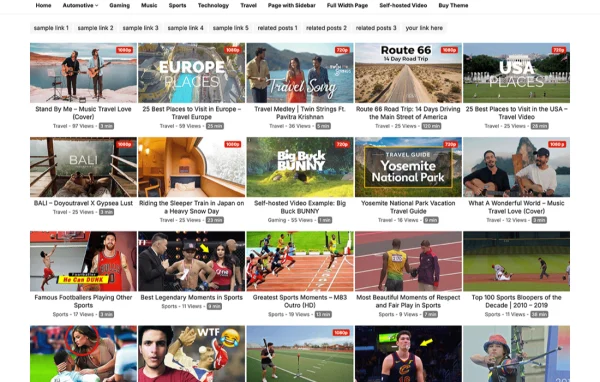
The layout follows a clean magazine style that adapts to desktops, tablets and phones, with a header search on mobile to help visitors find content. A one-click demo import sets up the site to match the demo, and the theme options panel lets you adjust fonts, colors and layouts without code. It suits video bloggers, creators and community video sites that want a ready video-focused structure.
Best for
- Video bloggers publishing regular video posts
- Content creators collecting videos from several platforms
- Community sites built around shared video content
Features
Multiple video sources
Publish videos from a variety of platforms or paste embed codes, so you can mix content from different hosts on one site.
Views and duration display
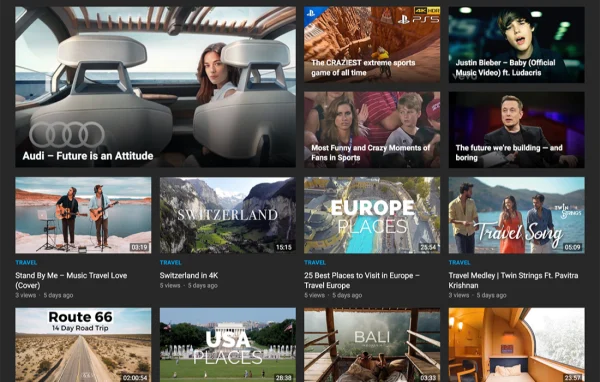
Each video post can show how many times it has been viewed and how long it runs, giving visitors useful context at a glance.
Thumbs up and down ratings
Viewers can rate videos with a thumbs up or thumbs down, and social sharing icons let them pass content along to their networks.
Dark and light skins
Switch between a dark skin and a light skin to match the look of your brand or the mood of your video content.
Theme options panel
Change fonts from over 1000 Google Fonts, adjust colors and set layouts from an options panel, without editing theme files.
One-click demo import
Import the demo content in one step so your site matches the demo layout, then replace it with your own videos and settings.
Flexible related posts
Display related videos in locations you choose, such as the sidebar or footer, to point viewers toward more of your content.
Custom code editor
Add your own scripts or CSS styles through a built-in editor, and visitors on phones get a header search for quicker navigation.
EnjoyVideo Pro older versions
- 1.1.2May 24, 2024
- 1.1.1Jan 1, 2024
- 1.0.8Apr 18, 2023
Members and buyers of this product can download older versions.
Questions about EnjoyVideo Pro
Can I post videos from different platforms on the same site?
Yes. The theme supports publishing videos from multiple sources, including a variety of platforms and embed codes, so you can combine videos hosted in different places within one consistent magazine-style layout.
Will my video site work well on phones?
The design is responsive and mobile-friendly, adjusting to desktops, tablets and smartphones. It also includes a header search on mobile so visitors on small screens can find videos easily.
Can I change the look without writing code?
The theme options panel lets you pick from over 1000 Google Fonts, change colors and adjust layouts. You can also choose between dark and light skins. For anything extra, a custom code editor accepts your own scripts and styles.
Does it show engagement details on video posts?
Yes. Video posts can display view counts and durations, and viewers can rate videos with thumbs up or down. Social sharing icons are included, and related posts can appear in places like the sidebar or footer.
Is EnjoyVideo Pro free?
The code of EnjoyVideo Pro is licensed under the GPL, so anyone may use, change and share it. GPL Feast is a paid service: a plan or a single purchase gives you the download and automatic updates. The developer's own support, licence key and online services are not included.
Which version of EnjoyVideo Pro is this?
Version 1.1.3, released Dec 18, 2024. New versions appear here when the developer publishes them, and members get them as automatic updates.
How do I update EnjoyVideo Pro?
Install the free GPL Feast Updater on your site and connect it with your API key. It installs new versions of EnjoyVideo Pro automatically and keeps a backup, so you can roll back.
More from WPEnjoy