Theme
Updated
FirstSite Pro
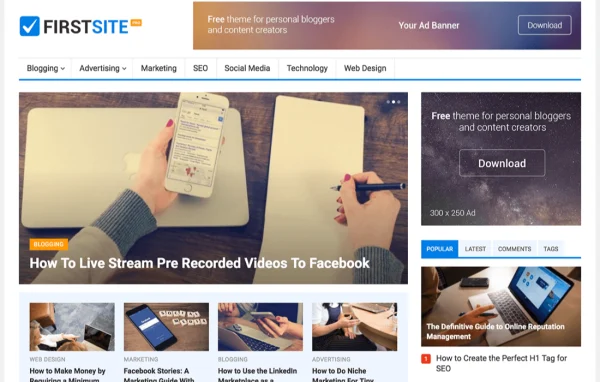
FirstSite Pro is a WordPress theme built for personal bloggers who want a clean, classic look. It gives you a theme options panel for colors, fonts and layout details, plus ad placements, social share icons and a one click demo import to get a blog set up quickly.
- Version
- 1.0.4
- Released
- Feb 4, 2025
- Developer
- WPEnjoy
- Type
- WordPress theme
- Licence
- GPL
- Included in
- Every plan, or $3.99 a year on its own
What’s new in FirstSite Pro 1.0.4
Version 1.0.4
Latest
- ImprovedUpdated theme framework
- ImprovedPHP 8.x compatible
- FixedBug fixes
What it does
Many blog themes either look plain or bury you in settings. FirstSite Pro takes a middle path with an elegant, classic design and an options panel focused on what bloggers actually change: colors, typography, excerpt length, thumbnail width and footer text. You can pick from unlimited colors and more than 1000 Google Fonts, all without writing code. The layout is responsive, so posts adapt to desktops, tablets and phones.
Setup starts with a one click demo import that loads a complete sample blog you can then edit. From there, you can turn on header search, add social share icons to posts and place ads in spots such as the top and bottom of posts. Custom widgets fill the sidebar and footer with blog-focused content. An import and export tool lets you back up your settings or move them to another site, which helps if you run more than one blog.
Best for
- Personal bloggers sharing stories and opinions
- New bloggers who want design control without coding
- Writers who plan to run ads on their posts
Features
Unlimited color choices
Pick any color for your blog's design elements so the site matches your brand or personal style, set right from the theme options panel.
Over 1000 Google Fonts
Choose typography from more than 1000 Google Fonts to set the tone and readability of your headings and body text.
One click demo import
Load a complete demo setup in one step, giving you a finished sample blog to edit instead of building every page from scratch.
Ad position management
Place advertisements in several locations, including the top and bottom of posts, through settings in the theme options panel.
Social share icons
Add share icons to your posts so readers can pass your articles along on social media platforms.
Excerpt and thumbnail controls
Adjust post excerpt length and thumbnail width to control how articles appear on archive pages and post lists.
Header search and footer text
Turn on a search box in the header and edit the footer copyright text to suit your site.
Settings import and export
Export your theme options as a backup or import them on another site to reuse the same configuration.
FirstSite Pro older versions
- 1.0.3Jan 1, 2024
- 1.0.2Apr 18, 2023
Members and buyers of this product can download older versions.
Questions about FirstSite Pro
Do I need coding skills to customize this theme?
No. Colors, fonts, excerpt length, thumbnail width, header search, footer text and ad positions are all set through the theme options panel, which is designed so you can make changes without touching code.
Can I place ads on my blog with it?
Yes. The theme includes ad position management, letting you put advertisements in multiple locations such as the top and bottom of your posts, all configured from the options panel.
Will my blog work on phones and tablets?
Yes. FirstSite Pro uses a responsive, mobile friendly design, so your layout adjusts to different screen sizes from desktop monitors down to smartphones.
Can I copy my settings to another blog?
Yes. The import and export feature lets you save your theme options to a file and load them on another site, which also works as a backup of your configuration.
Is FirstSite Pro free?
The code of FirstSite Pro is licensed under the GPL, so anyone may use, change and share it. GPL Feast is a paid service: a plan or a single purchase gives you the download and automatic updates. The developer's own support, licence key and online services are not included.
Which version of FirstSite Pro is this?
Version 1.0.4, released Feb 4, 2025. New versions appear here when the developer publishes them, and members get them as automatic updates.
How do I update FirstSite Pro?
Install the free GPL Feast Updater on your site and connect it with your API key. It installs new versions of FirstSite Pro automatically and keeps a backup, so you can roll back.
More from WPEnjoy