Theme
Updated
Homestore - Storefront Child Theme
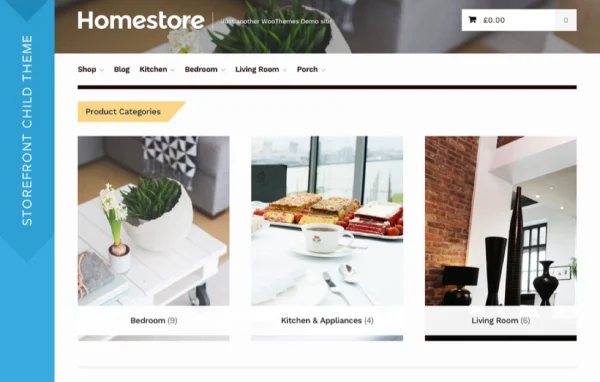
This is a WooCommerce child theme built on the Storefront parent theme. It gives an online shop a classic, clean design modeled on the look of a department store, with a clear layout that helps shoppers browse products and categories.
- Version
- 2.0.34
- Released
- Jun 21, 2021
- Developer
- Storefront Child Theme
- Type
- WordPress theme
- Licence
- GPL
- Included in
- Every plan, or $4.79 a year on its own
What’s new in Homestore - Storefront Child Theme 2.0.34
Version 2.0.34 · Jun 21, 2021
Latest
- ChangedMaintenance release.
What it does
Many WooCommerce shops start on Storefront because it is a solid, plain base, but the default look can feel generic. Homestore - Storefront Child Theme adds a classic department store style on top of that base, with a clear visual hierarchy that guides shoppers from categories to products. It works well for stores selling home goods, boutiques and retail brands that want a professional, familiar look customers recognize.
Because it is a child theme, it relies on the Storefront core and keeps that theme's compatibility with WooCommerce and its customer-facing extensions, including WooCommerce payment gateways. The layout is responsive, so the store adapts to phones, tablets and desktops. Shops with large catalogs can pair it with the optional Storefront Mega Menus extension for more detailed navigation across many product categories.
Best for
- WooCommerce shops selling home goods and furnishings
- Boutiques wanting a classic department store look
- Retailers with large catalogs using Storefront Mega Menus
Features
Classic department store design
A clean, timeless look modeled on familiar department store layouts, giving shops a professional appearance that suits home goods, boutiques and general retail.
Built on Storefront core
Runs as a child theme of Storefront, so it keeps that parent theme's compatibility with WooCommerce and its customer-facing extensions.
Clear visual hierarchy
The layout organizes products and categories in a clear order, helping shoppers find what they want and move through the store with less confusion.
Responsive layout
Pages adjust to different screen sizes, so the storefront works on mobile phones and tablets as well as desktop browsers.
Storefront Mega Menus support
Optional integration with Storefront Mega Menus adds expanded navigation, useful for stores with large catalogs or complex category structures.
Works with WooCommerce payments
Built to run with WooCommerce payment gateways, so the checkout uses the payment options your store already has configured.
Fits small and large stores
The design suits a modest boutique as well as a larger retail brand with many departments and product lines.
Questions about Homestore - Storefront Child Theme
Do I need the Storefront theme for this to work?
Yes. Homestore is a child theme built on the Storefront core parent theme, so Storefront needs to be present on your site. The child theme then applies its own department store style on top of the parent.
Will it work with my WooCommerce extensions?
Because it is built on Storefront, it keeps compatibility with WooCommerce and its customer-facing extensions, including WooCommerce payment gateways. That lets you add store features without switching to a different design.
Is it a good fit for a store with many product categories?
It can be. The layout uses a clear visual hierarchy for browsing, and it integrates with the optional Storefront Mega Menus extension, which adds expanded navigation suited to large catalogs and complex store structures.
Does the design work on mobile devices?
Yes. The theme is responsive and mobile-friendly, so product pages, categories and the rest of the store adjust to phones and tablets as well as desktop screens.
Is Homestore - Storefront Child Theme free?
The code of Homestore - Storefront Child Theme is licensed under the GPL, so anyone may use, change and share it. GPL Feast is a paid service: a plan or a single purchase gives you the download and automatic updates. The developer's own support, licence key and online services are not included.
Which version of Homestore - Storefront Child Theme is this?
Version 2.0.34, released Jun 21, 2021. New versions appear here when the developer publishes them, and members get them as automatic updates.
How do I update Homestore - Storefront Child Theme?
Install the free GPL Feast Updater on your site and connect it with your API key. It installs new versions of Homestore - Storefront Child Theme automatically and keeps a backup, so you can roll back.
More from Storefront Child Theme