Theme
Updated
Magazine Pro Theme
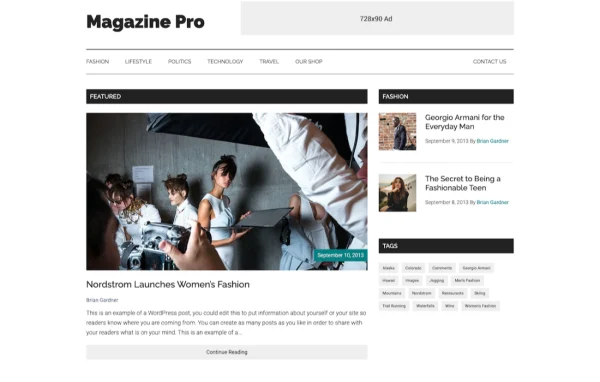
Magazine Pro Theme by StudioPress is a WordPress theme for online magazines, news sites and blogs. It runs on the Genesis Framework and works with the Gutenberg block editor, so you can build editorial layouts without writing code.
- Version
- 3.7.2
- Developer
- StudioPress
- Type
- WordPress theme
- Licence
- GPL
- Included in
- Every plan, or $4.79 a year on its own
What’s new in Magazine Pro Theme 3.7.2
Version 3.7.2
Latest
What it does
Running a content-heavy site means you need a layout that keeps articles readable and easy to browse. This theme gives publishers and bloggers a clean, modern design built for that kind of site. Because it sits on the Genesis Framework, it inherits a well-known foundation that many designers and developers already build with, and that community offers forums and resources if you want to learn more or extend your site.
Setup starts with a one-click import that brings in demo content, recommended plugins and pre-designed Gutenberg blocks, giving you a working starting point to edit. From there, the live customizer lets you adjust colors, fonts, layouts and content while previewing changes before you publish. Pre-styled WooCommerce support means you can add a store that matches the rest of the site, and the responsive, accessibility-ready design adapts to different screens and users.
Best for
- Online magazines and digital news publications
- Bloggers who publish frequent articles
- Publishers adding a small WooCommerce store
Features
Built on Genesis Framework
The theme runs on the Genesis Framework from StudioPress, a widely used foundation that a large community of designers and developers already works with.
One-click theme setup
Import demo content, recommended plugins and pre-designed Gutenberg blocks in one step, so you begin with a complete layout you can edit to suit your content.
Gutenberg block editor support
Build and adjust page layouts with the WordPress block editor, arranging content visually without needing to write any code.
Pre-styled WooCommerce pages
Store pages come with ready-made styles, so you can add an online shop to your magazine site and keep it visually consistent.
Live theme customizer
Change colors, fonts, layouts and content in real time and preview each adjustment before it goes live on your site.
Custom logo upload
Upload your own logo through the theme settings so your brand appears across the site header for readers to recognize.
Responsive and accessibility-ready
The layout adapts to different browsers, devices and screen sizes, and the theme is designed to be accessibility-ready for a wider range of visitors.
Questions about Magazine Pro Theme
Do I need the Genesis Framework to use this theme?
Yes. This theme is built on the Genesis Framework from StudioPress, which acts as the foundation it runs on. The framework also connects you to a large community of designers and developers who share forums and resources.
Can I get a site that looks like the demo quickly?
The theme includes a one-click setup that imports demo content, recommended plugins and pre-designed Gutenberg blocks. That gives you a ready layout to replace with your own articles, images and branding.
Can I sell products on a site using this theme?
Yes. The theme includes pre-styled WooCommerce support, so shop pages use designs that fit the rest of your magazine. You would add WooCommerce to your site to set up the store itself.
How much can I change the design without coding?
The live customizer lets you adjust colors, fonts, layouts and content with a real-time preview, and you can upload a custom logo. For page layouts, you can work directly in the Gutenberg block editor.
Is Magazine Pro Theme free?
The code of Magazine Pro Theme is licensed under the GPL, so anyone may use, change and share it. GPL Feast is a paid service: a plan or a single purchase gives you the download and automatic updates. The developer's own support, licence key and online services are not included.
Which version of Magazine Pro Theme is this?
Version 3.7.2. New versions appear here when the developer publishes them, and members get them as automatic updates.
How do I update Magazine Pro Theme?
Install the free GPL Feast Updater on your site and connect it with your API key. It installs new versions of Magazine Pro Theme automatically and keeps a backup, so you can roll back.
More from StudioPress