Theme
Updated
MySupplier
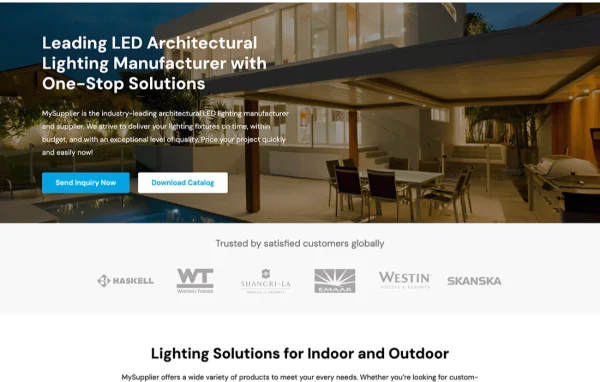
MySupplier is a WordPress theme built for suppliers, manufacturers and B2B businesses. It gives you clean, professional layouts for presenting products, services and company information, with an options panel for adjusting colors, fonts and layouts without writing code.
- Version
- 1.0.0
- Released
- Jun 28, 2024
- Developer
- WPEnjoy
- Type
- WordPress theme
- Licence
- GPL
- Included in
- Every plan, or $3.99 a year on its own
What’s new in MySupplier 1.0.0
Version 1.0.0
Latest
- NewFirst release
What it does
Supplier and B2B companies need a site that explains what they make, what services they offer and who they are, in a way that clients and partners can scan quickly. This theme is designed around that job. Its layouts are organized to highlight products, services and corporate profiles, so visitors can find the information they came for without digging through pages that were built for a different kind of business.
Customization happens through an options panel where you can change colors, fonts, layouts and other settings to match your branding, with no coding required. The layouts are responsive, so pages adapt to desktops, tablets and phones. The theme is translation ready and supports multilingual plugins, and it is described as working with WooCommerce, Contact Form 7 and Yoast SEO when you want to add a shop, contact forms or SEO tools.
Best for
- Suppliers and wholesalers presenting product ranges online
- Manufacturers that need a professional company profile site
- B2B service firms serving clients in several languages
Features
Layouts for B2B businesses
Clean, professional page layouts are designed for supplier and B2B sites, giving products, services and company information an organized place on the page.
Options panel customization
Change colors, fonts, layouts and other design settings from an options panel, so the site can match your corporate branding without touching code.
Responsive design
Pages adjust their layout for desktops, tablets and smartphones, so visitors on any of these devices get a usable version of your site.
Translation ready
The theme is prepared for translation and supports multilingual plugins, which lets you offer your content in more than one language.
WooCommerce compatibility
The theme is described as working with WooCommerce, so you can add product listings and store features to your supplier site if you need them.
Works with forms and SEO plugins
Compatibility with Contact Form 7 and Yoast SEO lets you add inquiry forms and manage search settings using plugins many site owners already know.
Lightweight codebase
The theme is built on a lightweight codebase, keeping the foundation of your site lean as you add your own content and plugins.
Questions about MySupplier
Can I change the look of the theme without knowing how to code?
Yes. MySupplier includes an options panel where you can modify colors, fonts, layouts and more. It is designed with non-technical users in mind, so you can align the site with your brand identity without editing any code.
Will my site work on phones and tablets?
The theme uses responsive layouts that adapt to desktops, tablets and smartphones. Your product, service and company pages rearrange to fit the screen size, so visitors on mobile devices can browse your site comfortably.
Can I run my site in more than one language?
Yes. The theme is translation ready and has built-in support for multilingual plugins. You can pair it with a multilingual plugin to translate your content and reach clients and partners who prefer other languages.
Does it work with WooCommerce and contact form plugins?
The theme is described as compatible with popular plugins including WooCommerce, Contact Form 7 and Yoast SEO. That lets you add store functionality, inquiry forms and SEO settings alongside the theme's supplier-focused layouts.
Is MySupplier free?
The code of MySupplier is licensed under the GPL, so anyone may use, change and share it. GPL Feast is a paid service: a plan or a single purchase gives you the download and automatic updates. The developer's own support, licence key and online services are not included.
Which version of MySupplier is this?
Version 1.0.0, released Jun 28, 2024. New versions appear here when the developer publishes them, and members get them as automatic updates.
How do I update MySupplier?
Install the free GPL Feast Updater on your site and connect it with your API key. It installs new versions of MySupplier automatically and keeps a backup, so you can roll back.
More from WPEnjoy