Theme
Updated
Nostalgia
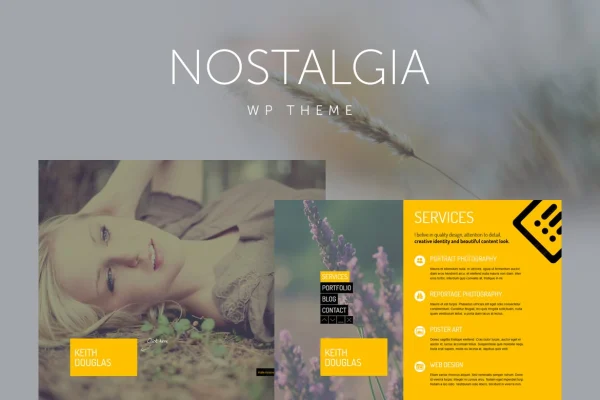
Nostalgia is a responsive portfolio WordPress theme by QuanticaLabs. It pairs retro-toned background imagery with clean, minimalist content areas, so photographers, designers and artists can present their projects through fullscreen slideshows and sliding pages.
- Version
- 7.9
- Released
- Oct 6, 2026
- Developer
- QuanticaLabs
- Type
- WordPress theme
- Licence
- GPL
- Included in
- Every plan, or $3.99 on its own
What’s new in Nostalgia 7.9
Version 7.9 · Oct 6, 2026
Latest
What it does
Many portfolio sites bury the work under busy layouts. This theme takes a quieter approach: a retro-toned background sits behind crisp, minimal content, and the contrast keeps attention on your images. A fullscreen slideshow greets visitors, and pages slide in from the left or right as people move through the menu. The layout is responsive and built with jQuery, so it adapts to desktops, tablets and phones.
The theme suits creatives and small studios who want a personal or corporate portfolio with some atmosphere. You can add as many scrolling menu pages as you need, set colors for single pages or the whole site with a colorpicker, and play background music through an Ajax-based player that keeps going while visitors browse. A built-in lightbox, a working contact form, validated XHTML and included documentation round out the package.
Best for
- Photographers presenting galleries with a retro mood
- Designers and artists building a personal portfolio
- Creative studios wanting a branded corporate portfolio
Features
Fullscreen slideshow
Open your site with fullscreen imagery that fills the browser window, giving your photos and projects plenty of room the moment a visitor arrives.
Background music player
An Ajax-based audio player plays music in the background and keeps playing as visitors move between pages, without interrupting site navigation.
Left and right sliding pages
Pages slide in horizontally from the left or right, giving portfolio browsing a smooth transition instead of a standard page reload.
Unlimited scrolling menu pages
Add as many menu pages as your content requires, so you can organize projects, an about section and other information however you like.
Colorpicker theme colors
Choose custom colors with a colorpicker and apply them to individual pages or across the entire theme to match your personal or brand palette.
Built-in lightbox
Portfolio images open in a lightbox, letting visitors view your work larger without leaving the page they are on.
Working contact form
A contact form is included and ready to use, so clients and visitors can send inquiries directly from your portfolio.
Responsive jQuery layout
The layout adjusts to different screen sizes from desktops to smartphones, and the theme uses validated XHTML with cross-browser compatibility.
Nostalgia older versions
- 7.8May 8, 2023
Members and buyers of this product can download older versions.
Questions about Nostalgia
Can I play music on my portfolio site with this theme?
Yes. The theme includes an Ajax-based background music player. Because it works through Ajax, the audio keeps playing as visitors move between pages, so navigation does not cut off the music.
Can I change the colors to match my brand?
Yes. A colorpicker lets you set custom theme colors. You can apply colors to single pages or to the entire theme, which helps with both personal and corporate branding.
Will my portfolio work on phones and tablets?
The layout is responsive and powered by jQuery, so it adapts to screens from desktops down to smartphones. The code is validated XHTML and the theme is built for compatibility across major browsers.
Is there a limit on how many pages I can add?
No. Nostalgia supports an unlimited number of scrolling menu pages, and each one slides in from the left or right as visitors navigate. Documentation is included to help with setup and customization.
Is Nostalgia free?
The code of Nostalgia is licensed under the GPL, so anyone may use, change and share it. GPL Feast is a paid service: a plan or a single purchase gives you the download and automatic updates. The developer's own support, licence key and online services are not included.
Which version of Nostalgia is this?
Version 7.9, released Oct 6, 2026. New versions appear here when the developer publishes them, and members get them as automatic updates.
How do I update Nostalgia?
Install the free GPL Feast Updater on your site and connect it with your API key. It installs new versions of Nostalgia automatically and keeps a backup, so you can roll back.
More from QuanticaLabs