Theme
Updated
Portada
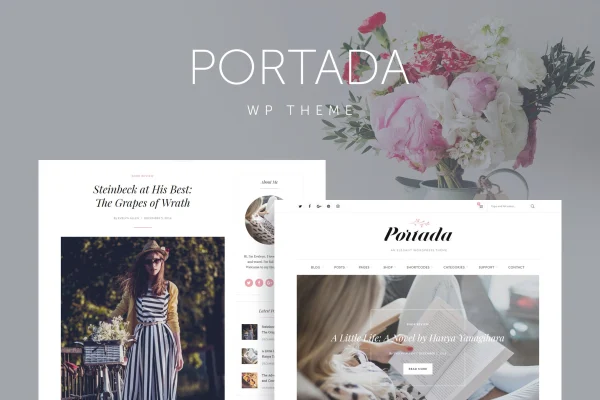
Portada is a WordPress blog theme by QuanticaLabs with a clean, light design built around readability. It gives bloggers multiple layouts, several post formats, featured sliders and theme panels for styling, so posts look polished without custom code.
- Version
- 2.5
- Released
- Nov 25, 2025
- Developer
- QuanticaLabs
- Type
- WordPress theme
- Licence
- GPL
- Included in
- Every plan, or $3.99 on its own
What’s new in Portada 2.5
Version 2.5 · Nov 25, 2025
Latest
- ImprovedImproved coding.
- ImprovedUpdated wooCommerce templates.
- ImprovedImproved look and feel of dashboard options.
- ImprovedUpdated plugin: Theme Fonts.
- ImprovedUpdated plugin: Theme Styles.
- ImprovedUpdated plugin: Widget Areas.
- ImprovedUpdated plugin: Theme Demo Data Installer.
- ImprovedUpdated plugin: Slider Revolution Responsive WordPress Plugin.
What it does
Many blog themes either look plain or bury your writing under clutter. Portada takes a light, refined approach that puts the focus on your posts and typography. It suits lifestyle, fashion, travel, book and personal blogs, along with small business blogs that want a graceful look. The layout is responsive and retina ready, so text and images stay sharp on desktops, tablets and phones.
You shape the site through theme configuration panels that control styling, fonts and other options without coding. Pick a right sidebar, left sidebar or full-width layout, and publish posts as normal, audio, video, review or gallery formats. A featured slider highlights chosen posts, and a sidebar slider can promote content or announcements. WooCommerce integration lets you add a shop, while Gutenberg and WPML compatibility cover block editing and multilingual blogs.
Best for
- Lifestyle, fashion and travel bloggers
- Book lovers and personal journal writers
- Small business blogs that sell a few products
Features
Multiple blog layouts
Choose between right sidebar, left sidebar or full-width layouts to match the way you want your posts and widgets arranged.
Varied post formats
Publish normal, audio, video, review and gallery posts, so different kinds of content each get a fitting presentation.
Featured post slider
Place a slider at the top of your blog to highlight selected posts or promotions for visitors as they arrive.
Sidebar slider
Add an extra slider in the sidebar of posts or pages to point readers toward featured content, ads or announcements.
Theme configuration panels
Adjust theme styling, fonts and other options from settings panels, with no need to write or edit code.
WooCommerce integration
Build an online store inside your blog with WooCommerce to sell products or services alongside your posts.
Gutenberg and WPML compatible
Write in the WordPress block editor and run a multilingual blog through WPML compatibility.
Responsive and retina ready
Pages adapt to desktops, tablets and smartphones, and graphics stay crisp on high-resolution screens.
Portada older versions
- 2.4Aug 23, 20257 improvements
Members and buyers of this product can download older versions.
Questions about Portada
Can I sell products on a blog built with this theme?
Yes. The theme integrates with WooCommerce, so you can add a store to your blog and sell products or services next to your regular posts.
Does it work with the block editor?
It is compatible with the Gutenberg editor, so you can write and arrange posts using the standard WordPress block editor. Styling and fonts are handled through the theme configuration panels.
Can I run my blog in more than one language?
The theme is compatible with WPML, which lets you translate your posts and pages and publish a multilingual blog for readers in different languages.
What kinds of posts does it support?
You can publish normal, audio, video, review and gallery posts. Each format presents its content differently, which helps when your blog mixes writing, media and product reviews.
Is Portada free?
The code of Portada is licensed under the GPL, so anyone may use, change and share it. GPL Feast is a paid service: a plan or a single purchase gives you the download and automatic updates. The developer's own support, licence key and online services are not included.
Which version of Portada is this?
Version 2.5, released Nov 25, 2025. New versions appear here when the developer publishes them, and members get them as automatic updates.
How do I update Portada?
Install the free GPL Feast Updater on your site and connect it with your API key. It installs new versions of Portada automatically and keeps a backup, so you can roll back.
More from QuanticaLabs