Theme
Updated
Ocularus
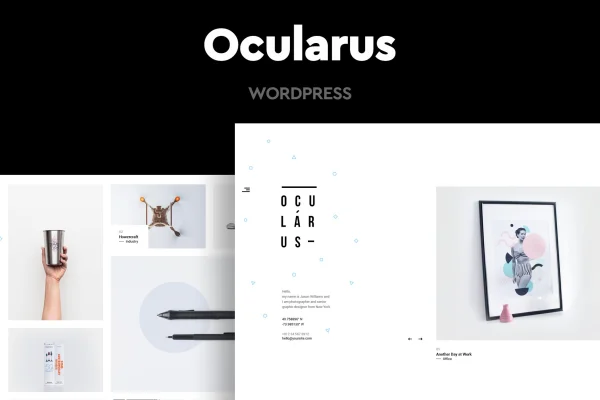
Ocularus is a minimal photography WordPress theme by CocoBasic. It presents portfolio images in a horizontal scroll layout with clean typography, giving photographers and other visual creatives a simple, distraction-free place to display their work.
- Version
- 1.8
- Released
- Aug 13, 2026
- Developer
- CocoBasic
- Type
- WordPress theme
- Licence
- GPL
- Included in
- Every plan, or $3.99 on its own
What’s new in Ocularus 1.8
Version 1.8 · Aug 13, 2026
Latest
What it does
Many portfolio themes surround photos with sidebars, widgets and busy menus that pull attention away from the images. This theme takes a quieter approach. Its horizontal scroll layout lets visitors move through your work side to side, and the clean typography stays in the background. A dedicated portfolio post type keeps projects organized apart from regular posts, so you can add new shoots and series without mixing them into a blog.
The theme suits photographers, artists and visual storytellers who want a simple site that is easy to manage. It is responsive and retina ready, so images display sharply on desktops, tablets and phones. You can add image and carousel sliders, place content with the shortcode generator and pick typography from Google Web Fonts. It works with Contact Form 7 for inquiries and with WPML and Polylang for multilingual sites, and a child theme is included for safe customization.
Best for
- Professional photographers building an online portfolio
- Artists and visual storytellers who prefer minimal design
- Creatives needing a multilingual portfolio site
Features
Horizontal scroll layout
Portfolio images are laid out in a horizontal scroll, so visitors browse your work side to side in a clean, minimal presentation.
Portfolio post type
A custom portfolio section lets you organize photography projects separately from regular posts, keeping your galleries tidy and easy to update.
Image and carousel sliders
Simple image sliders and carousel sliders give you more ways to display a set of photos on a page.
Shortcode generator
Add custom content and page elements anywhere on your site through the shortcode generator, without writing code by hand.
Multilingual support
The theme is compatible with WPML and Polylang, so you can build a portfolio site in more than one language.
Contact Form 7 compatibility
Works with Contact Form 7, letting you add contact forms where clients and visitors can reach you about your work.
Responsive and retina ready
The layout adapts to desktops, tablets and smartphones, and images display sharply on high-resolution retina screens.
Child theme and Google fonts
A child theme is included for safe customization, and Google Web Fonts integration gives you a wide choice of typefaces.
Questions about Ocularus
How are portfolio images displayed in this theme?
Images are shown in a horizontal scroll layout, so visitors move through your work side to side. A dedicated portfolio post type keeps your projects organized, and you can also use simple image sliders or carousel sliders to present groups of photos.
Can I run my photography site in several languages?
Yes. The theme is compatible with WPML and Polylang, two multilingual plugins for WordPress. Either one lets you translate your pages and portfolio content so visitors can view your site in their own language.
Will my photos look good on phones and high-resolution screens?
The layout is fully responsive, adjusting to desktops, tablets and smartphones. Ocularus is also retina ready, so images appear sharp on high-resolution displays. It is built to work across major browsers for a consistent look.
Can I add a contact form for client inquiries?
Yes. The theme works with Contact Form 7, so you can create contact forms and place them on your site for clients and visitors who want to ask about bookings, prints or projects.
Is Ocularus free?
The code of Ocularus is licensed under the GPL, so anyone may use, change and share it. GPL Feast is a paid service: a plan or a single purchase gives you the download and automatic updates. The developer's own support, licence key and online services are not included.
Which version of Ocularus is this?
Version 1.8, released Aug 13, 2026. New versions appear here when the developer publishes them, and members get them as automatic updates.
How do I update Ocularus?
Install the free GPL Feast Updater on your site and connect it with your API key. It installs new versions of Ocularus automatically and keeps a backup, so you can roll back.