Theme
Updated
Selfer
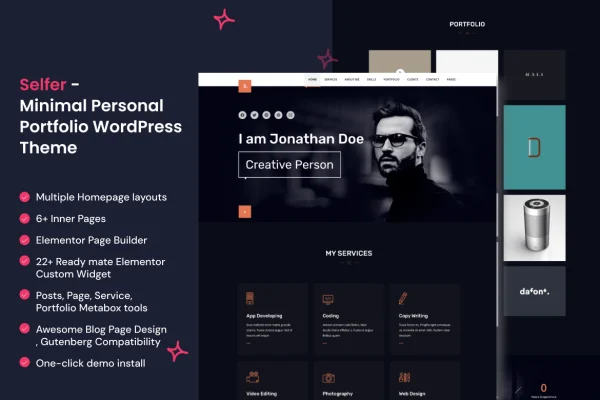
Selfer is a personal portfolio WordPress theme built for freelancers, developers and creatives. It gives you a clean, modern layout for presenting your projects, explaining your skills and letting visitors contact you, with colors, fonts and sections you can adjust to fit your personal brand.
- Version
- 2.0.5
- Released
- Feb 11, 2025
- Developer
- SoftHopper
- Type
- WordPress theme
- Licence
- GPL
- Included in
- Every plan, or $3.99 on its own
What’s new in Selfer 2.0.5
Version 2.0.5 · Feb 11, 2025
Latest
What it does
A portfolio site has a few jobs: show your work, explain what you do and make it easy for someone to get in touch. This theme is set up around those jobs. Its layout is minimal and uncluttered, so your projects stay in focus, and the menu and page structure are simple enough that visitors can move from your project list to your skills and back without getting lost. The design is responsive, so it adapts to desktops, tablets and phones.
Projects get their own sections with image galleries, written descriptions and technology tags, which suits developers who want to note the tools behind each build as well as designers and other creatives presenting visual work. You can change colors, fonts and sections to match your own style. A built-in contact form lets clients or collaborators reach you from the site, and documentation is included to guide setup.
Best for
- Freelancers presenting client work and services
- Developers listing projects with technology tags
- Designers and creatives building a personal portfolio
Features
Responsive layout
The design adjusts to desktops, tablets and smartphones, so your portfolio stays readable and usable on whatever screen a visitor happens to use.
Custom colors and fonts
Change the colors, fonts and sections of the theme so the site reflects your personal brand instead of looking like a stock template.
Project sections
Present each project with image galleries, descriptions and technology tags, giving visitors both the visuals and the context behind your work.
Integrated contact form
A contact form is built into the theme, so potential clients and collaborators can reach out to you directly from your website.
Simple navigation
A clear menu and page structure help visitors browse your projects and skills without hunting around for the information they want.
Clean, modern look
A minimal design keeps distractions out of the way so attention stays on your projects, your story and your skills.
Cross-browser consistency
The theme is built to display consistently across popular web browsers, so visitors get the same experience wherever they view it.
Setup documentation
Clear written instructions come with the theme to walk you through getting your portfolio configured and ready.
Questions about Selfer
Can I show which technologies I used on each project?
Yes. The project sections support technology tags alongside image galleries and descriptions, so you can note the languages, frameworks or tools behind each piece of work. This is especially handy for developers who want visitors to see their technical range at a glance.
Will my portfolio look right on phones?
The theme uses a responsive design that adapts to desktops, tablets and smartphones. Your project galleries, descriptions and navigation rearrange to fit smaller screens, so mobile visitors can browse your work comfortably.
Can people contact me through the site?
Yes. Selfer includes an integrated contact form, so potential clients or collaborators can send you a message directly from your portfolio without needing to copy an email address or look you up elsewhere.
How much can I change the design?
You can adjust the colors, fonts and sections to match your personal brand. The base look is clean and minimal, which gives you a neutral starting point to tailor toward your own style and the kind of work you present.
Is Selfer free?
The code of Selfer is licensed under the GPL, so anyone may use, change and share it. GPL Feast is a paid service: a plan or a single purchase gives you the download and automatic updates. The developer's own support, licence key and online services are not included.
Which version of Selfer is this?
Version 2.0.5, released Feb 11, 2025. New versions appear here when the developer publishes them, and members get them as automatic updates.
How do I update Selfer?
Install the free GPL Feast Updater on your site and connect it with your API key. It installs new versions of Selfer automatically and keeps a backup, so you can roll back.