Theme
Updated
Victim
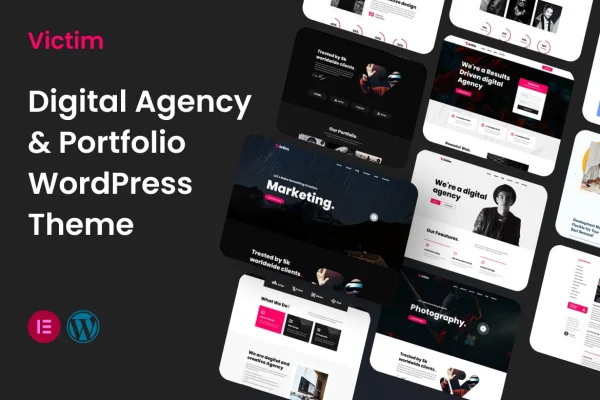
Victim is a WordPress portfolio theme by SoftHopper, made for photographers, designers and artists who want to present their work online. It uses a clean, minimal layout that keeps attention on images and projects, with options to adjust colors, fonts and layouts.
- Version
- 2.0.3
- Released
- Feb 11, 2025
- Developer
- SoftHopper
- Type
- WordPress theme
- Licence
- GPL
- Included in
- Every plan, or $3.99 on its own
What’s new in Victim 2.0.3
Version 2.0.3 · Feb 11, 2025
Latest
What it does
Creative work needs room to breathe, and a cluttered site can pull attention away from the images that matter. This theme takes a minimalist approach, with a clean, modern layout that keeps the focus on your portfolio. It suits professional artists and newer creatives alike who want a polished place to present projects to clients, galleries and fans without building a design from scratch.
You can adapt colors, fonts and layouts to match your personal brand without writing code, and arrange content and images with drag-and-drop tools. Projects can be displayed in several gallery styles, including grids, sliders and full-screen views. The layout is responsive, so it adjusts to desktops and smartphones, and it includes social media links plus dedicated contact and about sections for introducing yourself.
Best for
- Photographers building an online portfolio
- Graphic designers presenting client and personal projects
- Artists sharing work with galleries and fans
Features
Clean minimalist layout
A modern, uncluttered design keeps visitor attention on your photos, artwork and projects rather than on extra page elements.
Custom colors, fonts and layouts
Adjust colors, typography and page layouts to reflect your personal brand or creative style, with no coding knowledge needed.
Drag-and-drop arrangement
User-friendly drag-and-drop tools let you arrange content and images on your pages in the order that tells your story best.
Multiple gallery styles
Present projects in grid, slider or full-screen gallery layouts, so you can pick the view that suits each body of work.
Responsive on all devices
The layout adapts to different screen sizes, so your portfolio displays properly on desktops, tablets and smartphones.
Integrated social media links
Link your portfolio to your social channels so visitors can follow your work and connect with you elsewhere.
Contact and about sections
Dedicated sections let you introduce yourself professionally and give potential clients and collaborators an easy way to reach you.
Questions about Victim
Can I change the look of the theme without coding?
Yes. You can adjust colors, fonts and layouts to match your brand without coding knowledge, and drag-and-drop tools help you arrange content and images on your pages.
What gallery options does it include?
The theme offers several gallery styles for displaying projects, including grids, sliders and full-screen views. You can choose the layout that fits each collection, whether that is a photo series or a set of design pieces.
Will my portfolio look right on phones?
The theme is responsive and mobile-ready, so the layout adapts to different devices, from desktop screens down to smartphones, and your galleries stay usable on smaller displays.
Does it have pages for contact and personal info?
Yes. It includes dedicated contact and about sections, so you can introduce yourself to potential clients and collaborators, along with integrated social media links to your other channels.
Is Victim free?
The code of Victim is licensed under the GPL, so anyone may use, change and share it. GPL Feast is a paid service: a plan or a single purchase gives you the download and automatic updates. The developer's own support, licence key and online services are not included.
Which version of Victim is this?
Version 2.0.3, released Feb 11, 2025. New versions appear here when the developer publishes them, and members get them as automatic updates.
How do I update Victim?
Install the free GPL Feast Updater on your site and connect it with your API key. It installs new versions of Victim automatically and keeps a backup, so you can roll back.