Theme
Updated
Spring Plants
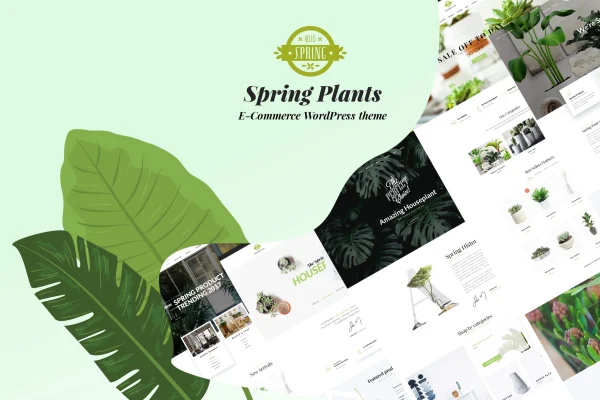
Spring Plants is a WordPress theme by G5Theme built for gardening and houseplant websites. It gives plant shops, landscape designers, garden blogs and flower sellers a set of ready-made layouts, store support through WooCommerce and the design options needed to match a brand.
- Version
- 4.1
- Released
- Jul 13, 2026
- Developer
- G5Theme
- Type
- WordPress theme
- Licence
- GPL
- Included in
- Every plan, or $3.99 on its own
What’s new in Spring Plants 4.1
Version 4.1 · Jul 13, 2026
Latest
What it does
Building a site for a plant business usually means bending a general theme to fit a green niche. This theme starts from that niche instead. It ships with 22 home page designs made for gardening and houseplant businesses, and a one-click demo import brings in complete demo content so you begin with a working site. From there you swap in your own text, photos and products without writing code.
The theme fits sites that sell, inform or display work. WooCommerce integration covers an online store for plants, seeds, tools or services, while the portfolio feature suits landscaping projects and garden designs. You can shape the layout with multiple header styles, a built-in mega menu, unlimited sidebars and unlimited color choices. It works with Gutenberg, Visual Composer and WPBakery Page Builder, is built on the Bootstrap framework and is translation ready.
Best for
- Online houseplant and garden supply shops
- Landscape designers displaying project portfolios
- Gardening blogs and plant care service businesses
Features
22 gardening home page demos
Pick from 22 pre-designed home pages tailored to gardening and houseplant businesses, then adjust the one that best fits your brand.
One-click demo import
Bring in complete demo content in one step, giving you a full starting site with pages and layouts already in place.
WooCommerce store support
Set up an online shop with WooCommerce to list and sell plants, seeds, gardening tools or landscaping services and process payments.
Portfolio for projects
Display landscaping projects, garden designs or plant collections in portfolio layouts that help potential clients see your past work.
Headers and mega menu
Choose from multiple header styles and build a mega menu to organize larger catalogs or service pages into easy browsing sections.
Colors, skins and sidebars
Apply unlimited skins and color choices to match your brand, and create unlimited sidebars so different pages can carry different widgets.
Page builder compatibility
Edit pages with Gutenberg, Visual Composer or WPBakery Page Builder, and use smart content blocks for promotions and featured products.
Translation and retina ready
Translate the site with included po/mo files, and rely on a responsive, retina-ready layout that adapts to different screen sizes.
Spring Plants older versions
- 3.7Sep 27, 2024
- 3.5Feb 4, 2024
- 3.4May 24, 2023
Members and buyers of this product can download older versions.
Questions about Spring Plants
Can I sell plants and gardening products with this theme?
Yes. The theme is integrated with WooCommerce, so you can build an online store, manage products and take payments. It suits shops selling plants, seeds, gardening tools or landscaping services.
Do I need to design my site from scratch?
No. You can start from one of 22 pre-designed home pages and use the one-click demo import to bring in complete demo content. After that, you replace the sample text, images and products with your own.
Which page builders does Spring Plants work with?
It works with Gutenberg, Visual Composer and WPBakery Page Builder, so you can edit layouts with whichever of these editors you prefer. Smart content blocks also help you build sections for promotions and featured products.
Can I run the site in another language?
Yes. The theme is translation ready and includes po/mo files, which lets you translate its text into other languages for visitors who do not read English.
Is Spring Plants free?
The code of Spring Plants is licensed under the GPL, so anyone may use, change and share it. GPL Feast is a paid service: a plan or a single purchase gives you the download and automatic updates. The developer's own support, licence key and online services are not included.
Which version of Spring Plants is this?
Version 4.1, released Jul 13, 2026. New versions appear here when the developer publishes them, and members get them as automatic updates.
How do I update Spring Plants?
Install the free GPL Feast Updater on your site and connect it with your API key. It installs new versions of Spring Plants automatically and keeps a backup, so you can roll back.