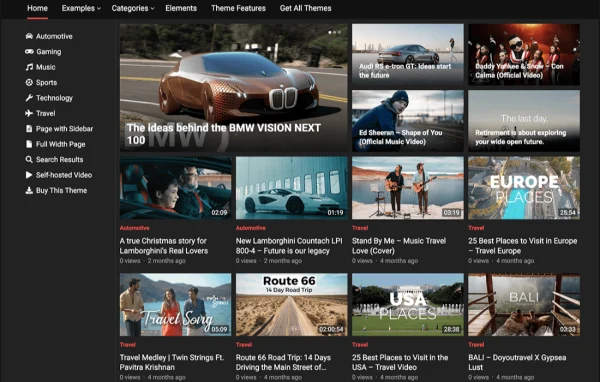
Theme
Updated
VideoLife Pro
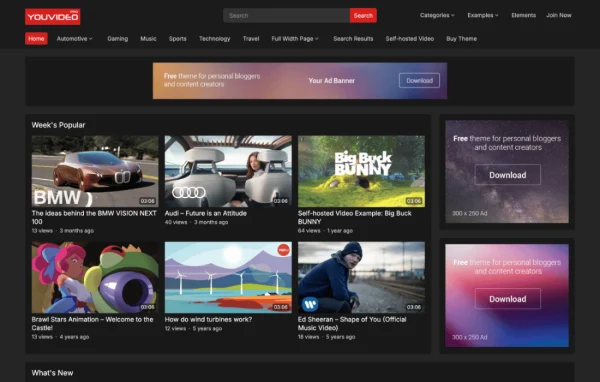
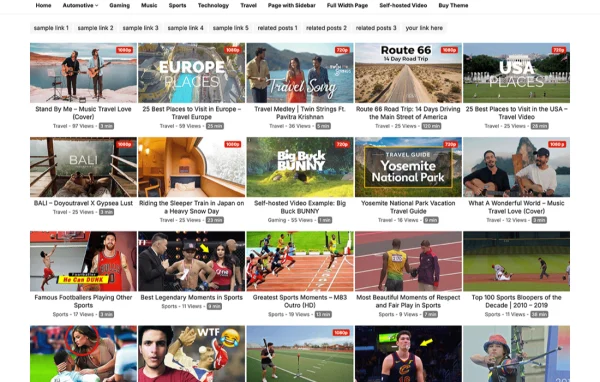
VideoLife Pro is a WordPress theme built for video blogs, vlogs and video sharing websites. It helps content creators publish videos from sources like YouTube and Vimeo, add details such as video duration, and present everything in a responsive layout that works on desktop, tablet and phone.
- Version
- 1.0.8
- Released
- Feb 4, 2025
- Developer
- WPEnjoy
- Type
- WordPress theme
- Licence
- GPL
- Included in
- Every plan, or $3.99 a year on its own
What’s new in VideoLife Pro 1.0.8
Version 1.0.8
Latest
- ImprovedUpdated theme framework
- ImprovedPHP 8.x compatible
- FixedBug fixes
What it does
Running a video site on a general blog theme often means wrestling with embeds, missing video details and layouts that were never meant for clips. This theme is designed around video posts from the start. You can embed videos from YouTube, Vimeo and other platforms, use extra embed fields, and show the duration of each video. If you are moving from another video theme, there is a migration feature for bringing your existing video content across.
Setup starts with a one click demo import, so you can begin from pre-designed content and adjust from there. A theme options panel and Customizer support let you change fonts, colors and layouts, with access to more than 1000 Google Fonts and unlimited color schemes. Visitor features include thumbs up and down ratings, related posts by category or tag, and social share icons. It suits personal video blogs, niche video directories and larger video sharing communities.
Best for
- Vloggers and video bloggers publishing YouTube or Vimeo content
- Niche video directories and curated video collections
- Video sharing communities that want ratings and social sharing
Features
Video embeds and duration fields
Embed videos from platforms such as YouTube and Vimeo using extra embed fields, and display the duration of each video alongside the post.
Migrate from other video themes
Bring existing video content over from another video theme, which helps when you are switching designs on an established video site.
One click demo import
Load pre-designed demo content in one step to get a working starting layout, then replace it with your own videos and branding.
Fonts, colors and layout options
Adjust typography with more than 1000 Google Fonts including Roboto, pick pre-built skins or your own colors, and change layouts through the options panel and Customizer.
Thumbs up and down ratings
Let visitors rate each video with a thumbs up or thumbs down, adding a simple layer of audience feedback to your posts.
Related posts and sharing
Show related videos automatically by category or tags, and add social share icons so viewers can pass videos along on social networks.
Mobile header search
A dedicated header search on mobile devices helps visitors on phones find videos quickly without digging through menus.
Custom code and settings transfer
Add your own scripts or styles through a custom code editor, edit footer and copyright text, and import or export theme settings between sites.
VideoLife Pro older versions
- 1.0.5Jun 4, 2024
- 1.0.4Jan 1, 2024
- 1.0.3Apr 18, 2023
Members and buyers of this product can download older versions.
Questions about VideoLife Pro
Can I show videos from YouTube and Vimeo with this theme?
Yes. The theme supports embedding videos from YouTube, Vimeo and other platforms, and it includes extra video embed fields plus a field for video duration, so each post can carry the details viewers look for.
I already run a video site on another theme. Can I move my videos over?
The theme includes a feature for migrating videos from other video themes. It is meant to help you bring existing video content across when you switch, so you do not have to rebuild every post by hand.
How much can I change the look of the site?
Quite a lot. A theme options panel and Customizer support cover fonts, colors and layouts. You get more than 1000 Google Fonts, pre-built skins or your own color schemes, an editable footer, and a custom code editor for your own scripts or styles.
Will the theme work well for visitors on phones?
The theme is responsive and mobile friendly, so layouts adapt to desktop, tablet and smartphone screens. It also adds a header search on mobile so visitors on small screens can find videos easily.
Is VideoLife Pro free?
The code of VideoLife Pro is licensed under the GPL, so anyone may use, change and share it. GPL Feast is a paid service: a plan or a single purchase gives you the download and automatic updates. The developer's own support, licence key and online services are not included.
Which version of VideoLife Pro is this?
Version 1.0.8, released Feb 4, 2025. New versions appear here when the developer publishes them, and members get them as automatic updates.
How do I update VideoLife Pro?
Install the free GPL Feast Updater on your site and connect it with your API key. It installs new versions of VideoLife Pro automatically and keeps a backup, so you can roll back.
More from WPEnjoy