Theme
Updated
VideoShare Pro
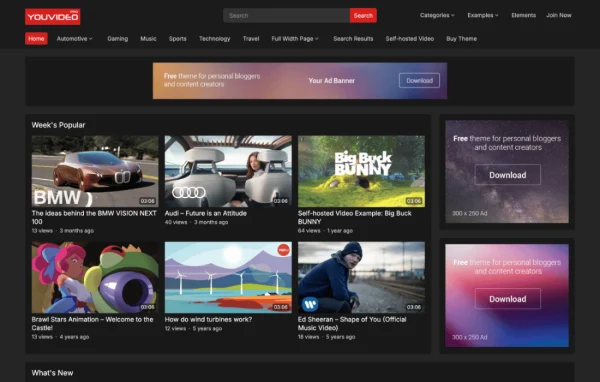
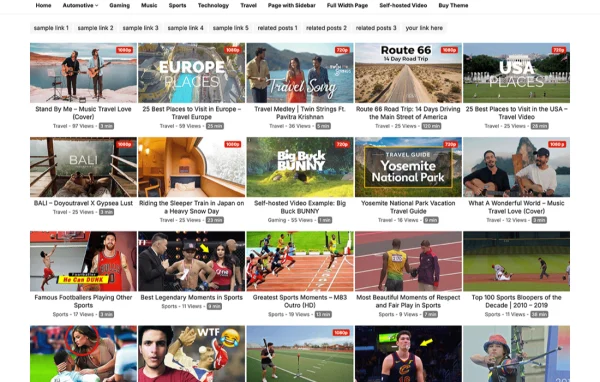
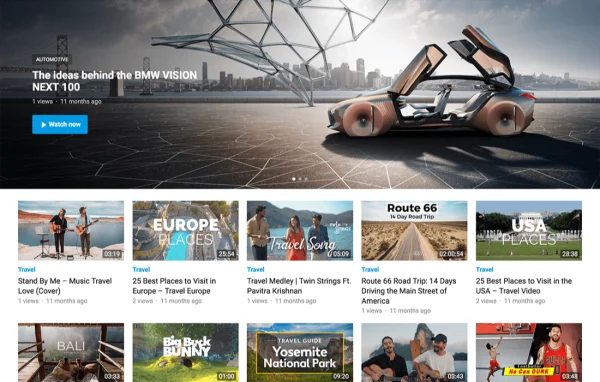
VideoShare Pro is a responsive WordPress theme built for running a video sharing website. It helps you publish and organize videos from multiple sources, with layouts suited to vloggers, filmmakers, tutorial makers and other content creators who want a dedicated video platform.
- Version
- 1.0.6
- Released
- Feb 4, 2025
- Developer
- WPEnjoy
- Type
- WordPress theme
- Licence
- GPL
- Included in
- Every plan, or $3.99 a year on its own
What’s new in VideoShare Pro 1.0.6
Version 1.0.6
Latest
- ImprovedUpdated theme framework
- ImprovedPHP 8.x compatible
- FixedBug fixes
What it does
A regular blog theme rarely handles video well. Thumbnails, durations, embeds and related clips all need a place, and visitors expect to browse by category and search quickly on their phones. This theme is built around that job. You can publish videos from a wide variety of sources, show video duration, add extra embed fields and let viewers rate posts with thumbs up or thumbs down. Related posts are suggested by category, so people can move from one video to the next.
Setup starts with a one click demo import that brings in pre-built layouts and content, which you can then adjust. A theme options panel covers fonts, colors, skins and layout choices, and you can edit footer text and copyright notes without touching code. For more control, a custom code editor accepts your own CSS or scripts outside the core theme files. If you are moving from another video theme, migration tools help carry your content over, and theme settings can be exported or imported between sites.
Best for
- Vloggers and filmmakers publishing their own video libraries
- Tutorial, review or entertainment video websites
- Community sites where users submit videos
Features
Front-end video submission
Visitors can submit videos from the front end of the site, which suits community platforms where creators contribute their own content.
Video details and ratings
Show video duration, add extra embed fields and let viewers rate each post with thumbs up or thumbs down buttons.
Related videos by category
Each video post recommends related posts from the same category, giving visitors an easy path to more of your content.
Migration from other video themes
Built-in migration tools help move existing video content over from other video themes, so switching does not mean rebuilding your library.
One click demo import
Import pre-built layouts and demo content in one step, then replace it with your own videos instead of configuring every page by hand.
Theme options panel
Adjust fonts, colors, skins and layout options from one settings panel to match the site to your brand.
Social sharing and mobile search
Each video post includes social share icons, and a header search on mobile helps visitors find videos on small screens.
Custom code and settings backup
Add custom CSS or scripts without editing core files, and export or import theme settings to back them up or reuse them.
VideoShare Pro older versions
- 1.0.4Jan 1, 2024
- 1.0.2Apr 18, 2023
Members and buyers of this product can download older versions.
Questions about VideoShare Pro
Can visitors upload or submit their own videos?
Yes. The theme includes front-end video submission, so contributors can send in videos from the public side of the site. That makes it a reasonable fit for community video platforms as well as single-creator channels.
I already run a video site on another theme. Can I switch without losing content?
The theme includes migration tools meant for moving content from other video themes. You can also export and import theme settings, which helps when you are testing a new setup on a staging site before moving it live.
How much can I change the design without coding?
A theme options panel lets you adjust fonts, colors, skins and layout options, and you can edit the footer text and copyright line. If you need more, the custom code editor accepts your own CSS or scripts outside the core files.
Will the site work well on phones?
The design is responsive and mobile friendly, so layouts adapt to smaller screens. It also places a search option in the header on mobile, which helps visitors find videos quickly when browsing on a phone.
Is VideoShare Pro free?
The code of VideoShare Pro is licensed under the GPL, so anyone may use, change and share it. GPL Feast is a paid service: a plan or a single purchase gives you the download and automatic updates. The developer's own support, licence key and online services are not included.
Which version of VideoShare Pro is this?
Version 1.0.6, released Feb 4, 2025. New versions appear here when the developer publishes them, and members get them as automatic updates.
How do I update VideoShare Pro?
Install the free GPL Feast Updater on your site and connect it with your API key. It installs new versions of VideoShare Pro automatically and keeps a backup, so you can roll back.
More from WPEnjoy