Theme
Updated
VisualNews Pro
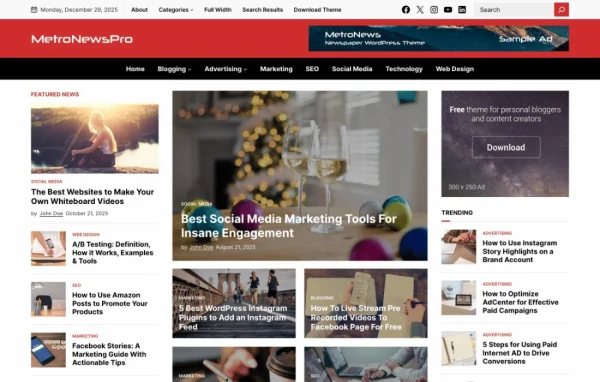
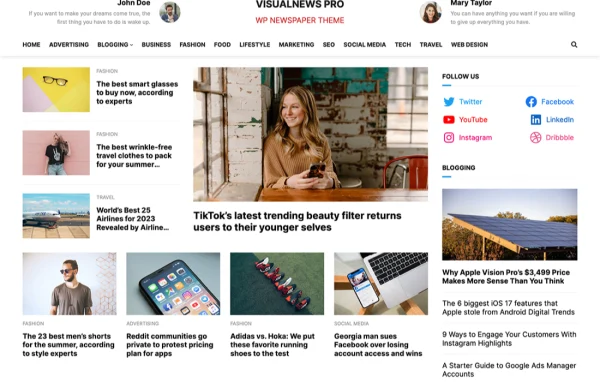
VisualNews Pro is a WordPress theme for newspaper, magazine and blog websites, built to work with the WordPress Site Editor. It gives you ready-made block patterns, a theme options panel and layout controls, so you can shape a news site visually without writing code.
- Version
- 1.0.4
- Developer
- WPEnjoy
- Type
- WordPress theme
- Licence
- GPL
- Included in
- Every plan, or $3.99 a year on its own
What’s new in VisualNews Pro 1.0.0
Version 1.0.0
Latest
- NewInitial release
What it does
Running a news or magazine site means handling a lot of content and keeping it easy to browse. This theme gives you a structured starting point for that job. You edit everything in the WordPress Site Editor using drag and drop, and you can start from more than 15 pre-designed block patterns covering hero sections, featured articles, author bios and social media feeds. A one-click demo import fills the site with sample content so you can see the layout in place and swap in your own stories.
Once the base is in place, the theme options panel lets you adjust colors, fonts and layouts, with access to over 1000 Google Fonts for headlines and body text. Readers get a sticky header, a search bar in the header and a back to top button on long pages, and the design is responsive on phones and desktops. For more control, there are single post layout settings, a custom code editor and an import and export tool for moving your settings between projects.
Best for
- Online newspapers and local news sites
- Digital magazines with many categories and authors
- Bloggers who publish news-style content regularly
Features
Site Editor drag and drop
Build and adjust pages visually in the WordPress Site Editor, moving blocks around with drag and drop instead of editing code.
Over 15 block patterns
Start from ready-made layouts for hero sections, featured articles, author bios and social media feeds, then edit them to suit your content.
Theme options panel
Change colors, fonts and layouts from one panel so the site matches your brand, with more than 1000 Google Fonts available.
Sticky header and search
The navigation bar stays visible as readers scroll, and a search bar in the header helps them find specific stories.
Single post layout controls
Set different layouts for individual posts to give special articles or certain content categories their own look.
Custom code editor
Add your own code for extra customization when the built-in options do not cover a specific change you want to make.
Settings import and export
Save your theme settings and reuse them on other projects, which keeps styling consistent across multiple sites you build.
One-click demo import
Load pre-built demo content in one step to get a working layout in place before replacing it with your own articles.
VisualNews Pro older versions
- 1.0.0Jun 28, 2023
Members and buyers of this product can download older versions.
Questions about VisualNews Pro
Do I need to know how to code to customize this theme?
No. The theme works with the WordPress Site Editor, so you arrange layouts with drag and drop and change colors, fonts and layouts from the theme options panel. A custom code editor is there if you want to add your own code.
What kinds of ready-made layouts are included?
There are over 15 pre-designed block patterns, including hero sections, featured articles, author bios and social media feeds. You can also run a one-click demo import to load sample content and a complete layout to build from.
Can I give certain articles a different layout?
Yes. Single post layout controls let you customize the layout of individual posts, which is useful for highlighting special articles or giving particular content categories their own style.
Will the site work well on phones?
The design is responsive and mobile friendly, so layouts adjust from desktop to smartphone screens. Navigation aids like the sticky header, header search and back to top button help readers move around on any device.
Is VisualNews Pro free?
The code of VisualNews Pro is licensed under the GPL, so anyone may use, change and share it. GPL Feast is a paid service: a plan or a single purchase gives you the download and automatic updates. The developer's own support, licence key and online services are not included.
Which version of VisualNews Pro is this?
Version 1.0.4. New versions appear here when the developer publishes them, and members get them as automatic updates.
How do I update VisualNews Pro?
Install the free GPL Feast Updater on your site and connect it with your API key. It installs new versions of VisualNews Pro automatically and keeps a backup, so you can roll back.
More from WPEnjoy