Theme
Updated
Zuka
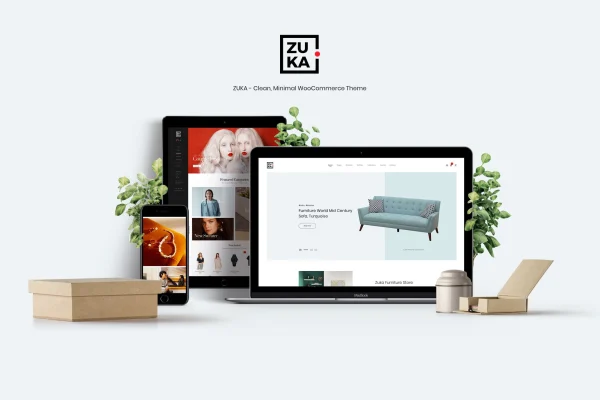
Zuka is a clean, minimal WordPress theme built for WooCommerce stores. It gives your shop an uncluttered, modern layout that keeps attention on your products, with options to adjust colors, fonts and layouts so the store matches your brand.
- Version
- 1.9.0
- Released
- Jul 11, 2026
- Developer
- LA-Studio
- Type
- WordPress theme
- Licence
- GPL
- Included in
- Every plan, or $3.99 on its own
What’s new in Zuka 1.9.0
Version 1.9.0 · Jul 11, 2026
Latest
What it does
Many online stores end up crowded with banners, sidebars and widgets that pull attention away from what is for sale. This theme takes the opposite approach. Its minimal design strips back distractions so product photos and descriptions stay in focus, and its navigation is laid out to help shoppers browse categories and find items without hunting around. The layout is fully responsive, so the same store adapts to phones, tablets and desktop screens.
The theme is built around WooCommerce, so your shop pages, product pages and cart follow the same clean style as the rest of the site. You can change colors, fonts and layouts from its customization options without a complicated setup. Several product display styles let you choose how items are presented, and an integrated blog layout gives you room for articles, guides or store news. It suits a small boutique as well as a shop with a larger catalog.
Best for
- Small boutiques wanting a simple, modern storefront
- WooCommerce stores with large product catalogs
- Brands that pair a shop with a blog
Features
Minimal, clean design
A modern, uncluttered look that keeps distractions to a minimum so your product images and descriptions stay at the center of each page.
Shopper-friendly navigation
Navigation is laid out to make browsing simple, helping customers move between categories and products and find what they are looking for.
Fully responsive layout
Pages adapt to different screen sizes, so your store displays properly on mobile phones, tablets and desktop computers.
Color, font and layout options
Customization settings let you adjust colors, fonts and layouts so the store reflects your brand identity without a complicated setup.
Built for WooCommerce
The theme is designed to work with WooCommerce, styling your shop, product and cart pages to match the rest of the site.
Multiple product display styles
Choose from several ways to present products, giving you flexibility in how items appear across your shop and category pages.
Integrated blog layout
A built-in blog layout lets you publish articles, guides or store updates that share the same clean style as your shop.
Zuka older versions
- 1.7.0Dec 16, 2024
- 1.6.1May 27, 2024
- 1.6.0Mar 1, 2024
Members and buyers of this product can download older versions.
Questions about Zuka
Does Zuka work with WooCommerce?
Yes. The theme is designed specifically for WooCommerce stores, so your shop, product and cart pages carry the same minimal styling as the rest of the site, and it is built to work with WooCommerce features and extensions.
Can I change the look to match my brand?
Yes. The theme includes customization options for colors, fonts and layouts, so you can adjust the store to fit your brand identity. You can also pick from several product display styles to control how your items are presented.
Will my store look right on phones and tablets?
The layout is fully responsive, so it adapts to the screen it is viewed on. Shoppers on mobile phones, tablets and desktop computers all get a version of the store sized for their device.
Can I run a blog alongside my shop?
Yes. Zuka includes an integrated blog layout, so you can publish articles, buying guides or store news on the same site. The blog follows the theme's clean design, keeping the look consistent across your shop and content pages.
Is Zuka free?
The code of Zuka is licensed under the GPL, so anyone may use, change and share it. GPL Feast is a paid service: a plan or a single purchase gives you the download and automatic updates. The developer's own support, licence key and online services are not included.
Which version of Zuka is this?
Version 1.9.0, released Jul 11, 2026. New versions appear here when the developer publishes them, and members get them as automatic updates.
How do I update Zuka?
Install the free GPL Feast Updater on your site and connect it with your API key. It installs new versions of Zuka automatically and keeps a backup, so you can roll back.