
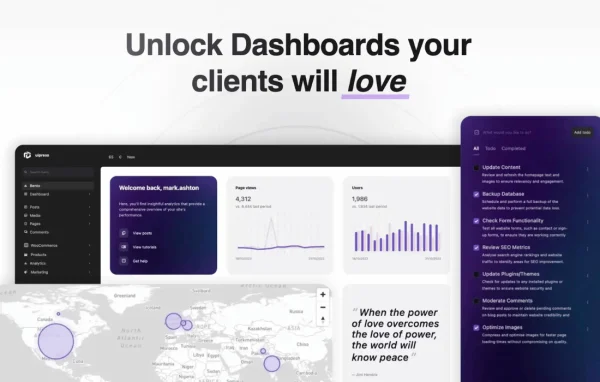
Plugin
Updated
Admin 2020 Pro
UiPress Pro (formerly Admin 2020) is a WordPress plugin by Admin 2020 that lets you rebuild the admin area to suit your own workflow. Its block-based visual builder handles custom dashboards, admin pages and full admin themes without code.
- Version
- 3.4.02
- Released
- Jun 15, 2024
- Developer
- Admin 2020
- Type
- WordPress plugin
- Licence
- GPL
- Included in
- Every plan, or $4.79 a year on its own
What’s new in Admin 2020 Pro 3.4.02
Version 3.4.02 · Jun 15, 2024
Latest
- FixedFixed issue with menu builder not displaying menu items
What it does
The default WordPress admin gives every user the same layout, whether they manage a store, write posts or just check a few settings. This plugin replaces that one-size-fits-all backend with screens you design yourself. Using the drag-and-drop uiBuilder, you place blocks to create dashboards and admin pages, control layout and style, and build a complete admin theme with a modern look. Prebuilt templates and blocks give you a starting point, so you can adapt an existing design instead of building every screen from scratch.
Beyond visual design, it adds tools that site managers use every day. WooCommerce stores get sales analytics shown as charts and graphs, plus a Kanban view for orders. You can create and adjust user roles and capabilities, review an activity log of user actions, and build forms that send emails, collect data or call functions, saving entries to site options or user meta. SnipVault integration lets developers manage reusable code snippets from the admin area. It suits agencies handing sites to clients and owners who want a tidier backend.
Best for
- Agencies building branded admin areas for client sites
- WooCommerce store owners who want sales charts and Kanban orders
- Site owners managing multiple user roles and permissions
Features
Block-based uiBuilder
Design full admin dashboards and pages with a drag-and-drop block interface, controlling layout and style without writing any code.
Custom admin themes
Create your own admin theme to give the WordPress backend a modern, polished look that fits your brand or your client's site.
WooCommerce analytics and orders
View sales analytics as charts and graphs inside the dashboard, and manage WooCommerce orders on a Kanban board.
User and role management
Create new user roles, fine-tune existing ones and control individual capabilities to decide exactly who can do what on the site.
Activity log
Track user actions across the site, including post creation, comments and other site changes, so you can see who changed what.
Forms builder
Build forms for sending emails, collecting data or triggering function calls, with submissions stored in site options or user meta.
Prebuilt templates and blocks
Start from a library of ready-made templates and blocks, then adjust them to create admin screens faster for each project.
SnipVault integration
Manage and deploy reusable WordPress code snippets directly from the admin interface, keeping common development tasks in one place.
Admin 2020 Pro older versions
- 3.4.01Jun 14, 20243 fixes
- 3.4.00Jun 12, 2024
- 3.2.20Mar 11, 2024
- 3.2.10Feb 14, 2024
- 3.2.09Dec 1, 20231 new, 1 improvement, 3 fixes
- 3.2.08Nov 22, 2023
- 3.2.07Nov 16, 2023
- 3.2.06Nov 12, 2023
- 3.2.05Nov 10, 2023
- 3.2.04Nov 10, 2023
Members and buyers of this product can download older versions.
18 older versions in all. If you need one that is not listed, ask support.
Questions about Admin 2020 Pro
Do I need to know how to code to customize the admin?
No. The uiBuilder uses drag-and-drop blocks, so you can design dashboards, admin pages and admin themes visually. Prebuilt templates and blocks also give you a ready starting point. Developers who want code can still use the SnipVault integration to manage reusable snippets.
Does it work with WooCommerce?
Yes. It adds WooCommerce sales analytics to your dashboard, displayed as charts and graphs, and lets you manage orders on a Kanban board. This keeps store data and order handling inside the admin screens you design.
Can I control what different users see and do?
Yes. The user and role management tools let you create new roles, adjust existing ones and set individual capabilities. An activity log also records user actions such as creating posts, leaving comments and making site changes.
What can the forms builder be used for?
You can build forms that send emails, collect data or trigger function calls. Submitted information can be stored in site options or user meta, which makes the forms useful for settings pages and user-specific data in the admin.
Is Admin 2020 Pro free?
The code of Admin 2020 Pro is licensed under the GPL, so anyone may use, change and share it. GPL Feast is a paid service: a plan or a single purchase gives you the download and automatic updates. The developer's own support, licence key and online services are not included.
Which version of Admin 2020 Pro is this?
Version 3.4.02, released Jun 15, 2024. New versions appear here when the developer publishes them, and members get them as automatic updates.
How do I update Admin 2020 Pro?
Install the free GPL Feast Updater on your site and connect it with your API key. It installs new versions of Admin 2020 Pro automatically and keeps a backup, so you can roll back.
You might also like






