
Plugin
Updated
Advanced Category Listing for Elementor
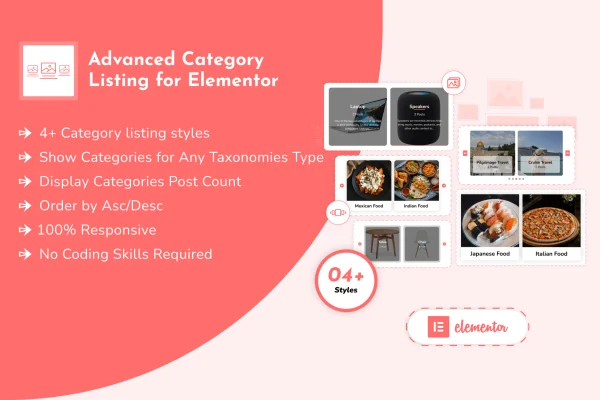
Advanced Category Listing for Elementor is a WordPress plugin that adds category listing widgets to the Elementor page builder. It lets you place blog, product, project or custom taxonomy categories on any page using grid and slider layouts, with no code required.
- Version
- 1.0.8
- Released
- Aug 29, 2026
- Type
- WordPress plugin
- Requires
- Elementor
- Licence
- GPL
- Included in
- Every plan, or $3.99 on its own
What’s new in Advanced Category Listing for Elementor 1.0.8
Version 1.0.8 · Aug 29, 2026
Latest
- ImprovedLatest WordPress 7.1 compatibility check
What it does
Sites with a lot of content often need a clear way to point visitors toward topics, product groups or project types. WordPress category menus and default archive links rarely look the way a designer wants. This plugin gives Elementor users a dedicated widget for building category listings directly on the page, so you can arrange categories visually and match them to the rest of your design. It requires Elementor and works through the familiar drag and drop editor.
You pick one of five layout styles, including grid and slider formats, then choose which taxonomy to pull categories from. That can be WooCommerce product categories, standard post categories, project categories or any custom taxonomy your site uses. Customization options let you adjust the appearance and content of the list to suit your branding. Layouts are responsive, so listings adapt to desktops, tablets and phones. It fits well on homepages, shop landing pages and blog hubs.
Best for
- Blogs with many topics to organize
- WooCommerce stores highlighting product categories
- Agencies building category pages in Elementor
Features
Five category layouts
Choose from 5 different category listing presentations, including grid and slider formats, to suit the style and purpose of each page.
Built as an Elementor widget
Add and arrange category listings with the Elementor drag and drop editor, the same way you work with other widgets, without writing code.
WooCommerce product categories
Display WooCommerce product categories on shop pages or landing pages so visitors can jump straight to the product groups they want.
Blog and project categories
Show standard post categories for a blog, or project categories for a portfolio, using the same widget and layout options.
Custom taxonomy support
Pull terms from any custom taxonomy on your site, which helps when your content is organized beyond the default WordPress categories.
Responsive listings
Category grids and sliders adjust to desktop, tablet and smartphone screens so listings stay readable across devices.
Appearance and content options
Adjust how your category lists look and what they display so they match your branding and the layout of each page.
Advanced Category Listing for Elementor older versions
- 1.0.7Aug 281 improvement
- 1.0.6Jul 282 improvements, 1 fix
- 1.0.5Jun 23, 20251 improvement
- 1.0.1Mar 12, 2024
Members and buyers of this product can download older versions.
Questions about Advanced Category Listing for Elementor
Do I need Elementor to use this plugin?
Yes. Advanced Category Listing for Elementor is built as an Elementor widget and requires Elementor. You add and configure category listings inside the Elementor editor using drag and drop, with no coding needed.
Can it show WooCommerce product categories?
Yes. The plugin can display WooCommerce product categories, which makes it useful for shop homepages and landing pages where you want shoppers to browse product groups through a grid or slider layout.
Does it work with custom taxonomies?
It does. Along with blog post categories, product categories and project categories, the widget can list terms from any custom taxonomy, so sites with custom content structures can use it too.
What layout styles are included?
There are 5 category listing layouts, including grid and slider formats. Each can be customized in appearance and content, and the layouts are responsive across desktop, tablet and mobile screens.
Is Advanced Category Listing for Elementor free?
The code of Advanced Category Listing for Elementor is licensed under the GPL, so anyone may use, change and share it. GPL Feast is a paid service: a plan or a single purchase gives you the download and automatic updates. The developer's own support, licence key and online services are not included.
Which version of Advanced Category Listing for Elementor is this?
Version 1.0.8, released Aug 29, 2026. New versions appear here when the developer publishes them, and members get them as automatic updates.
How do I update Advanced Category Listing for Elementor?
Install the free GPL Feast Updater on your site and connect it with your API key. It installs new versions of Advanced Category Listing for Elementor automatically and keeps a backup, so you can roll back.
What does Advanced Category Listing for Elementor need?
Advanced Category Listing for Elementor needs Elementor installed and active.
You might also like






