
Plugin
Updated
Advanced Comparison Table for Elementor
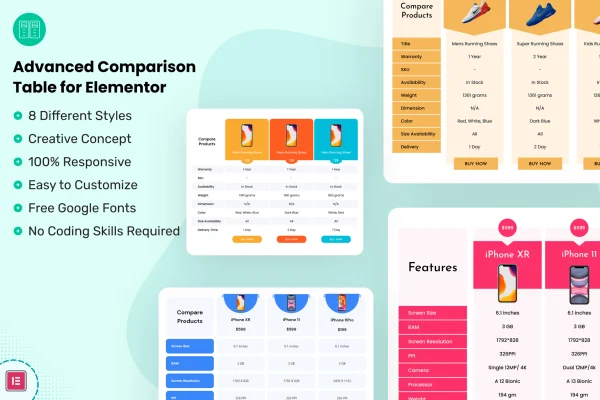
This is a WordPress plugin that adds comparison tables to the Elementor page builder. You use it to place products or services side by side, with their features, pricing, images and buttons, so visitors can see the differences at a glance.
- Version
- 1.1
- Released
- Jan 10, 2026
- Type
- WordPress plugin
- Requires
- Elementor
- Licence
- GPL
- Included in
- Every plan, or $3.99 on its own
What’s new in Advanced Comparison Table for Elementor 1.1
Version 1.1 · Jan 10, 2026
Latest
- ImprovedLatest WordPress 6.9 compatibility Check
What it does
Comparing options in plain paragraphs is hard to read, and building a clean table by hand usually means fighting with HTML or a generic table widget. This plugin gives you a set of multipurpose comparison table styles that you build and edit inside Elementor with drag-and-drop controls. No coding is needed, and the tables adjust to desktops, tablets and phones so the layout stays readable on smaller screens.
It fits anywhere you want to line up choices for a reader. An online store can compare products, a service business can lay out its plans, and a blogger can put reviewed items next to each other. You add and arrange rows for features, prices, images and buttons, then pick a table style that matches the rest of your site. Elementor is required, since the tables are built in its editor.
Best for
- Online stores comparing products side by side
- Service businesses presenting plans or packages
- Review bloggers and affiliate sites built with Elementor
Features
Multiple table layouts
Choose from a collection of comparison table designs and pick the one that suits the look and feel of your brand or site.
Built inside Elementor
Create and customize tables directly in the Elementor editor using familiar drag-and-drop controls, with no code to write.
Responsive on all devices
Tables are designed to adapt to desktops, tablets and smartphones so comparisons stay readable on any screen size.
Flexible table content
Add, edit and arrange product features, pricing, images and buttons in whatever order makes your comparison clearest.
Many use cases
Use the tables for online stores, portfolios, service listings and blogs, across a wide range of website types and niches.
Cross-browser support
The tables are built to work across the major web browsers, so visitors see the same layout whichever browser they use.
Simple content updates
An easy interface makes it quick to change prices, features or other details later as your products or plans change.
Advanced Comparison Table for Elementor older versions
- 1.0.6Jun 23, 20251 improvement
- 1.0.5Feb 7, 20251 improvement
Members and buyers of this product can download older versions.
Questions about Advanced Comparison Table for Elementor
Do I need Elementor to use this plugin?
Yes. The plugin requires Elementor, and you build and edit your comparison tables inside the Elementor editor with its drag-and-drop controls.
Can I include prices, images and buttons in the tables?
Yes. You can add, edit and arrange product features, pricing, images and buttons, so each column can show what an item offers along with a button linking where you want visitors to go.
Will the comparison tables look right on phones?
The tables are fully responsive and adapt to desktops, tablets and smartphones. They are also built to work across the major web browsers.
Do I need coding skills to build a table?
No. You pick one of the included table styles and build it with drag-and-drop controls in Elementor, so no HTML or CSS is required.
Is Advanced Comparison Table for Elementor free?
The code of Advanced Comparison Table for Elementor is licensed under the GPL, so anyone may use, change and share it. GPL Feast is a paid service: a plan or a single purchase gives you the download and automatic updates. The developer's own support, licence key and online services are not included.
Which version of Advanced Comparison Table for Elementor is this?
Version 1.1, released Jan 10, 2026. New versions appear here when the developer publishes them, and members get them as automatic updates.
How do I update Advanced Comparison Table for Elementor?
Install the free GPL Feast Updater on your site and connect it with your API key. It installs new versions of Advanced Comparison Table for Elementor automatically and keeps a backup, so you can roll back.
What does Advanced Comparison Table for Elementor need?
Advanced Comparison Table for Elementor needs Elementor installed and active.
You might also like






